
Kigo Movie One Review 2026: Hands-on Testing & Video Downloads
If you're new to Kigo and want to download videos from streaming sites, you may wonder whether Kigo Movie One is a good fit. If you already own a Kigo downloader, such as Netflix Video Downloader, Amazon Prime Video Downloader, Disney+ Video Downloader, you may also wonder whether Kigo Movie One is worth upgrading to. No worries! This article provides a comprehensive review of Kigo Movie One, covering its features, pricing, safety, and the complete streaming video download workflow based on our real-world testing. Whether you're a new or returning user, you'll find everything you're looking for here. Scroll down to learn more!
Part 1. Quick Verdict
If you've previously used Kigo's Netflix Video Downloader, Amazon Prime Video Downloader, Disney+ Video Downloader, or other standalone downloaders, you'll immediately notice that Kigo Movie One is more than just a redesign—it brings these dedicated tools together into one application while extending support to over 1,000 video websites.
To see how well this all-in-one approach performs in real-world use, we tested Kigo Movie One by downloading Off Campus Season 1 Episodes 1–4 from Amazon Prime Video in 1080P MP4 format. We also evaluated its installation process, ease of use, metadata handling, download stability, playback quality, and security.
Overall, Kigo Movie One delivered a smooth downloading experience during our testing, with an intuitive interface, reliable batch downloads, and clean installation behavior. While some limitations depend on changes made by streaming platforms, the software proved easy to use and practical for building an offline video library.
Free Download Free Download| Category | Score |
|---|---|
| Ease of Use | |
| Features | |
| Download Stability | |
| Video Quality | |
| Subtitle Handling | |
| Performance | |
| Safety | |
| Value for Money |
Part 2. What Is Kigo Movie One?
Kigo Movie One is an all-in-one streaming video downloader designed for users who want to save videos from multiple platforms in one place. It supports popular streaming services such as Netflix, Amazon Prime Video, Disney+, Hulu, Max, Apple TV+, Peacock, Paramount+, Crunchyroll and more, while also expanding compatibility to over 1,000 streaming and video-sharing websites.
For new users, Kigo Movie One offers a convenient one-stop solution without the need to install separate downloaders for different platforms. For long-time Kigo users, it extends Kigo's trusted video downloader lineup by bringing the capabilities of its standalone downloaders into a unified application with a consistent interface and shared download manager.

Key Features of Kigo Movie One
- Download videos from Netflix, Amazon Prime Video, Disney+, Max, OnlyFans and over 1,000 sites.
- Convert movies and TV shows to MP4 and MKV in 1080p Full HD quality.
- Record any streaming video - live streams, replays & on-demand content.
- Preserve multilingual subtitles and audio tracks, including immersive 5.1 surround sound.
- Safe batch downloads at up to 10× faster speeds—without ads.
- Enjoy permanent offline access to your favorite movies and TV shows anytime, anywhere.
Windows 11/10 Free Download
macOS 11 or later
The download workflow is designed to be straightforward: 1) choose a supported platform from the interface, 2) sign in to your account, 3) select the video you want to download, 4) customize output settings, and 5) start downloading. Compared with managing multiple platform-specific tools, Kigo Movie One provides a more consistent experience for users who frequently switch between different streaming services.
➡️ That said, Kigo's dedicated downloaders remain a solid choice for users who only need to download content from a specific streaming service. Kigo Movie One is particularly well suited for users who regularly download videos from multiple platforms and prefer the convenience of managing everything in one application.
Part 3. Is Kigo Movie One Legal and Safe to Use?
📢 Short answer: Yes, Kigo Movie One is safe to install and use when downloaded from the official source and used according to the terms of use.
For Safety Evaluation. Safety is often one of the first concerns when installing a third-party video downloader. To verify this, we downloaded the latest version of Kigo Movie One from the official KigoSoft Download Center and scanned the installer with Microsoft Defender and VirusTotal, a trusted multi-engine antivirus scanning service.
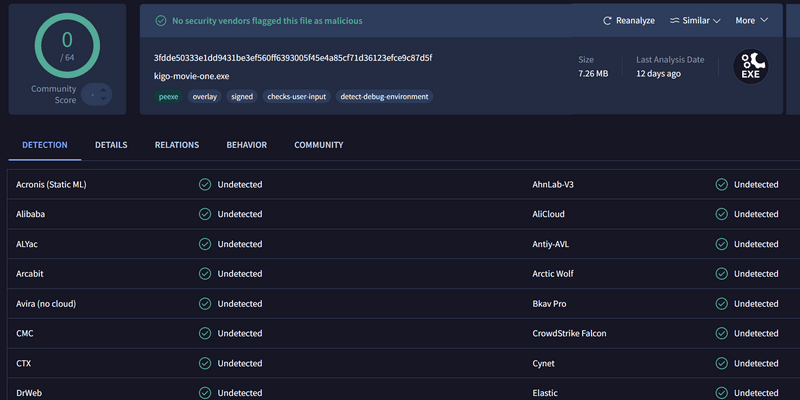
Our tests found no security threats. The installer received 0 detections across 60+ antivirus engines on VirusTotal, and Microsoft Defender did not report any malware or potentially unwanted software. During installation, we also found no bundled applications, browser extensions, or unexpected pop-ups.
As for legality, it really comes down to how you use the software. Kigo Movie One is intended for subscribers who want to save videos for their own offline viewing. In many countries, personal use is generally acceptable, although the rules can differ depending on where you live. What is clear, however, is that downloaded content should not be redistributed or used for commercial purposes. To stay on the safe side, it's always a good idea to check your local copyright laws and follow the streaming service's terms of use.
Editor's note:
For the best security and reliability, always download Kigo Movie One from the official KigoSoft website. Avoid cracked or modified versions from unofficial sources, as they may contain malware, unwanted software, or other security risks.
Part 4. Hands-on Testing: Download TV Show from Amazon Prime Video
So, how does Kigo Movie One work in real-world use? To find out, we tested the software by downloading some TV show from Amazon Prime Video and evaluated the entire workflow, from signing in and selecting the video to choosing the output settings and downloading it for offline viewing.
Overall, Kigo Movie One delivered a smooth and intuitive experience. During our broader testing across 10+ streaming platforms, it consistently completed downloads successfully, supporting video quality of up to 1080p along with flexible audio and subtitle options. To better illustrate the process, we'll use Amazon Prime Video as an example and walk through each step of downloading Amazon Prime Video Hot TV Series Off Campus Season 1 Episodes 1–4.
Test Environment:
| Item | Details |
|---|---|
| Software Version | Kigo Movie One V2.0.2 |
| Operating System | Windows 11 Pro |
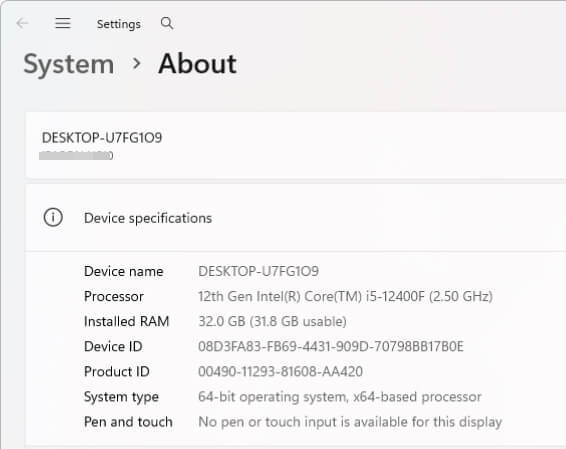
| CPU | 12th Gen Intel(R) Core(TM) i5-12400F (2.5 GHz) |
| RAM | 32.0 GB |
| Network | 5GHz Wi-Fi home network |
| Streaming Platform | Amazon Prime Video |
| Test Content | Off Campus Season 1 Episode 1–4 |
| Output format/quality | MP4;1080P |
| Output audio | EAC3 5.1 |
| Output subtitle | English |
Preparation:
Download Kigo Movie One from official KigoSoft download center. The installer size was approximately 7MB which is very light and fast to install on our Windows 11 test PC.
- Step 1 Launch Kigo Movie One and Choose Prime Video
- Step 2 Searching for the Series Off Campus
- Step 3Choosing Download Settings
- Step 4 Batch Downloading Episodes
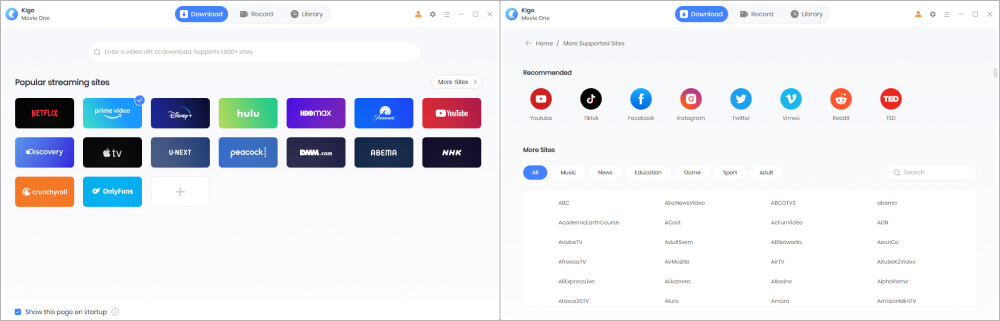
Once you open Kigo Movie One, you will see the home screen displaying major streaming services. By clicking "More Sites," you can browse additional supported websites (over 1,000 in total), which are clearly organized by category. Select Prime Video and choose the specific regional website you want to download videos from. Then, sign in to Amazon Prime Video through the built-in browser using your subscription account.
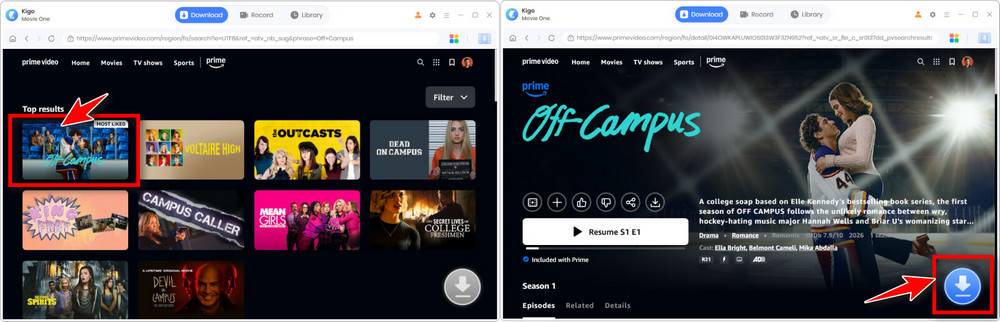
Search for Off Campus and open the TV series details page. Then, click the large blue Download button at the bottom of the screen to let Kigo Movie One automatically analyze the available streams.
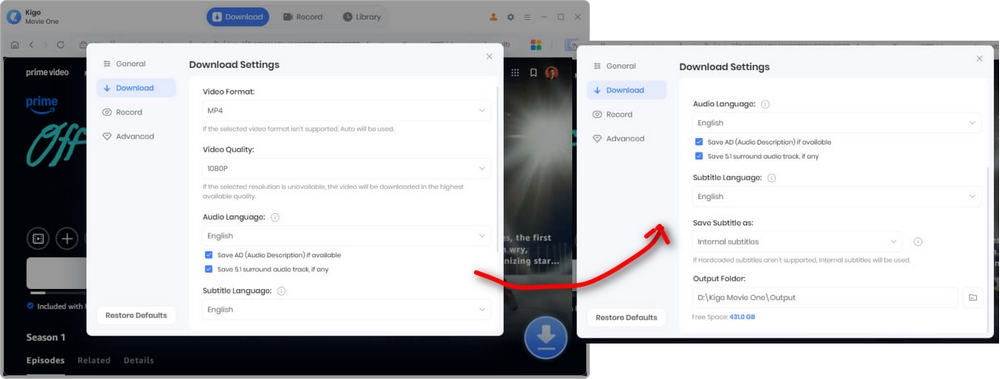
The settings window grouped all available options into a single dialog, making configuration straightforward. We set the output format to MP4, chose the output folder, and adjusted the other settings as needed.
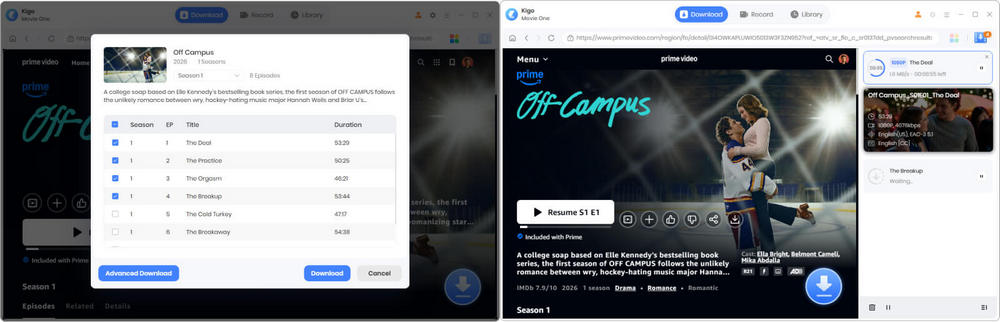
We selected Off Campus Season 1 Episodes 1–4 and added them to the download queue. By switching to the Audio and Subtitle tabs, we chose 1080p as the output quality and preserved the EAC3 5.1 audio track and English (CC) subtitles. Throughout the download process, the queue displayed the progress, download speed, estimated remaining time, and completion status. Even while downloading four episodes simultaneously, the application remained responsive, allowing us to continue browsing without any noticeable lag.
Download Results:
All four episodes completed downloading without interruption. The total download time was 56 minutes.
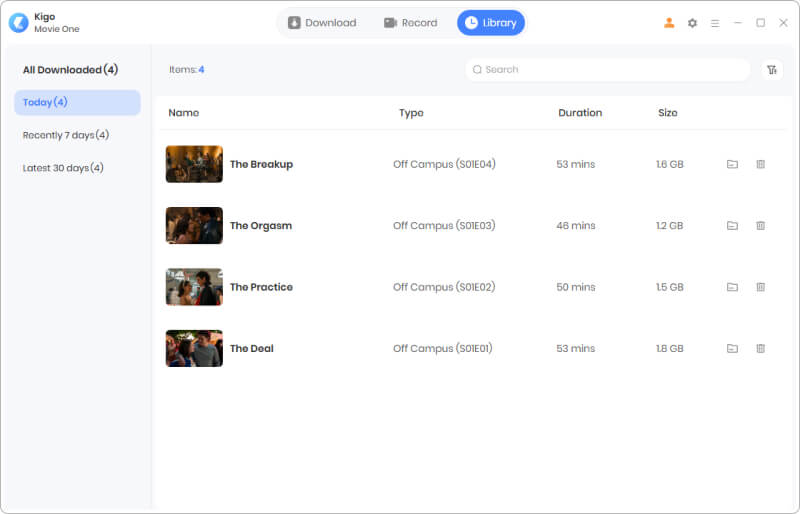
| Episode | Video Length | File Size | Resolution | Subtitle | Audio | Status |
|---|---|---|---|---|---|---|
| Episode 1: The Deal | 53 mins | 1.8 GB | 1080P | ✅ | Original | Success |
| Episode 2: The Practice | 50 mins | 1.5 GB | 1080P | ✅ | Original | Success |
| Episode 3: The Orgasm | 48 mins | 1.2 GB | 1080P | ✅ | Original | Success |
| Episode 4: The Breakup | 53 mins | 1.6 GB | 1080P | ✅ | Original | Success |
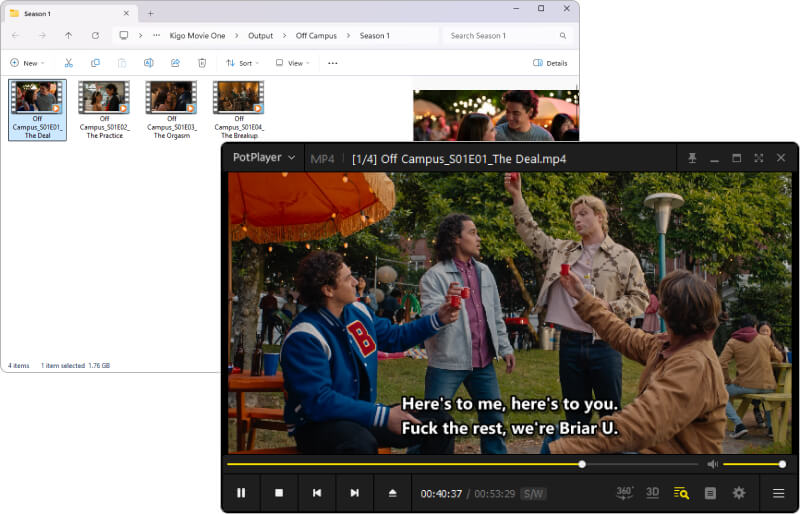
The downloaded Amazon Prime Video episodes were saved to D:\Kigo Movie One\Output\Off Campus\Season 1. We played the videos using PotPlayer, and everything looked perfect.
Part 4. Pricing Plans
Kigo Movie One is priced at $149.90 for a lifetime license (original price is $259.90). If your main goal is downloading videos from YouTube, there are plenty of free or low-cost alternatives. But if you're looking for a reliable tool to download content from multiple mainstream streaming platforms, Kigo Movie One is well worth considering. It brings together the capabilities of Kigo's standalone streaming downloaders—each typically priced at $79.90—while supporting over 1,000 streaming and video websites, making it a convenient solution for building a personal offline media library across multiple subscription services.
| Kigo Movie One | |
|---|---|
| Working platform | Windows/macOS |
| Plan | Lifetime |
| Price | $149.90 (purchase now) |
| Service supported | Netflix, Amazon Prime, Disney+, Hulu, MAX, YouTube and 1000+ video sites (see supported sites) |
| Update and support | Free future update and professional technical support |
| Refund policy | 30 days after purchase (for qualifying orders) |
Part 5. Kigo Movie One vs. Other Streaming Downloaders
Kigo Movie One has several alternatives. Based on our testing and research, we compare them in terms of platform support, key features, download speed, and pricing.
| Feature | Kigo Movie One | StreamFab | Audials | CleverGet |
|---|---|---|---|---|
| Supported Platform | 8 OTTs & 1000+ videos sites | 60 OTT & 1000+ videos sites | 8 OTTs | 1000+ videos sites |
| Built-in Browser | ✅ | ✅ | ❌ | ✅ |
| MP4 & MKV Output | ✅ | ✅ | ✅ | ✅ |
| Price for lifetime version | $259.9 (Now $149.9) | $299.99 | $300 | $249.95 |
| Output video quality | 1080p for major streaming sites, up to 8k for YouTube | 1080p/720p | 1080p/720p | 1080p/720p |
| Audio Tracks & Subtitles | ✅ | ✅ | ❌ | ✅ |
| Skip any ads on commercial-supported shows | ✅ | ✅ | ❌ | ✅ |
| Speed | Up to 10x | 5x | 4x | 5x |
| Batch Downloads | ✅ | ✅ | ✅ | ✅ |
| Update Frequency | Often | Often | Common | Common |
Part 6: FAQs about Kigo Movie One
❓1. Can I try Kigo Movie One for free?
Kigo Movie One is free to download for everyone. It offers a free trial that allows you to download the first 5 minutes of each video for testing purposes. You can also participate in Kigo's user feedback program to get a free license.
❓2. Is Kigo Movie One safe to use?
Yes. Make sure you download the program from the official KigoSoft website. Based on our testing, Kigo Movie One is a clean and professionally maintained Windows application. It passed scans by Microsoft Defender and VirusTotal and installed without any bundled software or browser extensions.
❓3. Does Kigo Movie One require your streaming password?
No. During our testing, Kigo Movie One used its built-in browser to access streaming platform. The login process closely resembled signing in through a regular web browser. Users entered their credentials directly into the streaming service's login page displayed within the built-in browser.
❓4. Does Kigo Movie One have download limits?
No. By upgrading to the full version with a valid license, you can access all the features of Kigo Movie One. You can download any movie or TV show you want from your preferred streaming service.
Final Verdict
Through our testing, Kigo Movie One delivered on what it promises. If you regularly binge content from multiple subscription-based streaming services, it provides a convenient way to save your favorite movies and TV shows to your computer for offline viewing. Whether you're downloading from Amazon Prime Video, Netflix, Disney+, or other supported platforms, the workflow is straightforward and easy to follow. If you're looking for a reliable all-in-one streaming video downloader, Kigo Movie One is well worth the investment. Should you encounter any issues while using the program, KigoSoft's responsive customer support and regular software updates provide additional peace of mind. Download the free trial and try it with your favorite streaming service to see how it performs for yourself.