
SpotiDown Review (Tested Sept 2026): Real MP3 Quality, Playlist Limits & Safer Alternative
SpotiDown is a free online Spotify downloader: paste a track or playlist link, and it returns MP3 files. You probably found it the same way many people do — by searching for "spotidown mp3" or "spotidown online" The promise is simple, but does it actually work? Is it safe for your computer and personal data? And does the audio quality really match the advertised 320 kbps?
We put the SpotiDown MP3 online downloader to the test using real Spotify content and dedicated audio and security tools. We tested a popular Spotify track and a 20-song playlist, going through the complete download process, measuring the actual audio quality, checking whether playlists could be downloaded successfully, inspecting the resulting files, and comparing the experience with a desktop Spotify converter such as Kigo Spotify Converter. So, what did we actually find? Keep reading to see how SpotiDown performed in our tests.
SpotiDown is simple enough for occasional single-song downloads, but our testing found inconsistent site access, misleading audio quality, and server issues. For better safety, stability, and control over your MP3 files, Kigo Spotify Converter is a more reliable option for downloading Spotify content.
Contents
- Part 1. What Is SpotiDown? Overview, Domains & How It Works
- Part 2. SpotiDown Audio Quality Test: Is It Really 320 kbps MP3 as Advertised?
- Part 3: SpotiDown Workflow Test: What a Download Actually Feels Like
- Part 4: SpotiDown Playlist & Library Test: Can You Build an Offline Library with It?
- Part 5: Is SpotiDown Safe?
- Part 6: All SpotiDown Sites Compared at a Glance
- Part 7: Best SpotiDown Alternative: Kigo Spotify Converter🏆🏆🏆
- Part 8: SpotiDown vs Kigo Spotify Converter: Head-to-Head
- Part 9: FAQs about SpotiDown Downloader
- Part 10: Final Verdict: Is SpotiDown Worth It?
Part 1. What Is SpotiDown? Overview, Domains & How It Works
SpotiDown is a browser-based Spotify downloader. You simply paste a song, album, or playlist link from Spotify, click a few buttons, and the site returns MP3 files — no app to install, no account to create, and no payment required.
One interesting finding is that when we search for "spotidown" on Google, we are directed to several different domains. These are not different versions of the same product, they appear to be separate operations run by different people, and in our tests, they behaved very differently.
➡️ Which SpotiDown site URL is correct? Which is the official one?
At the time of our testing (September 2026), a Google search for spotidown returned the four domains listed below. See the table for our test results.
| Domain | Registered | Note |
|---|---|---|
| spotidown.co | Nov 14, 2025 | the only site in our test that handled both a single track and a playlist |
| spotidown.org | Nov 27, 2025 | never loaded; our antivirus blocked it before the page could open (details in Part 5) |
| spotidown.net | Feb 9, 2026 | downloaded a single track, but its playlist download failed with an API error |
| spotidown.app | Mar 21, 2024 | never loaded; blocked by our antivirus, just like .org |
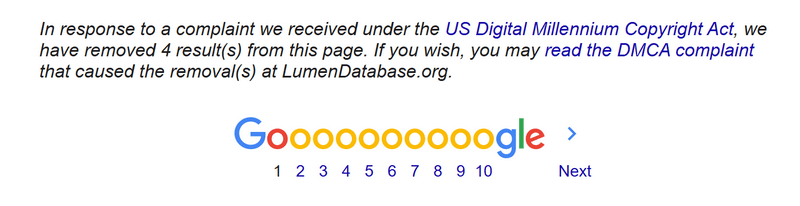
Some older reviews mention other domains, such as spotidown.com. These no longer appear in search results, and Google currently displays a notice stating that some results for this query were removed following DMCA complaints.
Editor's note:
There is no official spotidown site. These sites may come and go over time. The domains we found were registered within the last ten months, while even the "oldest" one is only about two and a half years old. This points to a pattern of relatively short-lived, anonymous sites that may be flagged, removed, or replaced. By comparison, KigoSoft, the developer of Kigo Spotify Converter, has maintained its domain registration since 2007.
➡️ How Does SpotiDown Work Online: Step by Step
As long as you have a browser and an internet connection, you can visit SpotiDown website to download MP3 files from Spotify. The steps are roughly the same on every working SpotiDown online downloader site. Here's how it works on spotidown.net:
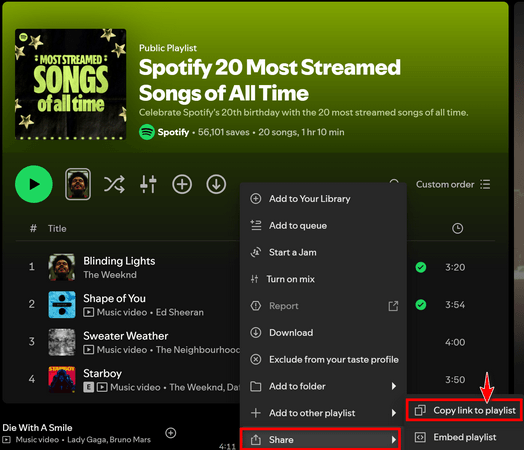
- Step 1 Copy a Spotify link — a track or playlist — from the Spotify app or web player (Share → Copy Link).
- Step 2 Paste the link into the box on the homepage and click Download.
- Step 3 Wait for the site to detect the track.
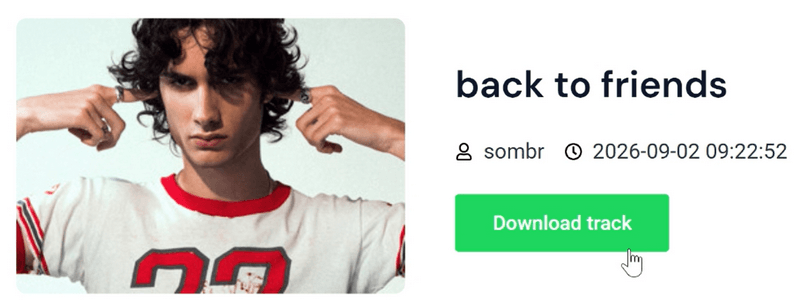
- Step 4 When the track appears on the site, click Download to save it as an MP3 file to your computer.
Part 2. SpotiDown Audio Quality Test: Is It Really 320 kbps MP3 as Advertised?
Every SpotiDown MP3 downloader we tested advertises the same headline figure: 320 kbps. So we took the claim seriously and put it to the test.
How We Test
We tested each working site under the same conditions, using the same computer, network connection, Spotify track, and audio analysis tools.
- Operating environment: Windows 11 / Chrome in Incognito mode
- Sample: "Back to Friends" by sombr (3 min 19 sec); 🔗: https://open.spotify.com/track/7qjZnBKE73H4Oxkopwulqe?si=189e8ce6a6f94f5c
- Audio analysis tools: MediaInfo to check the actual bit rate, sample rate, encoder, and metadata; Spek (v0.8.5) to analyze the actual frequency spectrum.
The frequency spectrum can reveal what the file's metadata alone cannot. A genuine 320 kbps encode typically retains audio energy smoothly toward 20 kHz. By contrast, a file re-encoded from a low-bitrate source may show a sharp cutoff — a clear drop in frequency content above a certain point, even when the file metadata claims a higher bit rate.
Testing Result
| Site | Advertised | Actual bitrate (MediaInfo) | Sample rate | File size | Spectrum (Spek) |
|---|---|---|---|---|---|
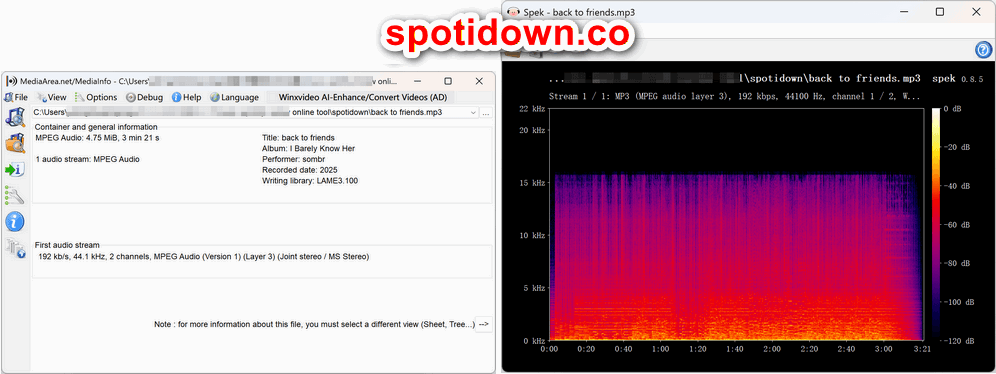
| spotidown.co | 320 kbps | 192 kbps | 44.1 kHz | 4.75 MB | Hard cutoff just under 16 kHz |
| spotidown.org | 320 kbps | — site blocked by antivirus, no file obtained | — | — | — |
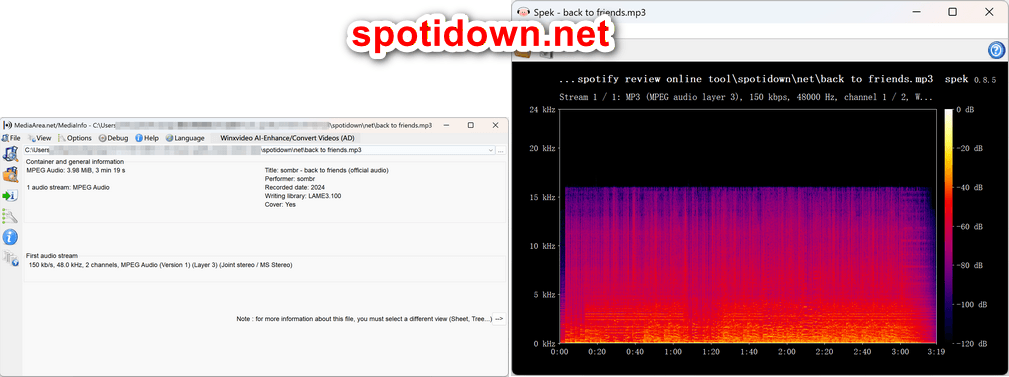
| spotidown.net | 320 kbps | 150 kbps | 48.0 kHz | 3.98 MB | Hard cutoff at ~16 kHz |
| spotidown.app | 320 kbps | — site blocked by antivirus, no file obtained | — | — | — |
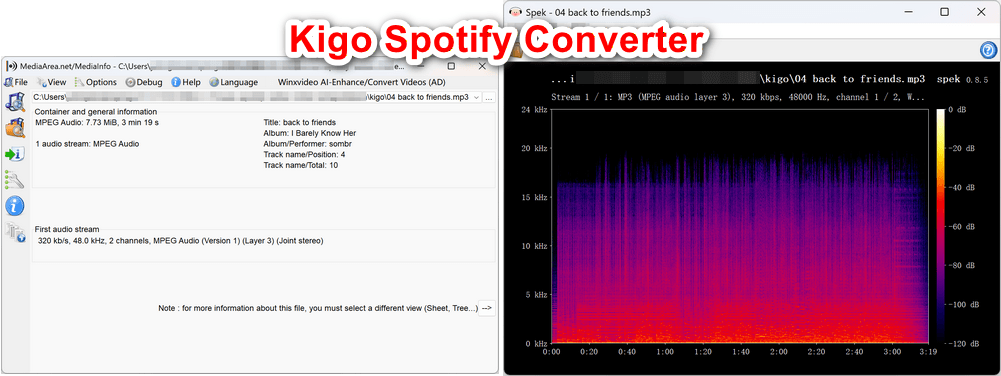
| Kigo Spotify Converter (reference) | 320 kbps | 320 kbps | 48.0 kHz | 7.73 MB | Smooth rolloff past 18 kHz |
spotidown.co — The spectrum stops at a hard cutoff just below 16 kHz. A genuine 320 kbps MP3 typically extends much higher.
spotidown.net — The title "sombr - back to friends (official audio)" reflects that is a YouTube video title pasted into the song metadata. The spectrum also shows a hard cutoff at around 16 kHz.
Kigo Spotify Converter — the reference file: 320 kbps, 48 kHz, 7.73 MB—roughly twice the size of the SpotiDown file. That larger file size is consistent with a true 320 kbps encode. The Spek image shows audio energy extending smoothly past 18 kHz with a natural rolloff. No cliff.
➡️ Why the 320 kbps Label Does Not Hold Up
1. The cliff-edge cutoff. Both working sites produced files whose frequency spectrum was cut off at roughly 16 kHz. That is a classic sign of audio re-encoded from a lower-bitrate source, such as 128–160 kbps—the kind of result you might get when a site pulls a matching video stream from a YouTube-style source instead of Spotify's catalog.
2. The metadata info. The .net file uses a YouTube-style video title ("… (official audio)") as its track title, while the two sites cannot even agree on the release year: the .co file is tagged 2025, while the .net file is tagged 2024. Same song, two different "records."
3. The version mismatch. The official track runs 3:19, but the .co file runs 3:21—a slightly different version of the song. That is exactly the kind of mismatch you can get when a tool matches a track by title and picks whichever video it finds first.
Part 3. SpotiDown Workflow Test: What a Download Actually Feels Like
As spotifydown.co is the only site that successfully completed both single-track and playlist downloads, we use this site as an example to show you the complete workflow. The Spotify playlist we tested is https://open.spotify.com/playlist/37i9dQZF1DWUzo5Cvs9zG6?si=c59442c8a6884e54. It contains 20 songs with a total duration of 1 hour and 10 minutes.
- Step 1 Copy a Spotify track or playlist link.
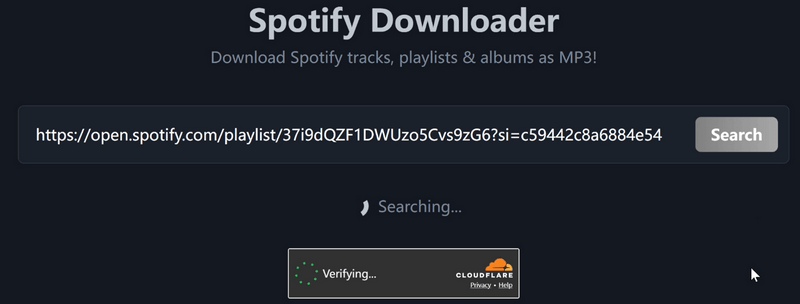
- Step 2 Paste the Spotify playlist URL into the box on the homepage and click Search.
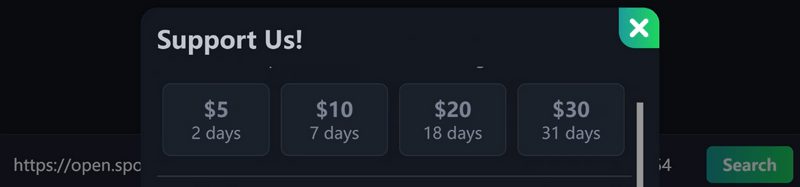
- Step 3 Complete the bot verification. It takes roughly 30 seconds. During the time, "Support Us" premium pop-up will appear for several times. You can simply close it.
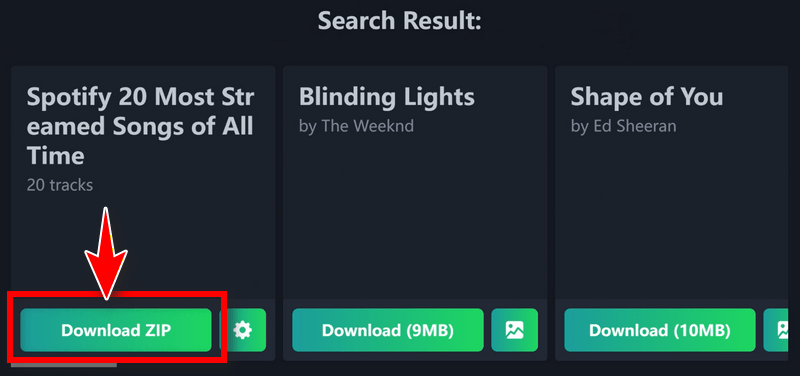
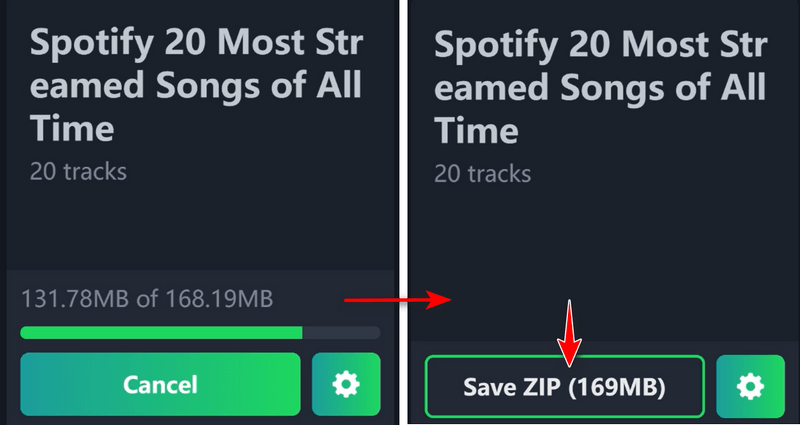
- Step 4 The site displays two options: download the playlist as a ZIP file or download the tracks individually. Click Download ZIP and wait for the progress bar to reach 100%.
- Step 5 Click the Save ZIP button to save the file to your computer. The "Support Us" premium pop-up will appear again, but you can simply close it. The downloaded MP3 files will be saved as a ZIP file in your Downloads folder.
Part 4. SpotiDown Playlist & Library Test: Can You Build an Offline Library with It?
➡️ Free Limits and Promotional Pop-ups
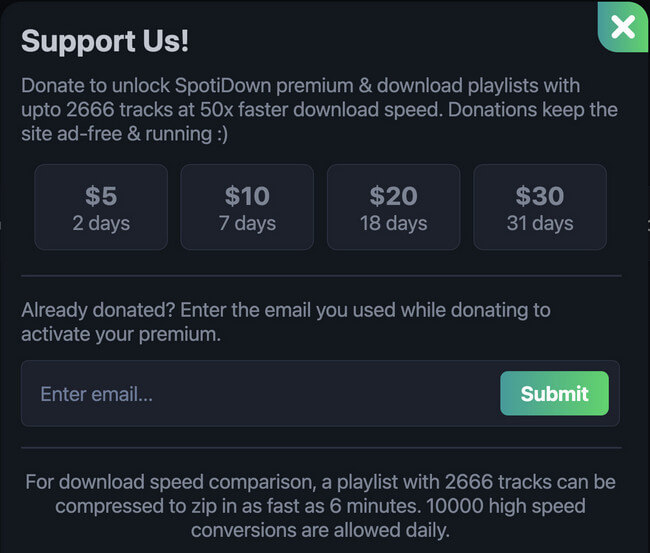
spotidown.co let us process our 20-song playlist for free, but the monetization was hard to miss. Four "Support Us" premium pop-ups appeared during each session. The site then presented an offer:
spotidown.net showed no upgrade pop-ups in our test, but its playlist downloader failed with a 404 API error, so there was nothing to pay for. spotidown.org and spotidown.app never loaded at all.

➡️ What Your Library Looks Like Afterward: File Names, ID3 Tags & Formats
A completed download doesn't necessarily mean the process is over, especially if you want to build a music library. Let's take a closer look at the downloaded MP3 files:
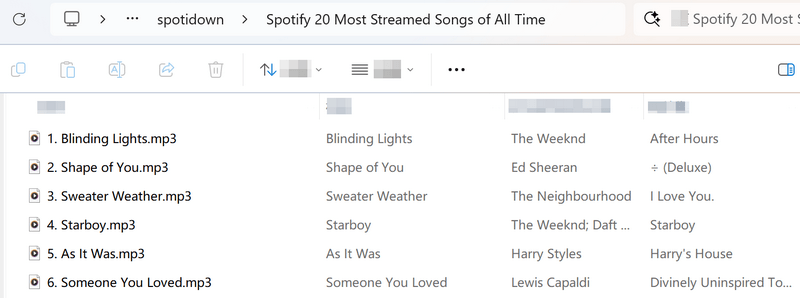
File names. The .co playlist ZIP names the downloaded MP3 files using the format {number} {track name}. Note that {number} is the track's position in the playlist, not its position on the album. In our 20-song playlist, "Blinding Lights" was saved as 1. Blinding Lights.mp3, even though it is track 9 on the album After Hours. This can cause file-name collisions when the same song appears in multiple playlists. If you download both playlists and merge the files into the same folder, the same song may have different file names because it has a different position in each playlist.
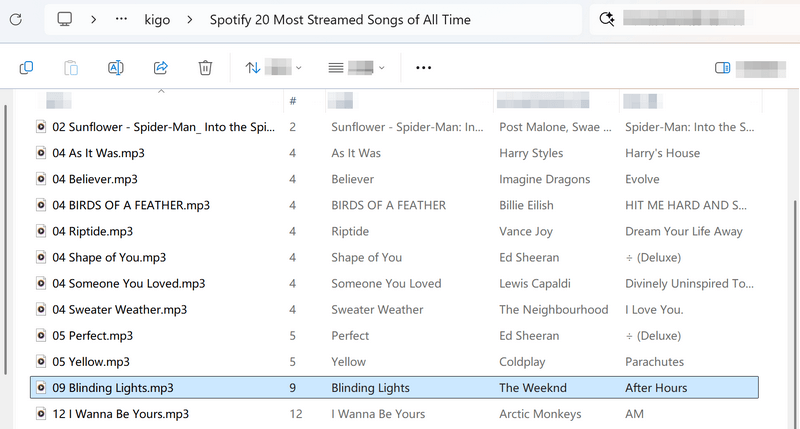
By comparison, Kigo's output for the same playlist is organized in a folder named after the playlist, and the file names use the song's album track number. For example, "Blinding Lights" was saved as 09 Blinding Lights.mp3, matching its actual position on After Hours.
SpotiDown.App – Song Name.mp3. In our September 2026 test, we saw no branded prefixes — both working sites used plain filenames.
Metadata.
| spotidown.co | spotidown.net | Kigo Spotify Converter (reference) | |
|---|---|---|---|
| Title | ✅ | ✅ (but contains "(official audio)") | ✅ |
| Album | ✅ | ❌ missing | ✅ |
| Artist | ✅ | ✅ | ✅ |
| Year | ✅ (2025) | ✅ (2024 — disagrees with .co) | ✅ |
| Track number | ❌ | ❌ | ✅ |
| Cover art | embedded | embedded | embedded |
Format. The default output format on the SpotiDown website is MP3, and there is no option to change it to another audio format. No FLAC, no WAV, no AAC. MP3 at 150–192 kbps is all you get.
Editor's note:
Metadata is vitally important when building a large offline music library. The more complete the metadata, the easier it is to sort, organize, and manage your collection. For example, losing the album tag can mean that, in many music players, a song can no longer be grouped with its album. MP3 is widely supported and convenient, but for long-term music storage, a lossless format such as FLAC or WAV is a better choice when preserving the original audio quality matters.
Try Kigo Spotify Converter to Save All Your Favorite Spotify songs!
Download lossless FLAC audio. Convert Spotify songs to 320kbps MP3. Retain ID3 tags. 40X conversion speed.Part 5. Is SpotiDown Safe?
What We Saw: Antivirus Blocks, Pop-ups, and Dead Buttons
We tested with the ad-blocker off and counted exactly what happened.
spotidown.org and spotidown.app never loaded. Our antivirus (Kaspersky) intercepted both before the page could open:
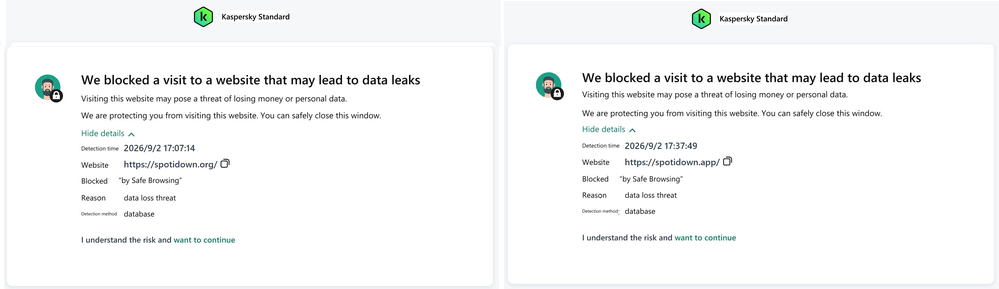
spotidown.co loaded fine and produced no redirects in our session — but every download ran through "Support Us" premium pop-ups and the company behind the site is anonymous.
spotidown.net showed no pop-ups — but its dead-click interface (several seconds of nothing after every action) invites misclicks, and the site was intermittently unreachable.
Who Are You Actually Dealing With?
- No company, no address, no support. None of the four sites identifies an operator. There is no contact beyond an email box for "already donated?" activation.
- A DMCA history. Google currently shows a notice that results for spotidown were removed following DMCA complaints. Previous SpotiDown domains have already vanished from search results. These sites do not last, by design or by force.
- Payment without recourse. The .co "donation" is exactly that — a donation to an anonymous site, with no refund path, no service agreement, and no one to email when the site is gone. $30 buys 31 days of access to a domain that could be DMCA'd tomorrow.
Part 6. All Four SpotiDown Sites Compared at a Glance
spotidown.co

| Best For | Free single tracks and small playlist ZIPs — our 20-song playlist arrived in 6 min 2 s |
| Highlights | Customizable ZIP file-name template; separate cover-art download; no account, no install |
| Watch Out For | "320 kbps" files measured 192 kbps; two paywall pop-ups per session; position-based numbering |
spotidown.net
| Best For | Quick single tracks |
| Highlights | Embedded cover art; simple interface |
| Watch Out For | Playlists fail with a 404 API error; files measured 150 kbps; album tag missing; intermittent downtime |
spotidown.org and spotidown.app have no result as our antivirus blocked both before they could load.
Score
If you absolutely must use one of them, spotidown.co is the only site that successfully completed both of our tests—at 192 kbps, with "Support Us" premium pop-up offers and position-numbered filenames. spotidown.net works for quick single-track downloads, but at even lower quality and without album metadata. The other two domains should be avoided.
| Category | Ratings |
|---|---|
| Ease of Use | 4/5 |
| Audio Quality | 2/5 |
| Playlist downloads | 2/5 |
| File names & tags | 2/5 |
| Safety & stability | 2/5 |
| Overall 🌟 | 2.5/5 |
- Free and browser-based — no installation, no account.
- spotidown.co downloaded a full 20-song playlist as one ZIP (6 min 2 s).
- Keeps basic ID3 tags (title, artist).
- "320 kbps" is actually 150–192 kbps with a hard 16 kHz cutoff.
- 2 of 4 domains are blocked by antivirus software (data-leak warning).
- spotidown.net cannot download playlists at all (404 API error).
- Missing necessary metadata such as track number.
- MP3 only; Pop-ups occasionally appeared.
Part 7. Best SpotiDown Alternative: Kigo Spotify Converter
If you're looking for an alternative to SpotiDown, Kigo Spotify Converter is worth considering. We also used the program to download the same Spotify track and playlists to MP3 under the same conditions to compare its performance. Here are the results.
| Test | spotidown online downloader | Kigo Spotify Converter |
|---|---|---|
| Bitrate (MediaInfo) | 192 kbps (.co) / 150 kbps (.net) | 320 kbps as advertised (Also support Spotify lossless audio) |
| Spectrum (Spek) | hard cutoff ~16 kHz | smooth rolloff past 18 kHz, no cliff |
| File size, same track | 4.75 MB / 3.98 MB | 7.73 MB (real 320 kbps weight) |
| Duration | 3:21 (mismatch) / 3:19 | 3:19 — exact match |
| 20-song playlist | 6 min 2 s with frequent premium pop-ups | 8 min 16 s |
| Playlist output size | 82.1 MB | 162 MB |
| Tags | no track number; .net has no album; conflicting years | Title, Album, Artist, Track number, Disc Number, Year, Artwork — complete |
| File names | 1. Blinding Lights.mp3 |
09 Blinding Lights.mp3 — real album track numbers |

Key Features of Kigo Spotify Converter
- Download Spotify track, album, playlist, podcast, radio, audiobook.
- Convert Spotify music to MP3, AAC, FLAC, AIFF, WAV, or ALAC audio.
- Keep 100% original audio quality; preserve ID3 tags, lyrics.
- Enjoy up to 10× faster conversion speeds with batch downloads.
- Burn Spotify music to CD or export to iTunes with one click.
- Enable offline listening for both Spotify Free and Premium users.
- Activate the permanent playback of Spotify music.
Windows 11/10/8 Free Download
macOS 11 or later
How to Download Spotify Playlist to files with Kigo?
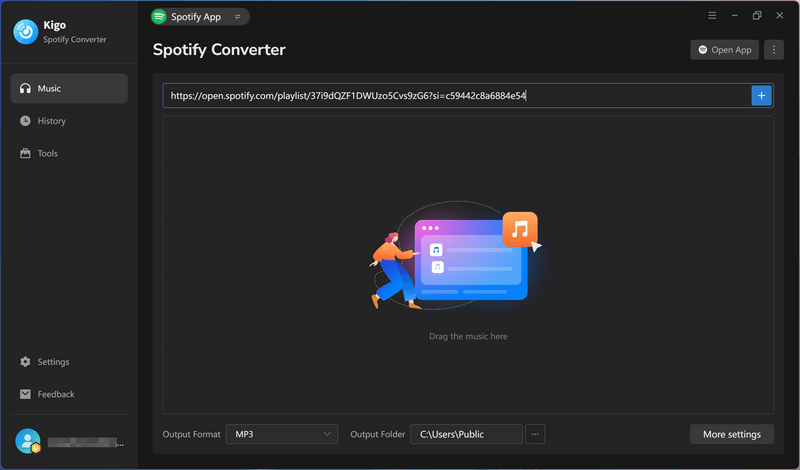
- Step 1 Launch Kigo Spotify Converter
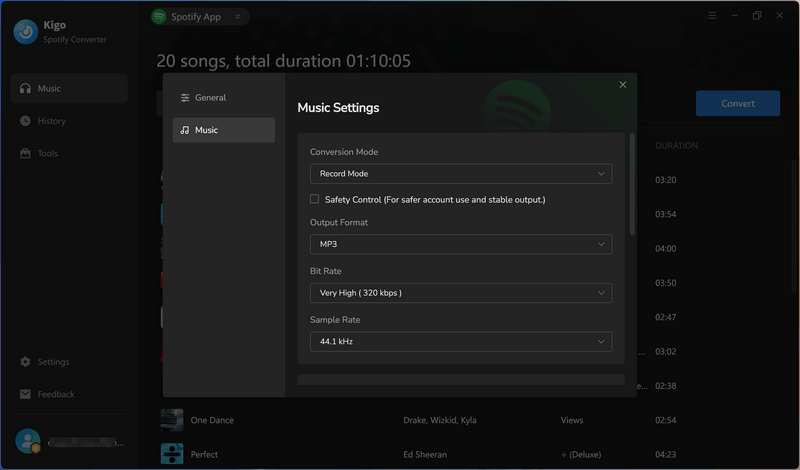
- Step 2 Adjust output settings
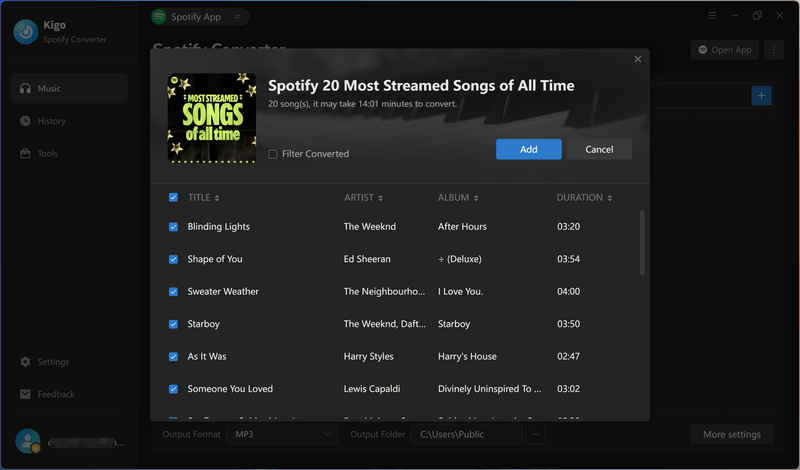
- Step 3 Add the Spotify music to download
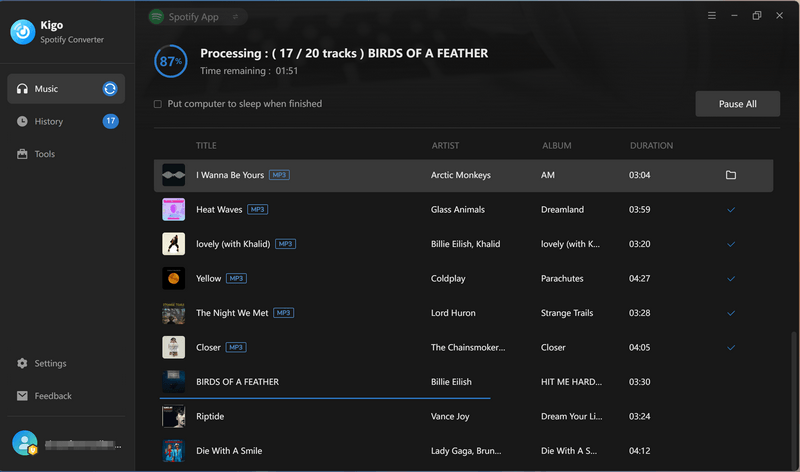
- Step 4 Download Spotify music in batch
Open the application on your computer and drag and drop your Spotify track / album / playlist to it.
Go to Settings and select the output format as MP3. You can set the output bitrate and sample rate, change file name organization (sort your list by title, artist, or album for easier selection) and etc.
Once you paste the Spotify link into Kigo Spotify Converter, it will quickly detect and display the songs. Here, you can select the songs you want to convert or download them all at once.
Click the Convert button to start downloading the Spotify playlist as MP3 files at 320 kbps. When the download process reaches 100%, all songs have been successfully saved to your computer.
Part 8. SpotiDown vs Kigo Spotify Converter: Head-to-Head
| SpotiDown | Kigo Spotify Converter | |
|---|---|---|
| Tool type | Online downloader | Desktop converter |
| Supported Spotify content | Track, album, playlist | Track, album, playlist, podcast, radio, audiobook, music video |
| Audio source | re-encoded YouTube-style web audio | direct conversion from Spotify Web Player and Spotify App |
| Advertised vs actual quality | 320 kbps → 192 (.co) / 150 (.net) kbps | 320 kbps → 320 kbps |
| Batch download | ✅ | ✅ |
| Playlists | only .co works (ZIP); .net errors out; .org/.app blocked | full playlists |
| Output formats | MP3 only | MP3, AAC, FLAC, WAV, AIFF, ALAC, MP4 |
| Personalized Settings | ❌ | ✅ |
| Keep Lyrics | ❌ | ✅ |
| File names | No track numbers; playlist-position numbering causes collisions | Customizable output file name: {Track Number} {Album} {Artist} {Title} {Year} {Disc Number} {Playlist Index} |
| ID3 Tags | no track number; .net missing album; conflicting years | title, album, year, artist, track number, disc number, cover |
| Ads / Pop-ups | Upgrade prompts; 2 of 4 domains antivirus-blocked | None |
| Operator accountability | anonymous; DMCA removals; no refund | identifiable company, reputable developer, 30-day refund |
| Price | "free" + $5–$30 temporary donation tiers | $44.95/year or $89.90 lifetime; free trial |
| Supported Languages | English | English, Japanese, German, French, and 44 more languages |
| Stability | Inconsistent availability | Regular updates |
| Technical Support | ❌ | ✅ |
FAQs about SpotiDown Downloader
❓ Is SpotiDown trustworthy?
In September 2026, spotidown.org and spotidown.app were blocked by anti-virus program Kaspersky with a data-leak warning; spotidown.co worked but pushed "donation" pop-ups from an anonymous operator; spotidown.net was intermittently unreachable. Regarding these, they seem untrustworthy.
❓How does SpotiDown work?
You paste a Spotify link into the site, and it fetches a matching recording from a video-style source, then re-encodes it into an MP3 file. You can read the step-by-step flow with screenshots in Part 1.
❓ Does SpotiDown really download 320 kbps MP3?
No. Both working sites advertised 320 kbps and delivered less: 192 kbps on spotidown.co and 150 kbps on spotidown.net, with a hard spectral cutoff at about 16 kHz — the signature of audio re-encoded from a low-bitrate YouTube-style source. If you want to get 320kbps from Spotify songs, try the best SpotiDown alternative - Kigo Spotify Converter.
❓ Can I download MP3s directly from Spotify?
Not officially. Spotify does not offer an MP3 export — even Premium downloads stay locked inside the app. Online Spotify downloaders such as SpotiDown fetch songs from a YouTube-style source and save them as MP3 files, rather than downloading the original Spotify audio. Desktop converters such as Kigo Spotify Converter convert songs directly from Spotify, with multiple output formats and complete ID3 tags.
❓ What is the best spotidown alternative?
For one or two songs, the working SpotiDown sites are fine for occasional use—just don’t expect true 320 kbps quality. If you’re downloading playlists, building an offline music library, or simply want the quality same as the source, the SpotiDown alternative we tested side by side is Kigo Spotify Converter. It offers true 320 kbps output, complete ID3 tags, an easy workflow, flexible settings, and a 30-day money-back guarantee.
Final Verdict: Is SpotiDown Worth It?
For one song, occasionally — yes, actually. spotidown.co or spotidown.net will hand you an MP3 without installing anything, and for that one-off job the flow is quick and free. Just know what you are getting: 150–192 kbps behind a "320 kbps" label, a hard 16 kHz cutoff, missing tags, and a file name you will have to fix. If that trade is acceptable for a single track, use the site and enjoy the free download.
For playlists, quality, and a library that stays organized — no. Only one of the four current domains could successfully download a playlist, and even that came with compromises: files were numbered by playlist position, album metadata was missing, and pop-up offers appeared during the process. Add the inconsistent availability, lower-than-advertised audio quality, the time spent renaming files, and potential security risks, and the "free" service comes with more trade-offs than it first appears. Whether that trade-off is worthwhile ultimately depends on your priorities.
If you want reliable playlist downloads, better audio quality, and properly organized music files, a desktop alternative such as Kigo Spotify Converter is worth considering.
Note: The trial version allows you to download the first 1 minute of each file. To access the full length, please unlock it with a valid license code.