
Kigo Spotify Converter Review 2026: Lossless Audio & 500+ Song Conversion
Spotify has transformed the way people listen to music, offering access to millions of songs, playlists, podcasts, and audiobooks. However, Spotify downloads remain restricted to the Spotify app, making it difficult to enjoy your music freely across different devices and platforms.
This is where Spotify converters come in. Among the available options, Kigo Spotify Converter has attracted attention for its ability to preserve Spotify original audio quality, support multiple output formats, and handle large-scale playlist conversions with impressive stability.
In this review, we'll examine Kigo Spotify Converter's features, performance, pricing, strengths, and limitations to help you determine whether it's worth your investment.
Contents
Part 1. Quick Verdict
Kigo Spotify Converter is a premium Spotify music downloader and converter for Windows and Mac. It enables users to download Spotify songs, albums, playlists, podcasts, and audiobooks, then convert them into MP3, AAC, WAV, FLAC, AIFF, or ALAC for permanent offline access.
While Kigo Spotify Converter is a relatively recent addition to Kigo's product lineup, it benefits from the company's extensive experience in multimedia software development. Its standout strengths include excellent audio quality preservation, support for lossless formats, highly customizable output settings, and the ability to process extremely large playlists without sacrificing stability.
Free Download Free Download| Kigo Spotify Converter | Ratings |
|---|---|
| Ease of Use | 4.8/5 |
| Conversion Speed | 4.8/5 |
| Audio Quality | 4.9/5 |
| Stability | 4.9/5 |
| Features | 4.8/5 |
| Value for Money | 4.7/5 |
| Overall Score 🌟 | 4.8/5 |
Part 2. Why You Can Trust Kigo Spotify Converter
Functionality, reliability, long-term support, and product stability are important considerations.
20+ Years of Multimedia Software Development. Kigo Spotify Converter is developed by KigoSoft Inc., a company with more than 20 years of experience in multimedia software development. Although the software was released in 2026, it benefits from the same engineering expertise behind the company's established audio and video solutions. This experience is reflected in features such as large-scale batch conversion, multiple and lossless audio output, metadata preservation, and ongoing compatibility updates.
Continuous Product Maintenance and Updates. A reliable software product doesn't stop improving after release. Kigo regularly updates Spotify Converter to enhance compatibility, optimize performance, and fix potential issues. The software also supports 49 languages and is backed by multilingual technical support (including English, Japanese, German, French, Spanish, and Chinese), ensuring users around the world can use the software comfortably and receive timely assistance whenever needed.
For users, this means choosing a product backed by an experienced development team committed to both product quality and long-term support.
Years of Experience
countries and regions
Active Users
Conversion Success Rate
Part 3. Getting Started with Kigo Spotify Converter
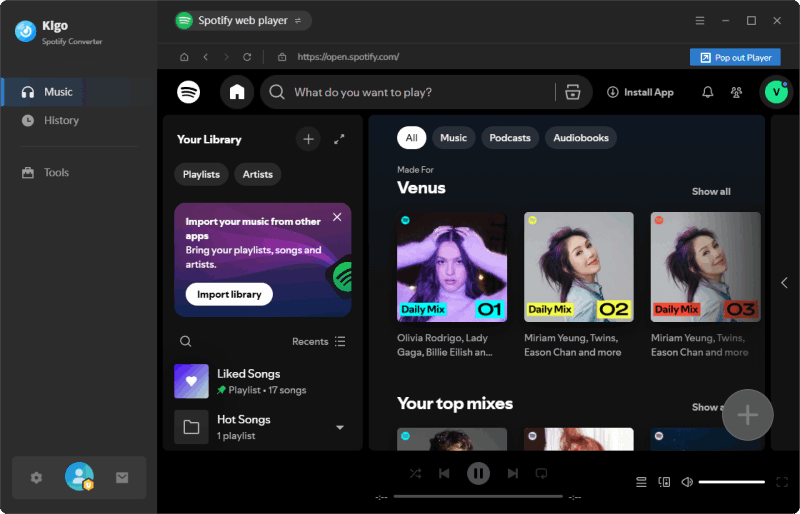
One of Kigo Spotify Converter's strengths is its simplicity. Unlike some Spotify converters that require complicated setup procedures, Kigo integrates the built-in Spotify web player, allowing users to browse and convert music directly within the application.
The basic workflow consists of four steps:
- Step 1 Launch Kigo Spotify Converter on your computer and sign in to your Spotify account.
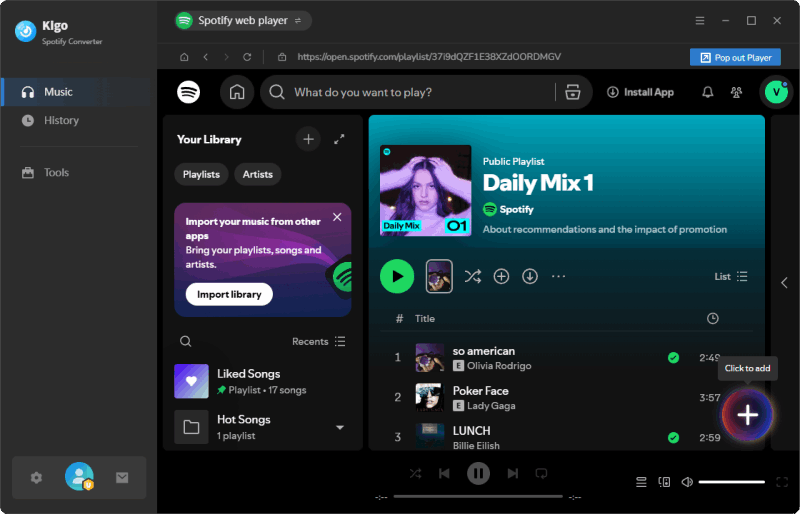
- Step 2 Find the Spotify songs, albums, or playlists you want to download. And click "+" to add the files to download queue directly.
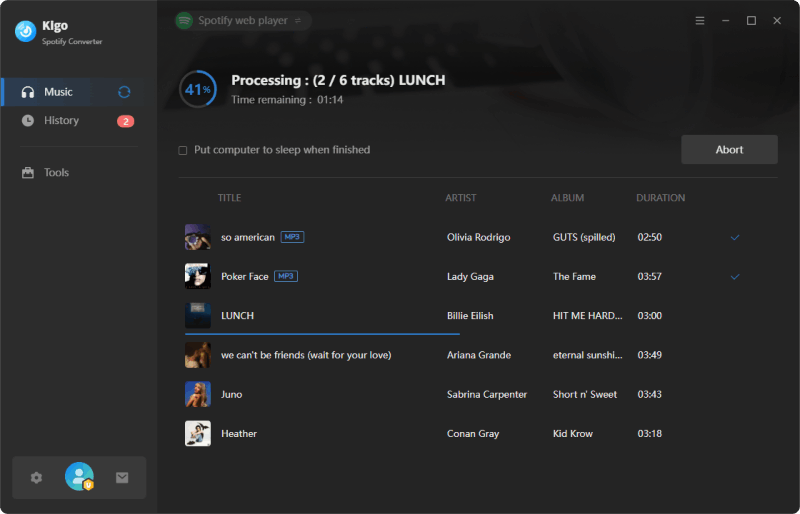
- Step 3 Choose output format, audio quality, destination folder and other settings.
- Step 4 Start the Spotify music conversion process.


| Features | Kigo Spotify Converter |
|---|---|
| Download Range | Songs, albums, playlists, podcasts, radios, and audiobooks from Spotify as well as Spotify music videos & podcast videos |
| Output Format | MP3, AAC, ALAC, AIFF, WAV, FLAC and MP4 |
| Output Quality | Support up to 320kbps & Lossless Audio (24-bit/44.1kHz FLAC) |
| Metadata | Artist, Title, Album, Track Number, Year, Disc Number, Artwork, etc. |
| Speed | 1x to 40x |
| Batch Download | ✔️ |
| Operation Level | ⚫⚫⚪⚪⚪ Easy |
| 🌟 Highlighting feature | Save lyrics and offer built-in handy tools to manager local music files. |
Part 4. Pricing and Free Trial
Kigo Spotify Converter is available as a free download, allowing users to test its features before making a purchase. The free trial provides full access to the program, enabling users to evaluate the software's performance, conversion speed, output quality, and overall user experience.
The main limitation of the trial version is that only the first minute of each song can be converted. If you are satisfied with Kigo Spotify Converter, you can upgrade by purchasing a license.
Price Plan
| Plan | Current Price | Regular Price | Savings |
|---|---|---|---|
| Yearly Subscription | $44.95 | 25% Off | |
| Lifetime License | $89.90 | 31% Off |
Technical Specs
- Operating System: Windows 8, 10, 11 (32-bit & 64-bit) / macOS 11 and above
- Processor: 1G Hz processor, or above
- Monitor: Monitor with 1024x768 pixels or higher resolution.
- RAM: 512MB or higher of RAM.
Part 5. Hands-On Performance Testing
To evaluate Kigo Spotify Converter's real-world performance, we use this tool to convert a large Spotify playlist to MP3. Below is our testing enviorement and result:
Preparation:
- Computer specifications: OS: Windows 11; Processor: Intel(R) Core(TM) i5-7200U CPU @ 2.50GHz 2.71 GHz; RAM: 8.00 GB
- Spotify account type: Spotify Premium (Individual Plan)
- Spotify playlist: https://open.spotify.com/playlist/67ozt4C3GSRNXIjAy50wXf (Number: 510 tracks; Length: 35:07:20)
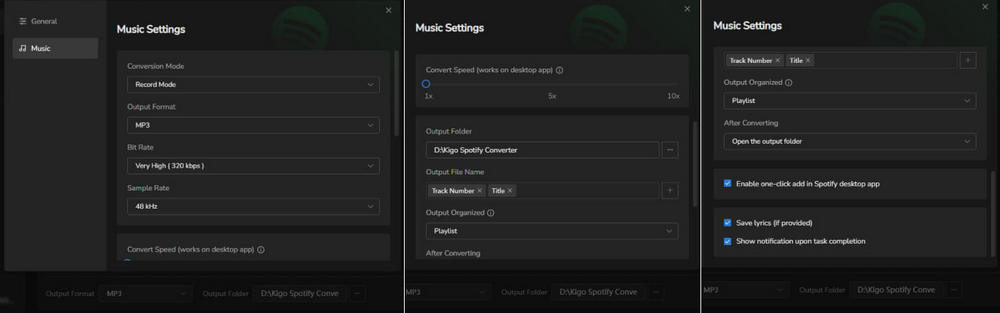
Kigo Spotify Converter settings:
- Output format: MP3
- Output audio quality: Very High 320kbps
- Sample rate: 48 kHz
- Output file name: [Track Number] [Title]
Download Speed Test
We followed the simple four-step process to convert the Spotify playlist to MP3 using Kigo Spotify Converter on a Windows laptop.

Output Test
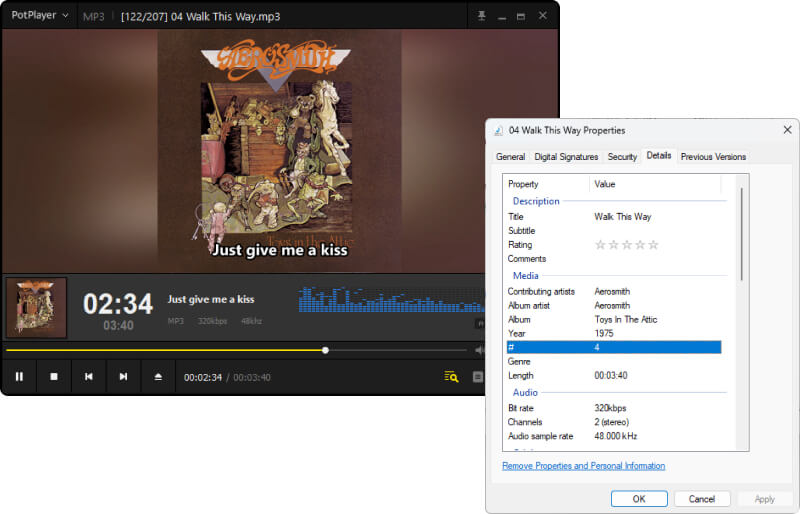
When the conversion process is completed, the destination folder would be opened automatically. If you go to History tab, you can find your download history sorted by date.

Part 6: What Makes Kigo Spotify Converter Stand Out?
➡️ Lossless Audio Preservation: One of Kigo's Biggest Advantages
For many users, conversion speed is important, but audio quality matters even more. One area where Kigo Spotify Converter stands out is its ability to preserve Spotify original audio quality during the conversion process. The software supports output formats including FLAC, WAV, AIFF, and ALAC, allowing users to retain as much audio detail as possible for offline playback. (Read how to download Spotify lossless FLAC audio-->)
This is particularly valuable for:
- Audiophiles building a local music collection
- Users listening through high-end headphones or speakers
- DJs and music professionals
- Content creators who require high-quality source audio
➡️ Large Playlist Stability: Where Kigo Spotify Converter Really Shines
Most Spotify converters perform reasonably well when downloading a handful of songs. The real challenge begins when users need to process large music libraries containing hundreds of tracks. Kigo Spotify Converter demonstrated strong stability throughout the testing process. For users who maintain large Spotify libraries, this is a significant advantage. Rather than downloading playlists in multiple smaller batches, users can process extensive collections in a single operation, saving considerable time and effort. This reflects one of the benefits of Kigo's long-term software development experience. Handling hundreds of files efficiently requires more than conversion speed alone—it requires effective resource management, queue handling, error recovery, and overall application stability.
For casual listeners, this feature may not seem important. However, for collectors, DJs, podcast listeners, and users migrating large music libraries, the ability to reliably process hundreds of songs in one batch can be a decisive advantage.
➡️ Flexible Audio Settings
Unlike many basic converters, Kigo Spotify Converter gives users more control over output quality. Users can customize: Output format, Bitrate, Sample rate, Output folder structure, File naming rules. This level of customization makes it suitable for both beginners and advanced users.
Part 7: Is Kigo Spotify Converter Worth the Price?
For users who frequently download Spotify content for offline listening, Kigo Spotify Converter provides a strong balance of performance, convenience, and flexibility.
- Spotify Premium users
- Music collectors
- Audiophiles
- DJs
- Travelers
- Podcast listeners
- Users who only stream music online
- Occasional listeners with no need for local files
- Developed by a multimedia software company with 20+ years of experience
- Preserves Spotify audio quality with support for lossless formats
- Supports MP3, AAC, WAV, FLAC, AIFF, and ALAC
- Batch convert 500+ songs at a time
- Excellent stability during large playlist downloads
- Preserves ID3 tags and album artwork
- User-friendly interface with built-in Spotify web player
- Premium software requires a paid license for full functionality
- Some advanced settings may be unnecessary for casual users
- Only works on Windows and Mac computer
Final Verdict
Kigo Spotify Converter combines a user-friendly Spotify downloading experience with the reliability of a company that has spent more than 20 years developing multimedia software. Its support for multiple audio formats, fast batch conversion, customizable settings, and metadata preservation make it a practical choice for users who want greater flexibility than Spotify's built-in offline mode can provide.
If you're looking for a reliable Spotify converter to build your offline music library, Kigo Spotify Converter is well worth trying. The free trial lets you explore its features, test the conversion quality, and experience its performance firsthand before deciding whether it's the right solution for your needs.