
How to Choose the Best Spotify to MP3 Converter? Comparison & 5 Questions
Trying to convert Spotify songs to MP3? Explore our real-world testing and detailed comparison of the leading tools to find the Spotify to MP3 Converter that best fits your needs.
Spotify allows Premium users to download music for offline listening, but it doesn't provide an option to save songs as MP3 files.
That's where a Spotify to MP3 converter comes in. Whether you want to play Spotify music on any device, keep your favorite songs permanently, or enjoy offline listening without app restrictions, a reliable Spotify to MP3 converter can help.
With so many tools available, choosing the right one can be challenging. Which Spotify to MP3 converter offers the best audio quality? Which is the safest and most stable? And which one fits your budget and needs? In this guide, we'll explore three major types of Spotify to MP3 converters, backed by real testing and practical insights. We'll compare them based on safety, audio quality, ease of use, stability, pricing, and real-world usage scenarios, helping you find the best Spotify to MP3 converter for your needs.
Part 1. Three Types of Spotify to MP3 Converters
There are more than 50 Spotify to MP3 Converters available online, but they can generally be grouped into three types. Knowing the differences between them is essential, as each offers a unique way to download Spotify music to MP3. These differences directly affect safety, audio quality, ease of use, stability, and your overall offline listening experience.
➡️ Online Spotify to MP3 Converter
An online Spotify to MP3 Converter is a web-based tool that converts Spotify music to MP3. It allows you to complete the conversion directly in a browser over the internet. It is sometimes also called a Spotify link to MP3 Converter because it requires you to copy and paste a Spotify track link to start the conversion process. The main advantage of an online Spotify MP3 converter is its convenience.
| Online Spotify to MP3 Converter | Performance |
|---|---|
| Working environment | Windows, Mac, Android, iOS device with a browser |
| Price | Mostly free, but some asks for upgrading to premium plan to unlock full album downloads. |
| Audio quality | Varies from 128kbps to 320kbps |
| Safety | Floating ads and redirections happen |
- Free to use.
- Works on computer, tablet, and mobile devices.
- Easily convert Spotify to MP3 without installing any app.
- Intrusive ads may appear while using the website.
- Possible redirects or misleading download buttons during the working process.
- No customizable options for output files.
- Limited metadata preservation.
- Basic audio quality, typically 128 kbps.
There are many online Spotify to MP3 converters available, including popular tools such as Spotdown, SpotiDownloader, and SpotiSongDL (see a list of free online Spotify playlist downloaders). However, users should be cautious when using these free services. Although they require no payment, they are typically ad-supported and may expose users to intrusive pop-ups, frequent redirects, and potential privacy or security risks. In some cases, these platforms may also include hidden tracking or unsafe download behaviors, as they rely heavily on advertising revenue to operate.
How to convert Spotify to MP3 with online Spotify to MP3 Converter?
Here we take SpotiDownloader as an example to show you how to free download Spotify songs to MP3.
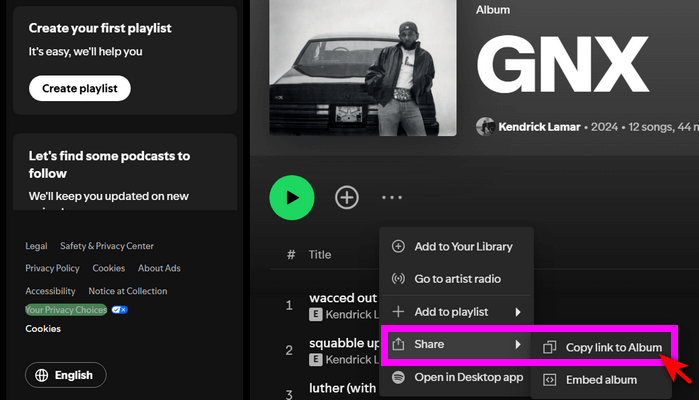
- Step 1 Open Spotify app or web player, find the Spotify track/album/playlist you'd like to download, then click three dots > Share > Copy link to Album.
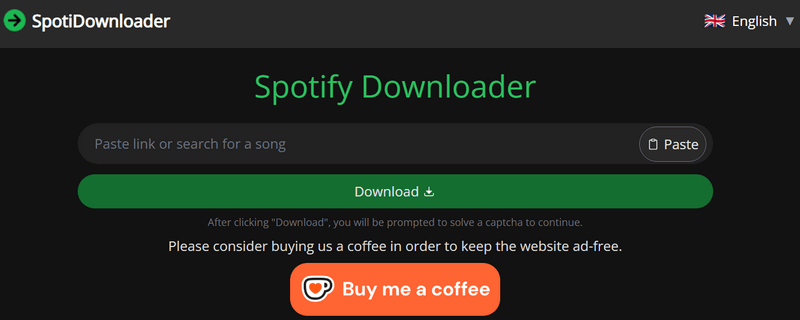
- Step 2 Visit SpotiDownloader website on your device. 🔗Link: https://spotidownloader.com/en16
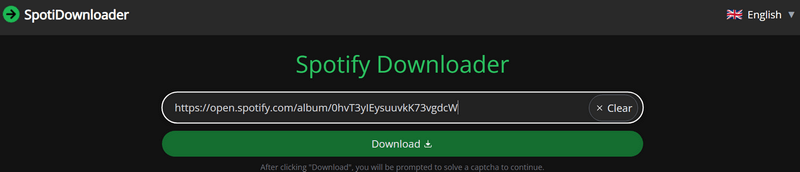
- Step 3 Paste the Spotify link to the input filed on the website.
- Step 4 Click Download button, the server will search and display the available tracks for you to confirm. Click Download MP3 to start converting Spotify song to MP3 automatically. During the process, you may be led to redirection site, just close the unnecessary tabs.
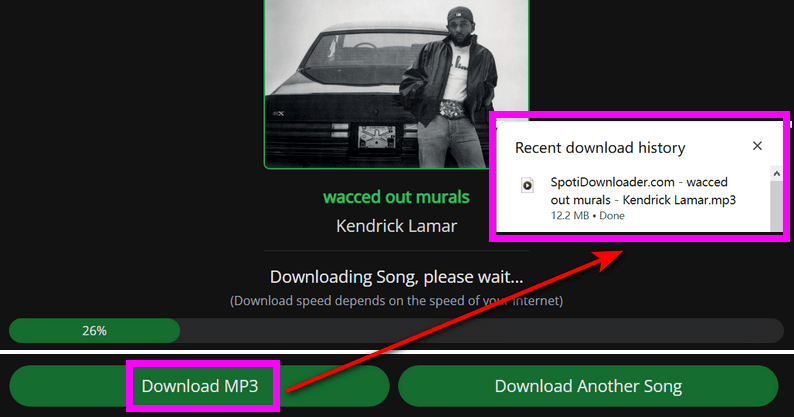
Although each online Spotify to MP3 converter website has a different interface and design, the working method and steps are largely the same. It should be easy to download MP3 files from Spotify songs using these online tools.
Editor's note:
For safety reasons, it is recommended to install an ad blocker in your browser and use antivirus software on your device when using online Spotify link to MP3 converter free. This helps reduce the risk of malware or Trojan infections and provides a safer environment for converting Spotify to MP3 online. At the same time, these services often rely heavily on server availability and may be shut down due to DMCA notices. Users should also carefully verify the website domain and avoid accessing unknown or untrusted sources.
➡️ Spotify to MP3 Converter Application
A Spotify to MP3 converter application is a desktop program that requires installation on your computer. There are more than 10 such tools on the market, often named Spotify Music Converter, Spotify Audio Recorder, or Spotify to MP3 Downloader. Popular brands include Sidify, Kigo, NoteBurner, AudiCable and more. Compared to online tools, these applications generally appear more professional, offer greater stability, and come with more advanced features that enhance the overall music downloading and listening experience.
| Spotify to MP3 Converter Application | Performance |
|---|---|
| Working environment | Windows, Mac |
| Price | $0 to test, but need to pay for full features |
| Audio quality | Various options, up to 320kbps, some can reach lossless audio |
| Safety |
- Supports multiple output formats such as AAC, FLAC, WAV, and more.
- Offers customizable settings for audio quality, conversion speed, and other preferences.
- Preserves high-quality Spotify audio up to 320 kbps, with some tools supporting lossless output.
- Retains ID3 tags, including lyrics in some cases.
- Safe, stable, and easy to use.
- Provides professional technical support.
- Requires a license to remove trial limitations.
- Available only on computers.
How to download Spotify to MP3 with Spotify to MP3 Converter app?
Here we take Kigo Spotify Converter as an example to show you how to convert a Spotify playlist to MP3 on Windows. Kigo Spotify Converter works on both Windows and Mac and is compatible with the latest operating systems. First, download Kigo based on your operating system, then install and launch Kigo Spotify Converter.
- Step 1 Add Spotify songs to the program
- Step 2 Customize the output settings
- Step 3 Download Spotify songs in batch
- Step 4 Go to destination folder to find downloaded Spotify songs in MP3
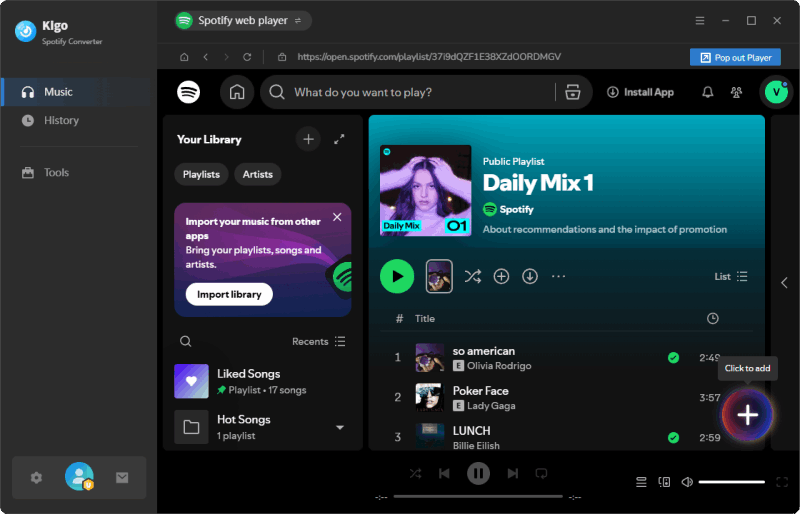
Kigo Spotify Converter offers two ways to add your desired Spotify songs for conversion. One is to copy and paste the Spotify track, album, or playlist URL into the program. The other is to search for and locate the songs you want to convert via the Spotify web player, then click "Add" to import them at once. Both methods are straightforward.
Go to Settings to customize how you want your output files to look and be organized. You can adjust everything from the output format (MP3, AAC, WAV, FLAC, AIFF, ALAC), bitrate (up to 320 kbps), and sample rate to file naming options (sort your list by title, artist, or album for easier selection). All of these settings are available at your fingertips.

Click the Convert button to start converting Spotify songs to MP3. With download speeds of up to 10×, it saves you a significant amount of time when downloading a large music library.
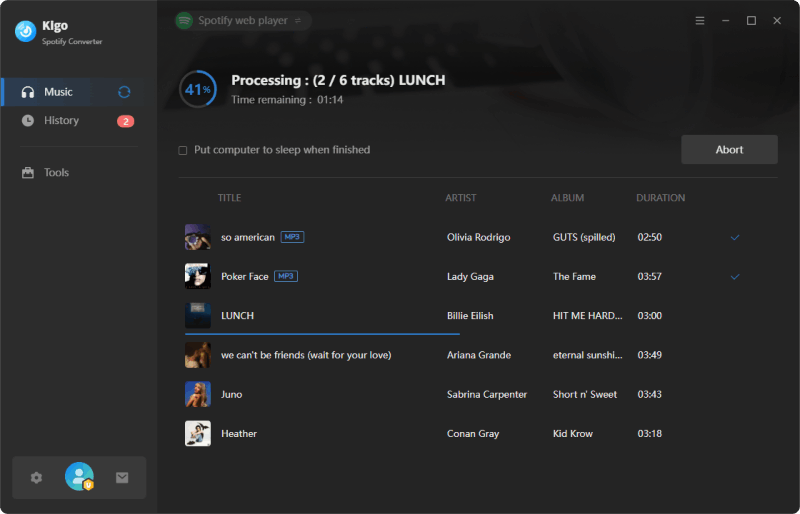
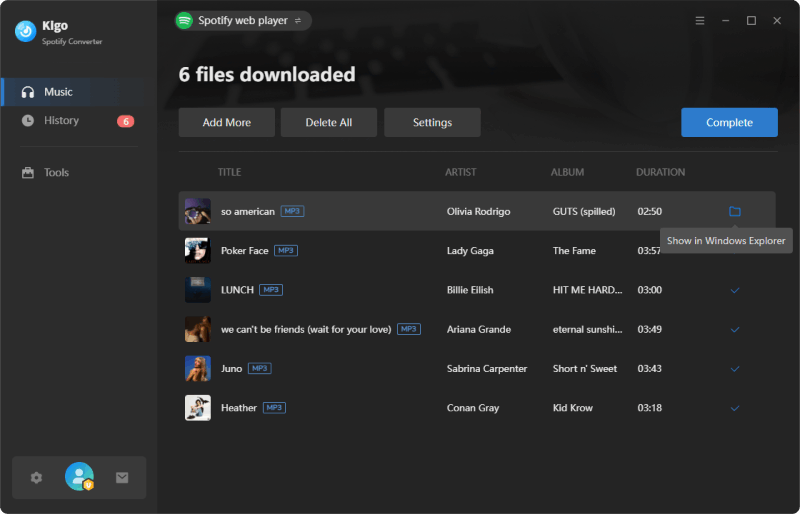
When the download progress reaches 100%, it means all Spotify songs have been successfully converted to MP3. You can go to "History" on the left to view the download list, where you can click the "Folder" icon next to each song to open the destination folder directly.
Editor's note:
Different Spotify converters may vary in performance when converting Spotify to MP3. When choosing a suitable tool, it is recommended to consider several key factors, including user interface design (ease of use), output settings (audio quality and customization options), conversion speed, and overall performance stability.
In addition to dedicated Spotify converters, there are also versatile music converters that support downloading or converting music from Spotify, such as Kigo Music One and AudiCable Audio Recorder. These tools typically work by recording or capturing audio from multiple music platforms, with Spotify being just one of the supported sources. In general, versatile music converters offer broader functionality, such as audio editing, CD burning, and format conversion, catering to users who need both streaming music downloading and local file management.
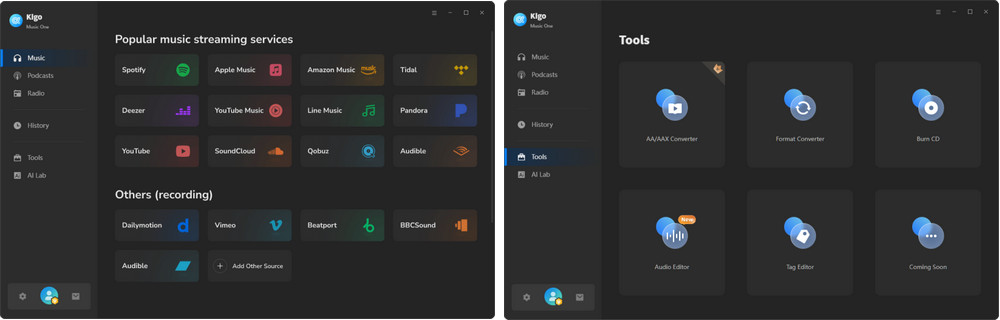
Taking Kigo Music One as an example, after launching the program, users will see a range of popular music streaming platform icons, including Spotify, Apple Music, Amazon Music, Tidal, YouTube Music, and Deezer. By selecting a platform, users are directed to the corresponding interface for music downloading or conversion. In addition to streaming content, the tool also provides access to a large collection of free podcasts and radio stations, enabling users to search, stream, and download in one place. Furthermore, it includes a built-in toolkit that allows users to convert local audio files between formats, trim tracks for background music use, edit metadata tags, and burn CDs directly.
Editor's note:
Audio recording app such as Audacity is primarily known for multi-track audio editing, it can also capture system audio when playing Spotify music on a PC. However, users should ensure the correct loopback input is selected (on Windows, choose Windows WASAPI; on Mac, use BlackHole). It is important to note that recording is performed in real time and cannot be sped up. As a result, the final recording will be completed once the song finishes playing.
➡️ Open-source Spotify to MP3 Downloader
Some developers publish Spotify-related projects on open-source platforms such as GitHub. Among the available Spotify to MP3 open-source projects, spotDL remains one of the most actively maintained options. This type of Spotify downloader offers a high degree of flexibility and control, as downloads are managed through command-line instructions. After users provide a Spotify track, album, or playlist URL, the tool searches for matching audio sources on YouTube and downloads the corresponding content. Because the audio is sourced from YouTube rather than Spotify directly, there may be cases where the downloaded version differs from the one available on Spotify in terms of release, mix, or audio quality.
| Open-source Spotify to MP3 Converter | Performance |
|---|---|
| Working environment | Windows, Mac |
| Price | Free |
| Audio quality | 128kbps ~ 256kbps |
| Safety |
- Free and open-source.
- Provides a high level of control over the download process.
- Supports batch downloading of tracks, albums, and playlists.
- The installation process can be complex for non-technical users.
- Downloads are sourced from YouTube, and audio quality may be limited to around 128 kbps. depending on the available source.
- Long-term maintenance and support are not guaranteed.
How to download music from Spotify to mp3 with command line?
Let's take spotDL for example. It's developed in Python and completely free. 🔗Link: https://github.com/spotDL/spotify-downloader
- Step 1 Install FFmpeg and spotDL.
- Step 2 Open the command line and run:
- Step 3 Download a single track:
- Step 4 Download an entire album or playlist:



Part 2. Objective Comparison Chart of Different Spotify to MP3 Converters
To help you better understand the differences between various Spotify to MP3 converters, we have compiled a comparison chart highlighting their key features and capabilities.
| Support device | Output formats | Audio Quality | Save metadata | Difficultly level | Ads? | |
|---|---|---|---|---|---|---|
| SpotiDownloader (Online) | Windows, Mac, Android, iOS device | MP3 | 128kbps | Title, Year | ⚠️Floating ads | |
| Kigo Spotify Converter (Software) | Windows, Mac | MP3, AAC, ALAC, AIFF, WAV, FLAC and MP4 | Up to 320kbps & lossless FLAC audio | Artist, Title, Album, Track Number, Year, Disc Number, Artwork, etc. | ✅Clean interface | |
| Music One (Software) | Windows, Mac | MP3, AAC, ALAC, AIFF, WAV, FLAC | 128kbps ~ 320kbps | Artist, Title, Album, Track Number, Year, Disc Number, Artwork, etc. | ✅Clean interface | |
| spotDL (Open-source) | Windows, Mac | MP3, M4A, OPUS | Up to 256kbps | Limited metadata | ✅Clean interface |
Part 3: How to Choose the Best Spotify to MP3 Converter?
The market is filled with Spotify to MP3 converters, each offering different features, advantages, and limitations. If you're having trouble deciding which one is right for you, this guide can help. Instead of comparing every tool one by one, we'll walk you through five simple questions. Based on your answers, you can quickly identify which type of Spotify song to MP3 converter best matches your needs. Each question is designed to evaluate important factors such as safety, cost, audio quality, ease of use, stability, and usage scenarios, helping you narrow down the options and choose the most suitable solution with confidence.
- If your answer is "Occasionally": – An online Spotify to MP3 downloader may be the most suitable option. These tools are typically free, require no installation, and are convenient for downloading a small number of songs when needed.
- If your answer is "Regularly": – A dedicated Spotify music converter is generally the better choice. It offers greater stability, faster download speeds, batch downloading, higher output quality, and more customization options, making it ideal for frequent use and large music libraries.
Audio quality is often measured by bitrate, expressed in kbps (kilobits per second). In general, a higher bitrate preserves more audio data and can deliver better sound quality.
- 128kbps is sufficient for casual listening and is commonly offered by many online Spotify to MP3 downloaders. However, some details may be lost, especially in complex tracks.
- 256kbps provides noticeably better audio quality and is often difficult to distinguish from the original source for most listeners.
- 320kbps is the highest standard bitrate for MP3 files and is preferred by users who want the best possible listening experience or plan to build a long-term music collection.
- If your answer is "No": – An online Spotify to MP3 downloader may be sufficient for your needs, as these tools typically provide compressed audio quality suitable for everyday listening.
- If your answer is "Yes": – A dedicated Spotify music converter is likely the better choice. These tools usually offer higher output quality options, such as 320kbps MP3, and some even support lossless formats like FLAC (For example: Kigo Spotify Converter), making them more suitable for users who prioritize audio fidelity.
If you store a large number of songs on your computer, external drive, or cloud storage, two factors become especially important: audio quality and metadata preservation. Metadata is the information attached to a music file, including details such as the song title, artist, album, track number, genre, release year, and album artwork. Accurate metadata makes it much easier to organize, search, sort, and manage a growing music library.
- If your answer is "No": – An online Spotify to MP3 downloader or an open-source tool may be sufficient, especially if you only download songs occasionally and do not need extensive library management features.
- If your answer is "Yes": – A dedicated Spotify music converter is generally the better choice. These tools typically preserve complete metadata for each track and offer higher audio quality options, helping you build and maintain a well-organized music library with minimal effort.
- If your answer is "No": – An online Spotify to MP3 downloader or a dedicated Spotify music converter is likely a better choice. These tools are generally easier to use and require little to no technical knowledge. If ease of use is an important factor, consider trying a tool before making a decision. Many dedicated Spotify converters offer free trials, while product screenshots, tutorials, and user guides can also provide a good indication of how user-friendly a tool is.
- If your answer is "Yes": – An open-source Spotify downloader may be worth considering. These tools are typically free, offer greater flexibility and control over the download process, and often support downloading entire Spotify albums and playlists. However, they may require additional setup and technical knowledge to use effectively.
- If you plan to use a work computer or a device that contains important files and personal data: – Security and reliability should be your primary considerations. While many online Spotify to MP3 downloaders are convenient, some websites may contain intrusive advertisements, misleading download buttons, redirects, or potentially harmful files. To minimize these risks, a dedicated Spotify music converter is generally the more suitable option.
- If you plan to use a personal device and only need to download Spotify songs occasionally: – An online Spotify to MP3 downloader may be sufficient for your needs. These tools are easy to access, require no installation, and can be a convenient choice for occasional downloads.
In general, users who prioritize security, stability, and long-term use may prefer a dedicated Spotify converter, while those looking for a quick and convenient solution for occasional downloads may find an online downloader adequate.
Conclusion
Throughout this article, we've compared the three most common types of Spotify to MP3 converters, including online downloaders, open-source solutions, and dedicated Spotify music converters, and explained how each one works. We've also provided five practical questions to help you evaluate your priorities and choose the Spotify to M3 converter that best fits your requirements. For most users, Kigo Spotify Converter is the overall best Spotify to MP3 converter, offering an excellent balance of audio quality, ease of use, stability, and advanced features for both everyday listening and long-term music collection.
Note: The trial version allows you to download the first 1 minute of each file. To access the full length, please unlock it with a valid license code.

Simon Durden | Editor-in-Chief
Simon Durden is the Editor-in-Chief at KigoSoft, specializing in music, video download and conversion. Before joining to KigoSoft, he served as a senior writer with the Any Video Converter Team. With extensive knowledge of music, video streaming platforms and expertise in video editing, Simon delivers high-quality content, expert tips, and in-depth tutorials in the multimedia field.