
Best Spotify IPA: Unlock Spotify Premium Features for iPhone and iPad
Are there any working Spotify IPA that I can install on my iPhone to unlock Premium? I used Spotify++, but it stopped working occasionally. Which is the best Spotify IPA MOD of 2026?
A Spotify IPA is a modified iOS app file that claims to unlock Spotify Premium features for free, such as ad-free listening, unlimited skips, and offline playback. While this sounds appealing, most Spotify IPA files are unstable, frequently revoked by Apple, or simply stop working overtime. That's why many users keep searching for updated versions or better alternatives.
In this guide, we'll break down what a Spotify IPA is, whether any working options still exist in 2026, and how to install them on your iPhone or iPad. We'll also cover the potential risks, limitations, and safer alternatives—so you can decide the best way to enjoy Spotify Premium features.
Part 1. What is Spotify IPA?
An IPA file (iOS App Store Package) is the file format used to install applications on Apple devices like iPhones and iPads—similar to APK files on Android. A Spotify IPA refers to a modified version of the official Spotify app designed for iOS devices.
With a modded Spotify IPA, users with a free Spotify account may gain access to Premium-like features such as ad-free listening, unlimited track skips, higher audio quality, and on-demand playback—without a subscription. However, these Spotify Premium IPA files are typically developed and distributed by third-party independent developers or online communities, meaning their performance can vary widely in terms of features, stability, and compatibility with different iOS versions.
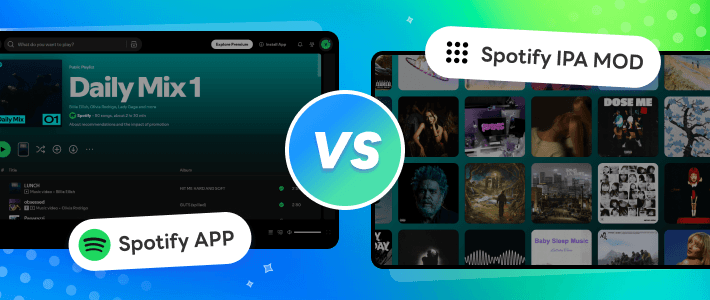
Here is a comparison between official Spotify app and Spotify IPA for iOS:
| Official Spotify App | Spotify MOD IPA | |
|---|---|---|
| Developer | Spotify Inc | Independent developers and communities |
| Download Source | App Store | Third-party sources |
| Premium Cost | $12.99/month | Free |
| Premium Feature | All | Partial (eg: some is lack of offline downloads feature.) |
| Stability | Regular updates | Unstable |
| Safety | 100% secure and safe | Uncertain, depending on source |
| Update Method | Promoted by iOS device | Manually download and install updates |
| Technical Support | ✔️ | ❌ |
Part 2. The Best Spotify Premium MODs for iOS in 2026
#1 Spotify++ IPA
| Compatibility | Price | Size | Ad-free | Unlimited Skips | Offline Playback | On-Demand Streaming |
|---|---|---|---|---|---|---|
| iOS 14 or later | Free | ~75MB | ✔️ | ✔️ | ⚠️ | ✔️ |
Spotify++ IPA is a popular modded version of Spotify for iOS that offers access to Premium-like features such as improved audio quality, unlimited skips, and an ad-free listening experience—without a subscription. This tweaked version enhances your overall streaming experience; however, it does not support downloading songs for offline listening. You can install Spotify++ IPA on your iPhone or iPad through third-party app stores like AltStore, TweakBox, TopStore, AppDB, or AppValley, without the need to jailbreak your device.
Steps to Download and Install Spotify++ IPA MOD on iOS AltStore
You can choose any third-party app store you’re familiar with to download Spotify++ on your iOS device. In this guide, we'll use AltStore—one of the most popular sideloading app stores since 2019—as an example to walk you through the detailed steps to install and use Spotify++ IPA on your iPhone.
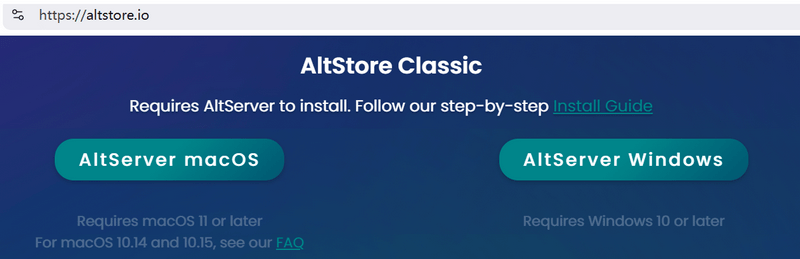
- Step 1 Go to https://altstore.io/ to download AltServer on your Windows or Mac computer.
- Step 2 Connect your iPhone to the PC and launch AltServer, then AltStore will be installed on your iPhone automatically.
- Step 3 On your iPhone, open AltStore, search for Spotify++, then select the Spotify++ IPA file to install.
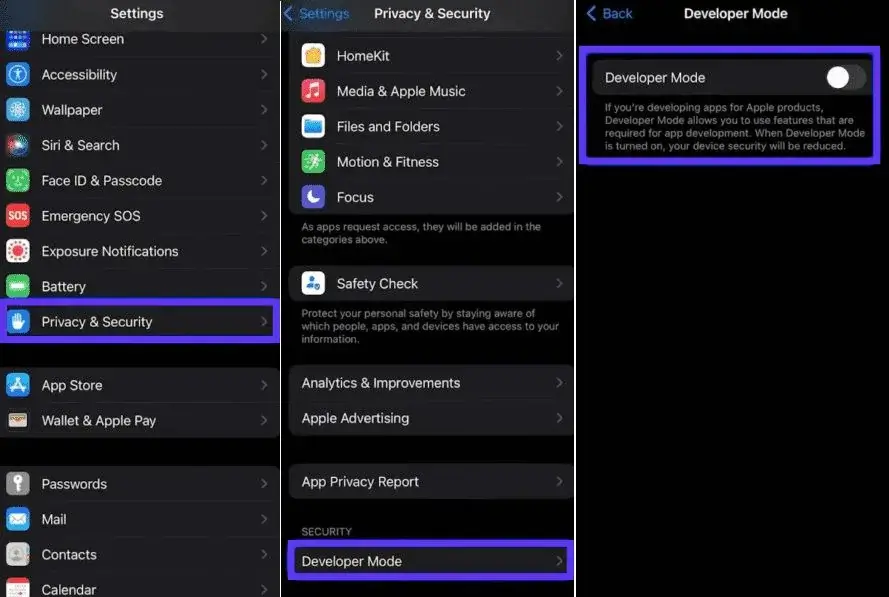
- Step 4 After Spotify++ IPA is installed successfully, go to Settings > Privacy & Security > Developer Mode, and turn it on.
- Step 5Open Spotify++, log in your Spotify free account, and enjoy Premium features!
#2 EeveSpotifyReborn
| Compatibility | Price | Size | Ad-free | Unlimited Skips | Offline Playback | On-Demand Streaming |
|---|---|---|---|---|---|---|
| iOS 14 – iOS 18 | Free | ~82.6MB | ✔️ | ✔️ | ⚠️ | ✔️ |
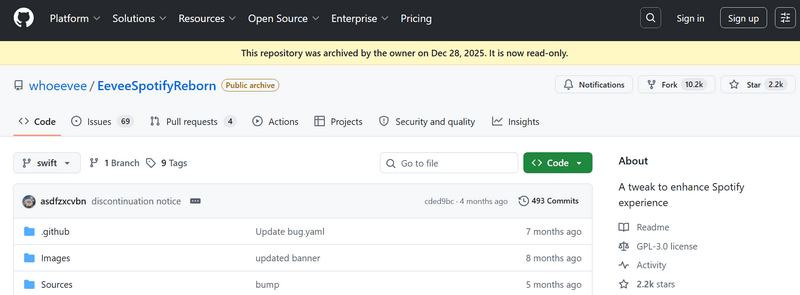
EeveeSpotify is a free, open-source project on GitHub, based on SpotilifeC. It is another popular tweak among iOS users that provides access to Spotify Premium–like features without a subscription. The original EeveeSpotify IPA was taken down due to a DMCA notice. Fortunately, a newer version—EeveeSpotifyReborn, especially version 4.0—has emerged, allowing iPhone and iPad users to access Spotify's extensive catalog of music and podcasts, enjoy ad-free listening, and play songs in any order. It also includes additional features such as custom lyrics, integrating sources like Genius, LRCLIB, Musixmatch, and PetitLyrics to deliver time-synced lyrics and enhance the overall listening experience.
How does EeveeSpotifyReborn IPA work?
The only reliable source for downloading EeveeSpotify Premium IPA is GitHub. However, ready-to-download IPA packages are not provided, likely due to previous takedown issues. Don't worry—you can still build the EeveeSpotify IPA manually using GitHub Actions. Once the build is complete, download the IPA file from the Releases section of your forked repo. Then, follow the guide below to install this Spotify Premium MOD IPA on your iPhone or iPad.
- Step 1 Install a secure third-party sideloading app like Sideloadly, AltStore, TrollStore on your Windows or Mac computer.
- Step 2 Connect your iOS device via USB, drag the EeveeSpotify IPA file into Sideloadly, and install it.
- Step 3 On your iPhone/iPad, go to Settings > General > VPN & Device Management, find your Apple ID profile, and tap Trust.
- Step 4 Open EeveeSpotify, log in with your Spotify account. Now you are granted to access Spotify Premium features now!
Part 3: Safe Alternatives to Spotify MOD IPA to Get Full Spotify Premium Features
Installing a Spotify IPA may seem like a free and convenient way for iOS users to access Spotify Premium features. However, it often comes with ongoing challenges—you need to carefully choose safe sources, manually install updates, and constantly look for new working versions when one gets revoked. These risks not only affect usability but may also compromise your device's security and system stability. Fortunately, there's a better solution. A Spotify music downloader serves as a safer and more reliable alternative to Spotify IPA, allowing you to enjoy Premium-like features without the hassle of sideloading or security concerns.
Kigo Spotify Converter is a top-rated Spotify music downloader and one of the best Spotify IPA alternatives. It requires no jailbreaking, no sideloading apps, and no complicated setup on your iPhone or iPad. Available on both Windows and Mac, it enables you to download Spotify songs, albums, playlists, podcasts, and audiobooks as high-quality MP3, AAC, FLAC, WAV, AIFF, or ALAC files. Once downloaded, you can transfer the Spotify music to your iOS or Android devices, MP3 players, or other devices for offline playback—enjoying ad-free listening and full control over your music. With its intuitive interface and advanced settings, Kigo Spotify Converter is suitable for both beginners and experienced users. Follow the guide below to download Spotify music as MP3 and listen offline without restrictions.

Key Features of Kigo Spotify Converter
- Download Spotify track, album, playlist, podcast, radio, audiobook.
- Convert Spotify music to MP3, AAC, FLAC, AIFF, WAV, or ALAC audio.
- Keep 100% original audio quality; preserve ID3 tags, lyrics.
- Enjoy up to 10× faster conversion speeds with batch downloads.
- Burn Spotify music to CD or export to iTunes with one click.
- Enable offline listening for both Spotify Free and Premium users.
- Activate the permanent playback of Spotify music.
Windows 11/10/8 Free Download
macOS 11 or later
- Step 1 Launch Kigo Spotify Converter
- Step 2 Add Spotify songs to download queue
- Step 3 Adjust output settings
- Step 4 Start download Spotify music
- Step 5 Find downloaded Spotify music and transfer to iPhone/iPad
Click the Download button above to download the application on your Windows or Mac computer, depending on your operation system. The program is of small size, around 8MB, the whole installation wizard is clear and fast. After installation, launch Kigo Spotify Converter.
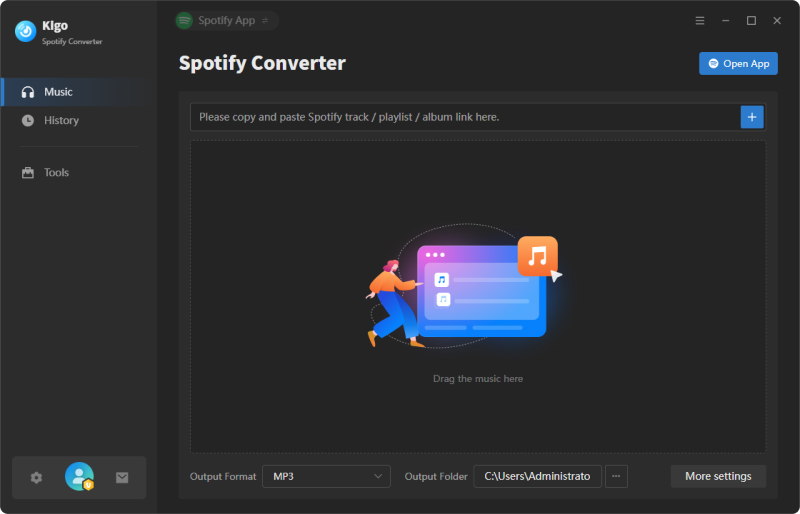
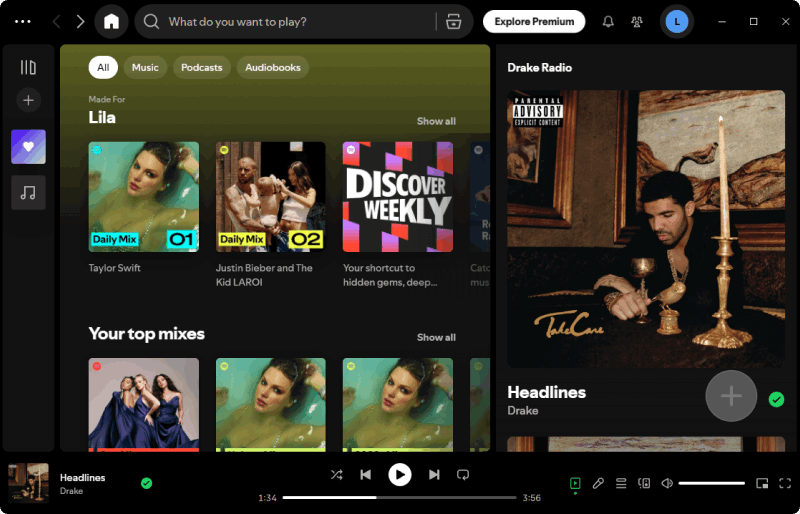
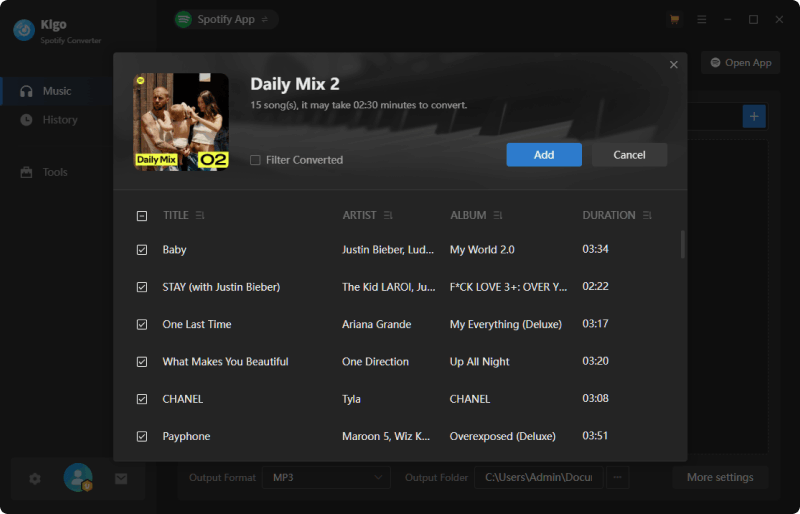
In the Spotify app, open the track, album or playlist you want to download. Click the "Click to add" button to load the tracks into Kigo. You can continue adding more tracks or deleting any track you don’t want in this Add panel. Click Add button to confirm the selection, the program will import them to download queue.
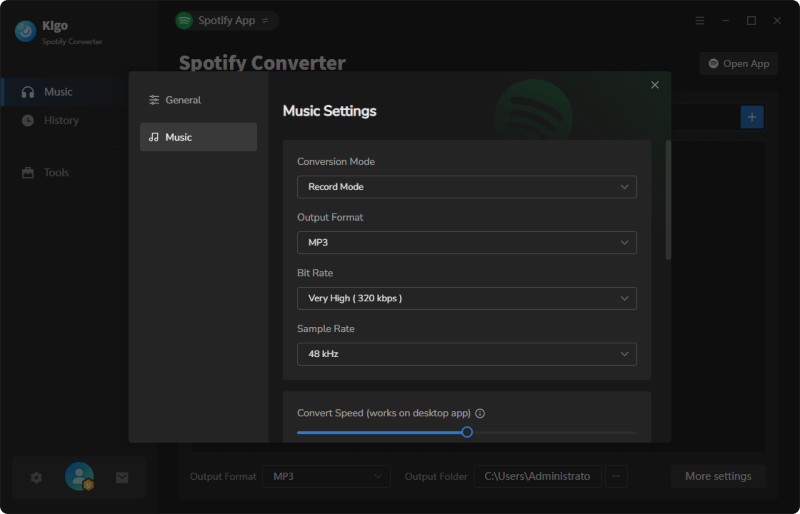
Go to Settings to customize the output settings like output format (MP3, AAC, WAV, FLAC, ALAC, AIFF), conversion mode (3 flexible options), bit rate (up to 320kbps), sample rate, output folder. Kigo also allows you to change the file names, and file organization for easier management.
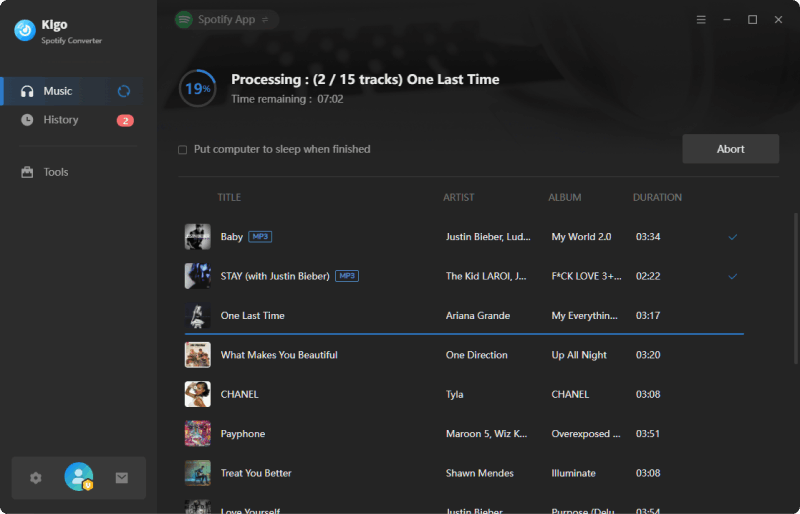
Click "Convert" to start downloading your Spotify tracks. Kigo Spotify Converter supports up to 10x download speed and batch conversion, meaning you can get the downloaded songs from Spotify in less time.
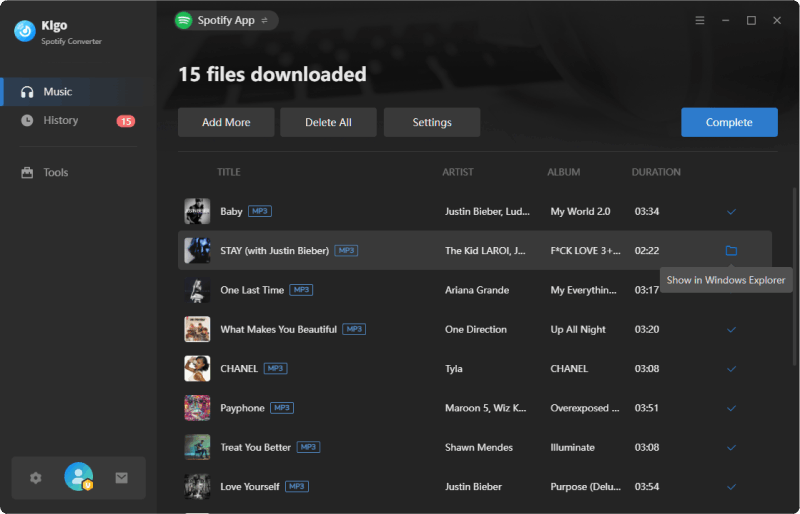
Once the download is complete, click the "History" tab to view all your downloaded songs. You can go to the destination folder directly by clicking the "Folder" icon when you hover to any converted song. Now, you can use the lightning cable or AirDrop for wireless transfer to your iPhone or iPad.
FAQs about Spotify Premium IPA
❓ Is it safe to use Spotify IPA on iOS?
Spotify IPA files are not available on the Apple App Store, which means they must be downloaded and installed through third-party sideloading tools. As a result, their safety largely depends on the source you choose. Because these modded apps alter Spotify’s code to unlock Premium features, they can introduce several risks. For example, they may request additional permissions on your iPhone or iPad, potentially exposing your personal data to misuse or causing compatibility issues with iOS updates. In short, Spotify IPA files come with potential security, privacy, and stability risks. You should carefully evaluate these factors before installing any modded IPA from unofficial sources.
❓ Why is my Spotify IPA not working?
Spotify Premium IPA may stop working for several reasons:
- Revoked by Apple – Apple frequently revokes sideloaded apps, causing them to stop opening.
- Compatibility issues – The IPA may not support your iOS version or the latest Spotify updates.
- Detection by Spotify – Spotify actively detects and blocks modded apps, which can break functionality or even risk account restrictions.
- No ongoing updates – Developers may stop maintaining the IPA, leaving it outdated and unusable.
For example, Spotilife—a once popular Spotify tweak—has not worked properly with newer Spotify versions since early 2024.
❓ What should I do if the Spotify IPA MOD does not work?
If your Spotify Premium IPA is not working, first check whether a newer version is available. If so, download and install the update manually using your sideloading tool. If the issue persists, consider trying another Spotify IPA MOD from a trusted source. Options like Spotify++ and EeveeSpotify are among the working Spotify IPA choices in 2026. Alternatively, you can switch to a more reliable solution like a Spotify IPA alternative. Tools such as Kigo Spotify Converter offer a safer and more stable way to access Spotify Premium features without the risks of revoked or unstable IPA files.
❓ Apart from Spotify Premium IPA, how can I get Spotify Premium for free?
There are currently two easy ways to access Spotify Premium–like features without using a Spotify IPA on iOS. The most direct option is to take advantage of Spotify's official free trial. By joining promotions offered by Spotify or its partners, you may get up to 6 months of Spotify Premium for free—so it's worth checking for any available campaigns. Another option is to use a Spotify music downloader like Kigo Spotify Converter. This tool allows you to download and convert Spotify songs for high-quality, ad-free offline listening without requiring a Premium subscription.
Conclusion
In this article, we introduced what Spotify IPA is and explored working Spotify Premium IPA options for iOS. However, while Spotify IPA may seem like a shortcut to unlock Premium features, it often comes with instability, security risks, and ongoing maintenance issues. Instead of dealing with revoked apps and compatibility issues, a Spotify IPA alternative is the smarter choice. With Kigo Spotify Converter, you can download and keep your favorite Spotify songs in high quality, enjoy ad-free offline playback, and play them on any device—without relying on modded apps. It's a safer, more stable, and hassle-free solution.
Note: The trial version allows you to download the first 1 minute of each file. To access the full length, please unlock it with a valid license code.

Simon Durden | Editor-in-Chief
Simon Durden is the Editor-in-Chief at KigoSoft, specializing in music, video download and conversion. Before joining to KigoSoft, he served as a senior writer with the Any Video Converter Team. With extensive knowledge of music, video streaming platforms and expertise in video editing, Simon delivers high-quality content, expert tips, and in-depth tutorials in the multimedia field.