
Spotify Wrapped 2025: 11 Things You Need to Know
Since November, there have been many discussions and polls predicting Spotify Wrapped 2025's top lists. And now Spotify Wrapped 2025 has arrived!
Spotify Wrapped is a feature that many users eagerly anticipate every year-end. Are you excited to discover your personal Spotify Wrapped 2025? Who will be your most-streamed artist? Wondering how to download your Spotify Wrapped? What is your listening age? Here are 11 important things you need to know about the 2025 Spotify Wrapped round-up, including the release date, counting period and useful tips to get the most from your year-in-music recap.
Contents
- Part 1. What is Spotify Wrapped?
- Part 2. Who can Get Spotify Wrapped?
- Part 3. When does Spotify Wrapped 2025 Come Out?
- Part 4. When does Spotify Stop Collecting Data for Wrapped?
- Part 5. Where to Find Spotify Wrapped 2025?
- Part 6. Where to Find Your Personal Spotify Wrapped in 2025? 🔥
- Part 7. What is the New Feature of Spotify Wrapped 2025?
- Part 8. Can you See Your Previous Spotify Wrapped?
- Part 9. How to Share Your Spotify Wrapped?
- Part 10. How to Download Spotify Wrapped to MP3?
- Part 11. Trouble Shooting: Spotify Wrapped 2025 does not show up, how to fix?
Part 1. What is Spotify Wrapped?
Launched in 2016, Spotify wrapped is an annual campaign that summarize your listening habits of the year into vivid, colorful, sharable graphics. In Spotify wrapped, you will see your five most-played artists, songs, genres and podcasts, as well as a playlist of your 100 most-streamed tracks and some fun facts.
Part 2. Who can Get Spotify Wrapped?
To make sure you get your Wrapped, all you need is a Spotify account and a few hours with the songs and podcasts you love. It is not an exclusive feature for Spotify premium subscribers-free users who have spent time listening on Spotify can also get their Spotify Wrapped.
| Available for | Spotify Premium User ✔️ | Spotify Free User ✔️ |
|---|
Part 3. When does Spotify Wrapped 2025 Come Out?
That's December 3, 2025. The exact release date of Spotify wrapped is always a mystery as Spotify does not announce the round-up date in advance. But there is a hint - Spotify Wrapped 2025 page goes live, asking you to download the latest version of Spotify app. After several days of waiting, it finally came out on December 3.
Here is the release date of Spotify wrapped since 2020:
| Release date | |
| Spotify Wrapped 2025 | Dec 3 |
| Spotify Wrapped 2024 | Dec 4 |
| Spotify Wrapped 2023 | Nov 30 |
| Spotify Wrapped 2022 | Nov 30 |
| Spotify Wrapped 2021 | Dec 1 |
| Spotify Wrapped 2020 | Dec 1 |
Part 4. When does Spotify Stop Collecting Data for Wrapped?
The Spotify wrapped reflects your listening habit of the year. It starts from January, but it is not counting data from Jan 1 to Dec 30. As Spotify wrapped usually released in November or December, so Spotify stops tracking for wrapped prior to the launch. In 2024, Spotify cutted the deadline for 2024 Wrapped to November 20. And it is hopefuly that Spotify may stop collecting data for wrapped in the middle of November of 2025.
Part 5.Where to Find Spotify Wrapped 2025? 🔥
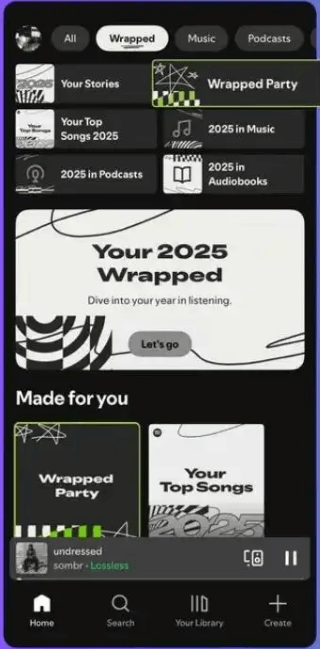
Once Spotify Wrapped come out, it is time to check it out. Make sure that you update Spotify app to the latest version. Then open Spotify on your mobile device or desktop, you can see big banner for Wrapped 2025. Don't know how to find it? Follow our detailed guide below:
Find Spotify Wrapped on iOS, Android device or desktop:
- Step 1 Download the latest version of Spotify app, log in with your account.
- Step 2 Click the "Wrapped" feed on the top of the home screen.
Part 6. Where to Find Your Personal Spotify Wrapped in 2025?
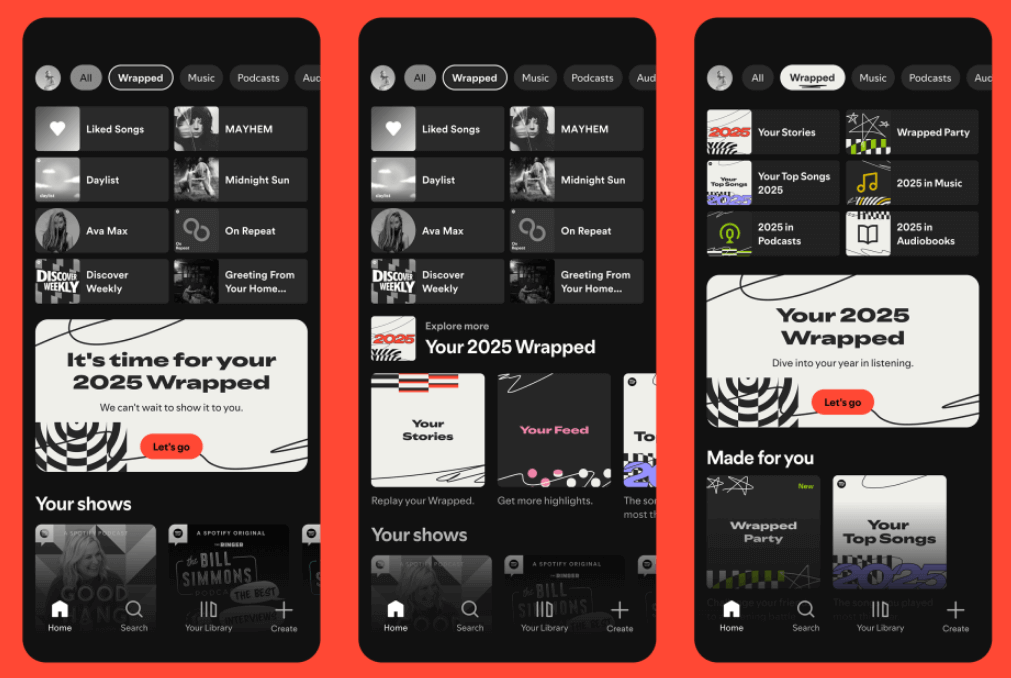
Everyone has their own unique listening taste. Your listening highlights will differ from others. The section above explains how to find Spotify Wrapped 2025, but where to get a deeper look into your listening with a recap?
Spotify creates a truly personalized experience for the millions of listeners around the world. It is easy to find your personal Spotify Wrapped 2025. Just follow the steps outlined above and click on “Your Wrapped.” Let's go!
Part 7. What is the New Feature of Spotify Wrapped 2025?
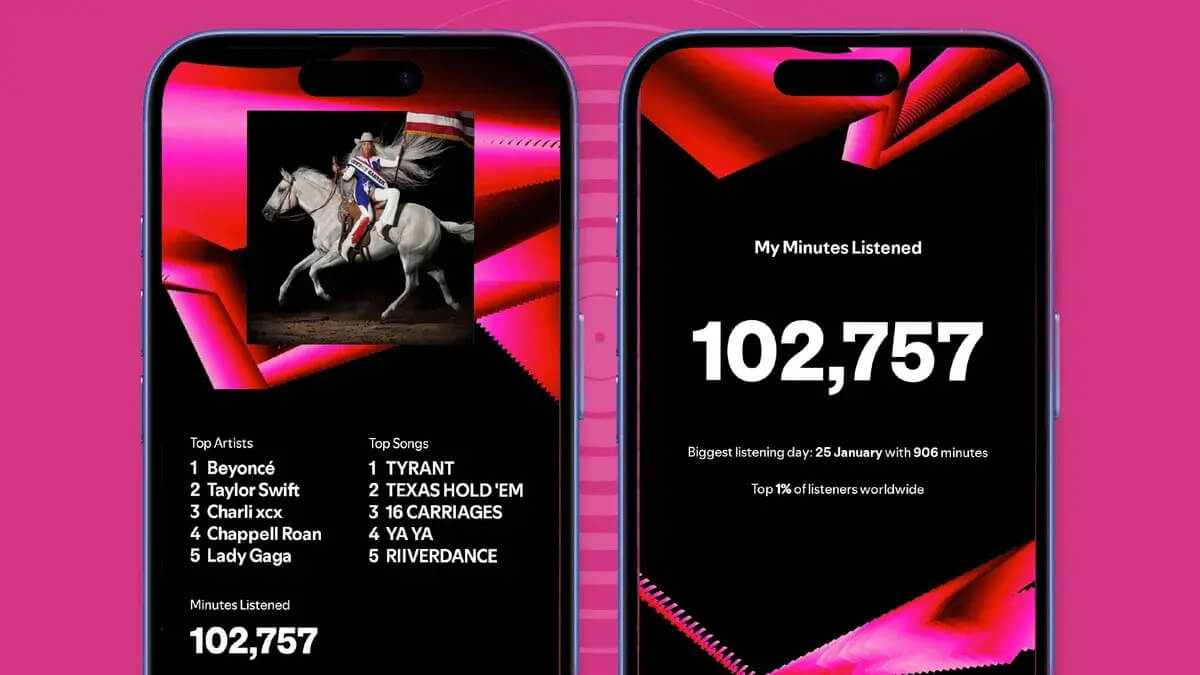
Along with a bundle of shareable stats that break down the most-listened artists, songs and podcasts for million users, Spotify has new features to make your recap even more personal and fun this year. It includes:
- Listening Age, Clubs, Archives, and Wrapped Party: Pit your listening data against your friends and compares your listening habits.
- Fan Leaderboard: Where you rank among a particular artist'a top fans based on your total minutes listened.
- Design upgrade : Wrapped 2025 revamped its classic features with Top Song Quiz and Top Artist Sprint.
The elements of fun makes Spotify Wrapped more interesting than competitors like Apple Music Reply, YouTube Music’s annual Recap breakdowns. Are you satisfied with these new features in Spotify's annual recap of 2025?
Part 8. Can you See Your Previous Spotify Wrapped?
Sorry, no. Spotify Wrapped only exists for a limited time in the current year. For example, you can't view Spotify Wrapped 2024 on Spotify. Some user may try to access the previous Spotify wrapped through the link, but it is a pity that the link would be invalid as well.
Part 9. How to Share Your Spotify Wrapped?
Spotify Wrapped is displayed through a series of shareable infographics, encouraging you to share them on social platforms. After browsing your Spotify Wrapped story, you’ll see several slides with your top 5 artists, songs, playtime, genre and more. By clicking the "Share" button on the screen, you can share your Spotify Wrapped on social platforms such as WhatsApp, Instagram, X, Facebook, and more.
Part 10. How to Download Spotify Wrapped to MP3?
Spotify Wrapped reveals your listening highlights of the year, but it's only available for a limited time on Spotify. To get your top songs, artists, genre and podcasts you love of the year forever, the best way is to download Spotify Wrapped to MP3. What you need is Kigo Spotify Converter, a professional yet easy-to-use Spotify song downloader that supports converting Spotify music to MP3, AAC, FLAC and other popular formats with 10x fast download speed.

Key Features of Kigo Spotify Converter
- Download Spotify track, album, playlist, podcast, radio, audiobook.
- Convert Spotify music to MP3, AAC, FLAC, AIFF, WAV, or ALAC audio.
- Keep 100% original audio quality; preserve ID3 tags, lyrics.
- Enjoy up to 10× faster conversion speeds with batch downloads.
- Burn Spotify music to CD or export to iTunes with one click.
- Enable offline listening for both Spotify Free and Premium users.
- Activate the permanent playback of Spotify music.
Windows 11/10/8 Free Download
macOS 11 or later
Let's learn how to use Kigo Spotify Converter to download your 2025 top Spotify songs to MP3s, so you can enjoy your favorite tracks or playlists without any restrictions.
- Step 1 Choose Spotify download source on the main screen
- Step 2 Go to Settings to set output format, quality and so on
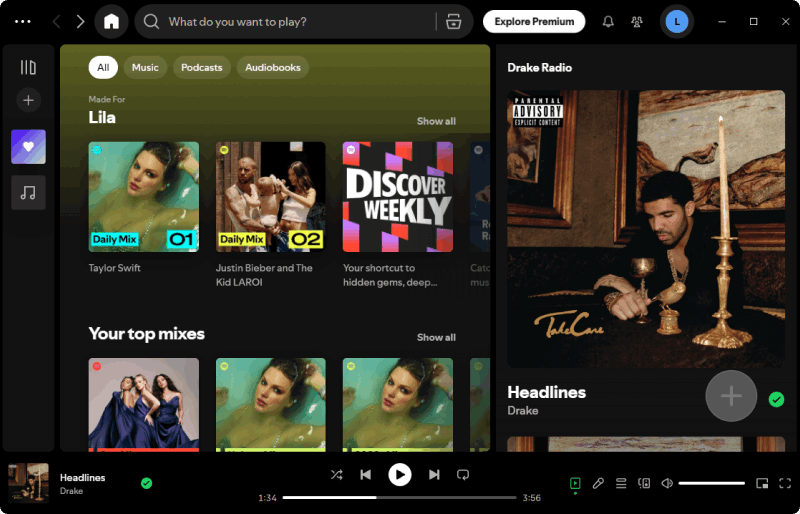
- Step 3 Add Spotify Wrapped songs to Kigo Spotify Converter
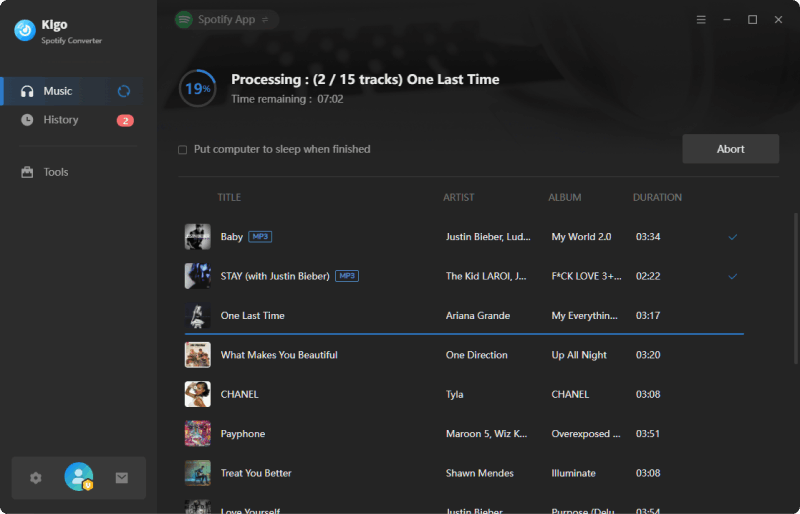
- Step 4 Converting Spotify Wrapped to MP3
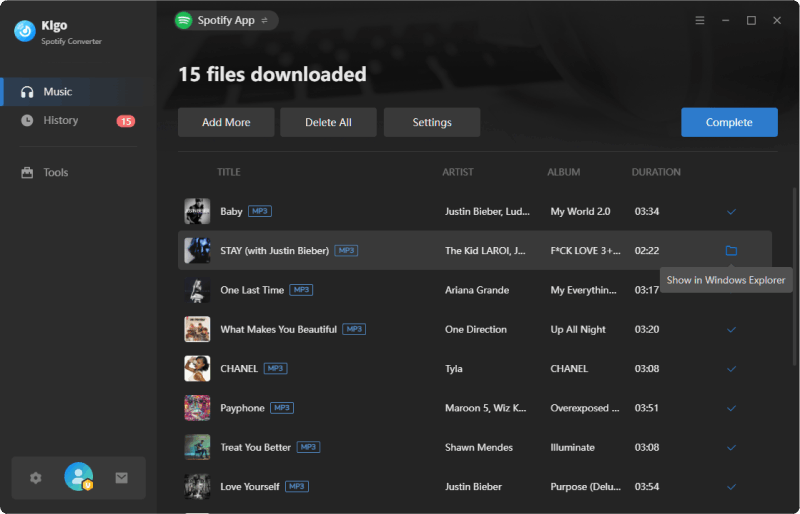
- Step 5 Find downloaded Spotify Wrapped
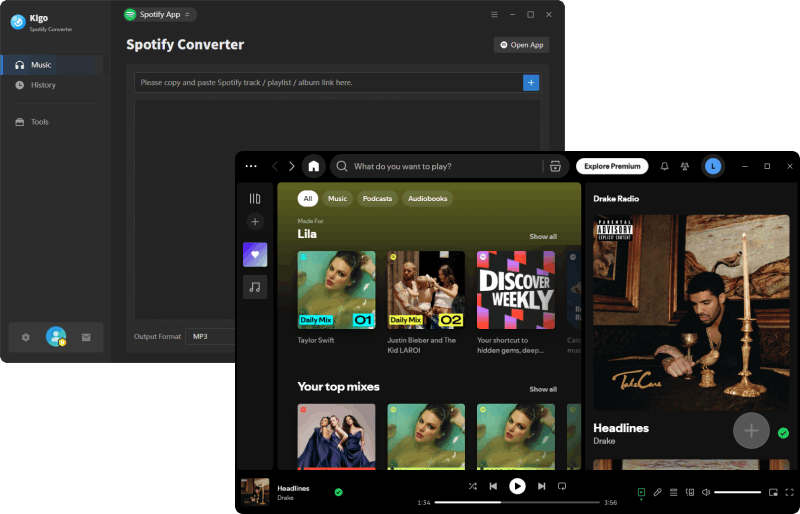
The available output formats include: MP3, AAC, WAV, FLAC, AIFF, ALAC. You can set output quality from 128kbps to 320kbps according to your needs.
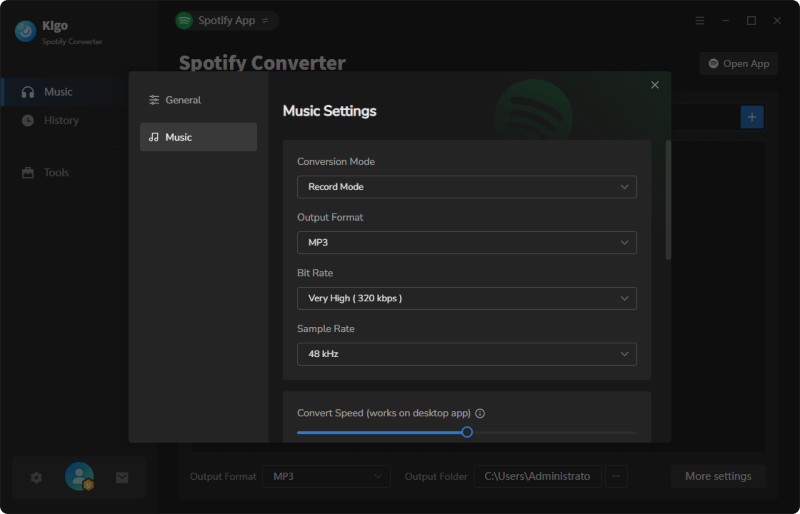
To play your Spotify Wrapped songs on any of your device with high quality, we suggest you choose MP3 as output format and set the bit rate as Very high (320kbps).
Copy and paste the Spotify Wrapped playlist URL to Kigo Spotify Converter. The program will recognize and display the songs on the screen, allowing you to select the ones you'd like to download.
Click Convert button to start converting your selected Spotify Wrapped into high quality MP3. As the program supports 10x download speed, you won’t have to wait long to get your converted Spotify Wrapped tracks.
Go to Converted tab on the left, you can find the downloaded MP3 versions of Spotify Wrapped. Clicking the folder icon next to the song will take you to the destination folder of the converted file on the computer.
Part 11. Trouble Shooting: Spotify Wrapped 2025 does not show up, how to fix?
When Spotify Wrapped 2025 is live, users can access the wrapped from the Spotify homepage directly. But if your Spotify Wrapped 2025 is not working, try these methods to resolve the issue.
1) Make sure that you have installed the latest version of Spotify app. If not, go to App Store or Google Play to download it.
2) If you have your Spotify with the latest version and your Spotify Wrapped still does not show up, you can click Search tab on the bottom of the app, then type "wrapped" in the search bar to get the search result directly.
3) To access Spotify Wrapped, you can also visit https://www.spotify.com/us/wrapped/ to find it directly.
Conclusion
We've shared everything we know about Spotify Wrapped 2025, including when it will be released, when data collection ends, how to access and download your Wrapped, and more. We can't wait to see your top songs, artists, and genres of the year—don’t forget to download your Spotify Wrapped as MP3! This way, you can enjoy your favorite tracks on any MP3 player. Kigo Music One is the perfect tool to help you do that.
Note: The trial version allows you to download only the first minutes of each file. To access the full length, please unlock it with a valid license code.

Simon Durden | Editor-in-Chief
Simon Durden is the Editor-in-Chief at KigoSoft, specializing in music, video download and conversion. Before joining to KigoSoft, he served as a senior writer with the Any Video Converter Team. With extensive knowledge of music, video streaming platforms and expertise in video editing, Simon delivers high-quality content, expert tips, and in-depth tutorials in the multimedia field.