
Kigo Music One Review 2026: A Reliable Streaming Music Downloader
I love listening to my favorite songs on Spotify, Apple Music, but I prefer downloading them as MP3 so I can listen to them offline and enjoy them on the go. Is there a robust downloader that can help?
Kigo Music One is the answer. It is designed to download songs, audiobooks, podcasts, and radio from popular streaming services such as Spotify, Amazon Music, TIDAL, Apple Music, and more. It then converts them to MP3, AAC, FLAC, and other formats while preserving the original audio quality and full ID3 tags. Do you want to enjoy your favorite music offline on any device? Read this Kigo Music One review and follow our real-world testing to see whether it meets your needs for a reliable music downloader for everyday use.
Part 1. What is Kigo Music One?
Kigo Music One is developed for music enthusiasts who want to enjoy their favorite streaming music offline without the usual platform restrictions. It is an all-in-one streaming music downloader which supports downloading any track, album, playlist, audiobook, podcast from top platforms, including Spotify, Apple Music, Amazon Music, Tidal, Deezer, YouTube Music, SoundCloud, Pandora Music, Qobuz, Audible, Beatport, BBC Sounds, Bandcam and more.
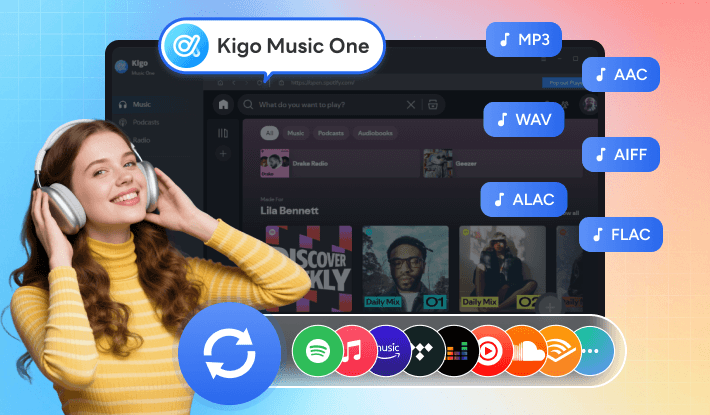
Beyond downloading, Kigo Music One also works as a professional music converter. It can convert streaming music to MP3, AAC, WAV, FLAC, AIFF, and ALAC, giving you the flexibility to balance audio quality and file size. It also includes several practical tools, such as an audio format converter, tag editor, CD burner, and AI vocal separator, making it easy to convert, organize, edit, and manage your local music collection in one place.
Backed by KigoSoft's more than 20 years of experience in multimedia software development, Kigo Music One represents KigoSoft's latest achievement in streaming music downloading, helping users save music from multiple streaming platforms with ease. Alongside Kigo Movie One for video downloads, KigoSoft continues to offer dedicated downloaders, such as Spotify Music Converter, Netflix Video Downloader, and Amazon Prime Video Downloader, giving users the flexibility to choose either an all-in-one solution or a platform-specific tool based on their needs.
Part 2. How to Use Kigo Music One? (Real Testing)
Kigo Music One is available for both Windows and macOS, so you can use it on either Windows PC or Mac. To show you how it works, we used Spotify as an example to test the download workflow, conversion speed, output quality, and overall user experience. Before getting started, download Kigo Music One from KigoSoft's official download center. The installer is around 10 MB, making it quick and easy to install.
Note: Spotify free user can use Kigo Music One to download songs from Spotify too. (Check these 4 ways to get Spotify Premium for free ->)
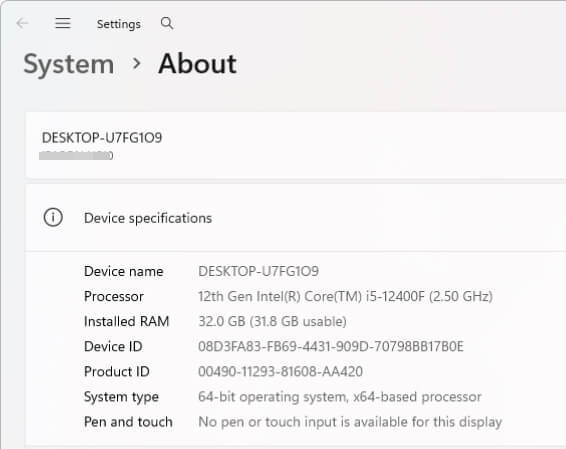
Test Environment:
| Item | Details |
|---|---|
| Software Version | Kigo Music One V2.6.2 |
| Operating System | Windows 11 Pro |
| CPU | 12th Gen Intel(R) Core(TM) i5-12400F (2.5 GHz) |
| RAM | 32.0 GB |
| Network | 5GHz Wi-Fi home network |
| Streaming Platform | Spotify |
| Test album link | https://open.spotify.com/playlist/37i9dQZF1DX1gRalH1mWrP |
| Test Songs | 6 songs, 00:18:09 duration time |
| Subscription Plan | Spotify Premium |
Editor's note:
To ensure a smooth and hassle-free experience, the process of downloading songs from different music streaming platforms is almost identical. Thanks to its thoughtful design, all music settings are clearly organized and easy to customize. No learning curve is required before getting started, making it user-friendly for beginners and experienced users alike.
- Step 1 Launch Kigo Music One and Choose Spotify
- Step 2 Adjust output settings
- Step 3 Add the Spotify songs to Kigo Music One
- Step 4 Start downloading Spotify music on the computer
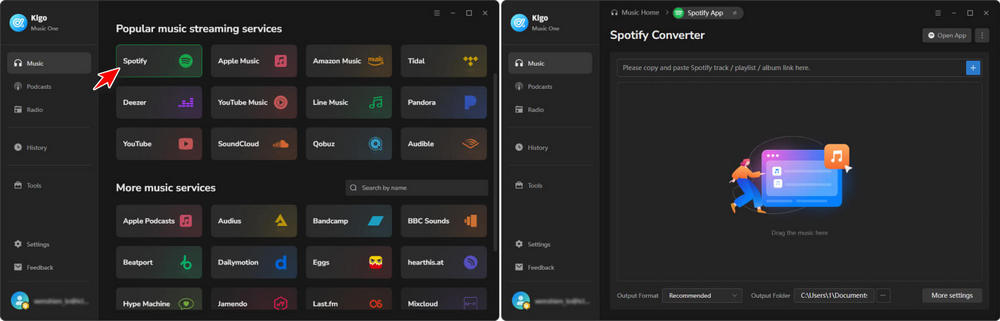
Launch Kigo Music One and choose Spotify from the main interface. The interface is straightforward—simply select the platform you want to download from, and the program will take you to the corresponding music download panel. Choose the Spotify App or Web Player source and log in to your Spotify account. Here we choose Spotify App source.
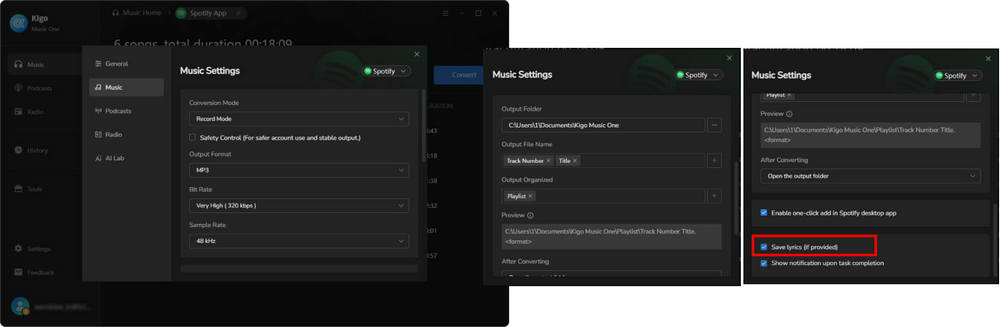
Go to the Settings panel, where you can customize various options, including output format (Recommended, MP3, AAC, FLAC, WAV, AIFF, ALAC), bit rate (from Low 128 kbps to Very High 320 kbps), sample rate (44.1 kHz or 48 kHz), output path, output file name, and more.
➡️ In our Spotify download test, we selected Record Mode, set MP3 as the output format, chose 320 kbps as the output quality, and left the other settings as default (The default convert speed is 1×, but you can increase it to up to 40×.). We then scrolled down and enabled the "Save Lyric (If provided)" option in the settings window to download lyrics along with the songs.
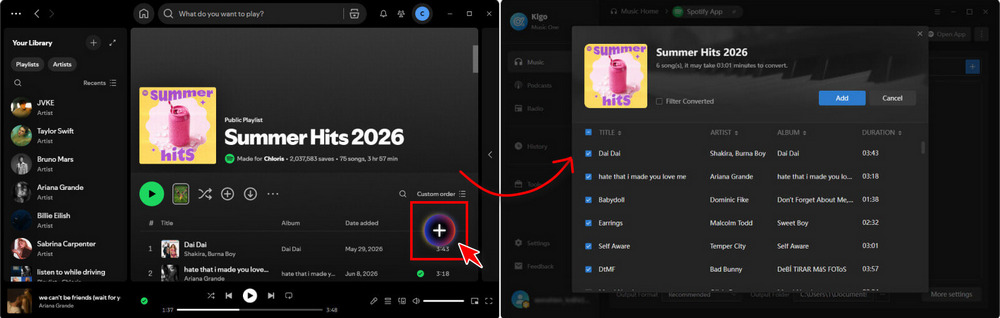
There are two ways to add your desired Spotify songs to Kigo Music One for downloading. One is to simply drag and drop the playlist or album from the Spotify app into the Kigo program. The other is to open your desired Spotify playlist or album within Kigo's built-in Spotify player. Both methods are straightforward.
➡️ Here, we use the second method by clicking the + Add button in the bottom-right corner. Kigo Music One will automatically detect and list all the songs in the panel. You can select the songs you want to download by ticking or unticking the checkboxes. Once you've finished selecting the songs, click the "Add" button to confirm.
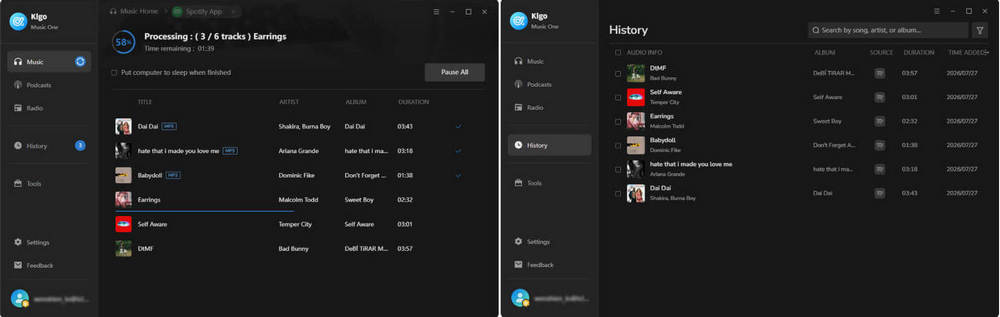
Click the Convert button to start the batch conversion of Spotify songs to MP3. Once the conversion is complete, the output folder will open automatically. Alternatively, you can go to the History section to view and access your downloaded songs.
Download Results:
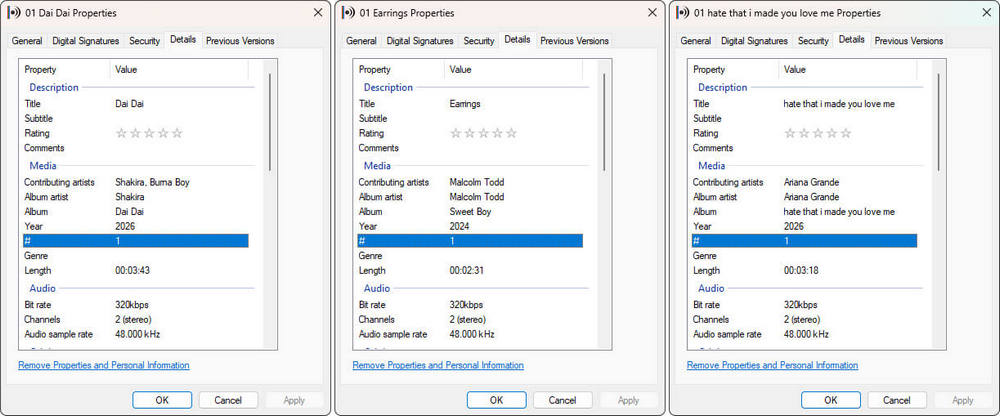
The 6 songs are downloaded successfully within 12 minutes. The downloaded Spotify songs were saved to C:\Users\1\Documents\Kigo Music One\Summer Hits 2026\
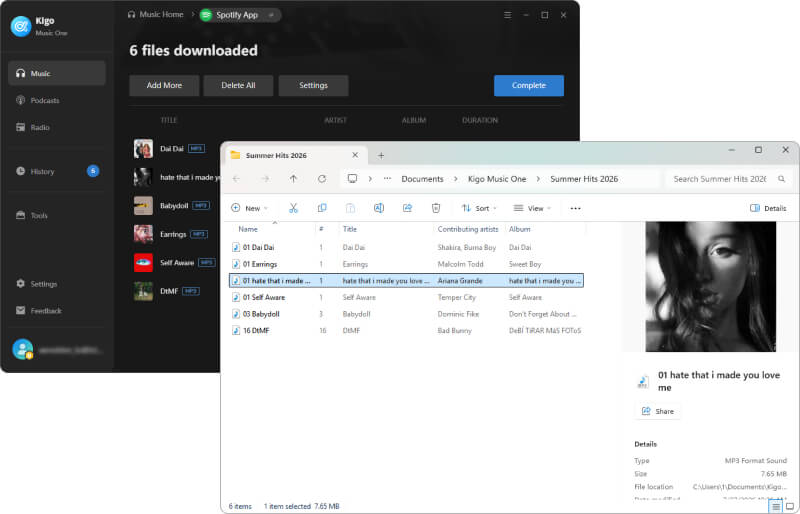
The table below shows the details of the downloaded MP3 versions of Spotify songs:
| Output file name | Cover art | Album | Format | Size | Length | Bitrate | Metadata |
|---|---|---|---|---|---|---|---|
| 01 Dai Dai | ✅ | Dai Dai | MP3 | 8.66 MB | 3 min 43 s | 320kbps | Title, Album, Artist, Year, Track number, Position |
| 01 Earrings | ✅ | Sweet Boy | MP3 | 5.94 MB | 2 min 31 s | 320kbps | Title, Album, Artist, Year, Track number, Position |
| 01 hate that i made you love me | ✅ | hate that i made you love me | MP3 | 7.65 MB | 3 min 17 s | 320kbps | Title, Album, Artist, Year, Track number, Position |
| 01 SelfAware | ✅ | SelfAware | MP3 | 6.94 MB | 3 min 0 s | 320kbps | Title, Album, Artist, Year, Track number, Position |
| 03 Babydoll | ✅ | Don't Forget About Me, Demos | MP3 | 3.82 MB | 1 min 37 s | 320kbps | Title, Album, Artist, Year, Track number, Position |
| 16 DtMF | ✅ | DeBI TIRAR MaS FOToS | MP3 | 9.27 MB | 3 min 57 s | 320kbps | Title, Album, Artist, Year, Track number, Position |
Part 3. Pricing Plans and Free Trials
Kigo Music One offers different pricing plans to meet different user needs. Currently, it provides both a yearly subscription, which is suitable for long-term use, and a lifetime plan, which is ideal for users who want permanent access. Once you purchase Kigo Music One, you can enjoy free lifetime updates and VIP technical support.
| Kigo Muic One | |
|---|---|
| Working platform | Windows/macOS |
| Plan | Subscription, Lifetime |
| Price | $79.9/yearly subscription; $159.9/lifetime (purchase now) |
| Service supported | Spotify, Apple Music, Amazon Music, Tidal, YouTube Music, Deezer, Pandora Music, Audible, Line Music, YouTube, SoundCloud, Qobuz, Dailymotion, Vimeo, Beatport, BBC Sounds, Bandcamp, and etc. |
| Type supported | Track, album, playlist, podcast, audiobook, radio |
| Update and support | Free future update and professional technical support |
| Refund policy | 30 days after purchase for lifetime orders (for qualifying orders) |
Kigo Music One is free to download and install, allowing anyone to try its features at no cost. For downloading from popular streaming services such as Spotify, Apple Music, TIDAL, Amazon Music, Deezer and etc, the free trial allows you to download the first minute of each track. For recording from supported services such as Apple Podcasts, Bandcamp, Dailymotion, Beatport, and Eggs, you can record up to 10 files. Handy tools such as the local audio converter, tag editor, and CD burner are available to all users at no extra cost.
Part 4. Who Should Get Kigo Music One?
Kigo Music One is a powerful all-in-one music downloader that gives you greater control over your streaming music. Whether you're a casual listener or a music enthusiast, it makes it easy to download, convert, and manage your music library. It is particularly suitable for:
- Users who want to enjoy their favorite music offline without relying on an internet connection.
- Audiophiles who value high-quality audio, including Spotify Lossless, Apple Music Lossless, Amazon Music Ultra HD (HD), TIDAL Hi-Res, and Deezer HiFi.
- Music collectors who want to build and expand a personal offline music library.
- DJs and content creators who need high-quality audio files for personal projects, editing, or mixing.
- Podcast and radio listeners who want a more convenient way to discover, stream, and save their favorite podcasts and radio programs.
Final Verdict
Based on our hands-on testing, we'd give Kigo Music One a rating of 4.8/5. It delivered stable and reliable performance throughout our tests, with fast conversion speeds, high-quality audio output, and complete ID3 tag preservation. Whether you're downloading music from Spotify, Apple Music, Amazon Music, TIDAL, YouTube Music, or other supported platforms, the workflow is straightforward and easy to follow. If you're looking for a reliable music downloader for everyday use, Kigo Music One is a solid choice. Download the free trial and see how it performs with your favorite streaming service.