
SpotiDownloader Review: Is it Risky? Warning Notes for Users
I'm looking to download songs from Spotify and came across spotidownloader website. Has anyone tried it before? Is it safe and reliable?
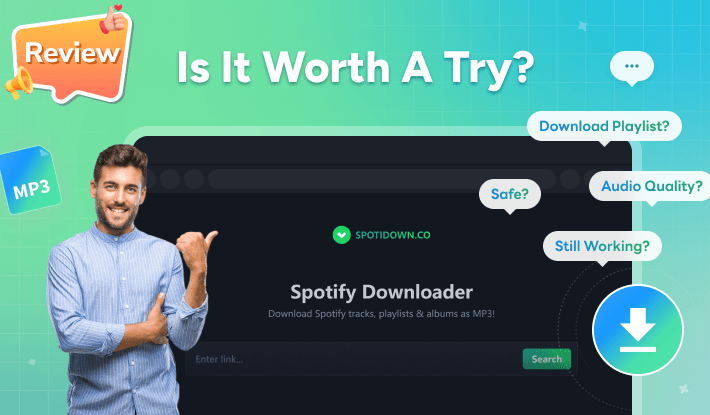
Using Spotify downloader is the best way to export songs from Spotify for offline listening. Online Spotify downloaders like SpotiDownloader offers a quick and convenient way to save Spotify playlist as MP3. But is it safe to use? Are there any risks to use such web-based Spotify download tool? Does it deliver good audio quality? In this SpotiDownloader review, we'll cover everything you may concern based on our testing result. We’ll also introduce the best alternative to SpotiDownloader to meet your diverse needs. Let's dive in.
Contents
Part 1. What is SpotiDownloader?
SpotiDownloader is a free online Spotify song downloader that allows people to complete the Spotify to MP3 conversion via a browser. When searching for "Spotify download" or similar keywords, it often appears at the top of the results, making it more popular than other online Spotify downloader tools. Formerly known as SpotifyDown, it was officially renamed to spotidownloader.com according to the SpotifyDown community page on Reddit.
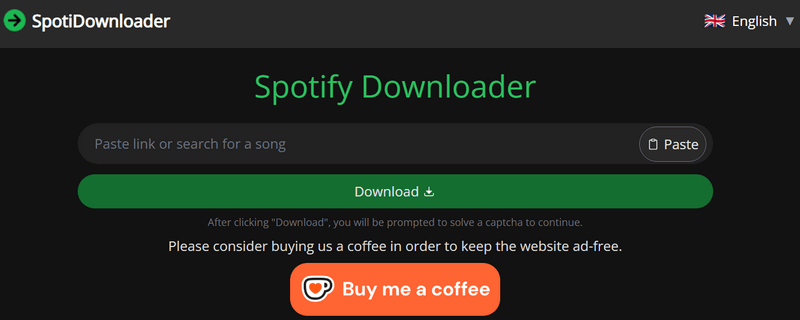
As a browser-based Spotify music downloader, it does not require installing any apps. No matter what kind of device you use—a desktop computer, smartphone, or tablet—as long as you have a browser, all you need to do is paste in the song or album link from Spotify. You can download an individual track as an .mp3 file or download an album as a .zip file.
Part 2. Is SpotiDownloader safe and Legit?
We live in a world where nothing is truly "free". SpotiDownloader is free to use, but being free often comes with hidden costs. Before using this online Spotify downloader, the most important consideration is its security and safety.
⚠️ Is SpotiDownloader safe to use?
When we visited spotidownload.com website, it initially appeared clean and concise. However, two or three seconds later, ads suddenly popped up. When I tried to click the x and close button, it redirected to a new website instead of closing the current ad banner, which is really annoying. At that point, my antivirus app, Norton, displayed a warning: "URL: Malvertising".
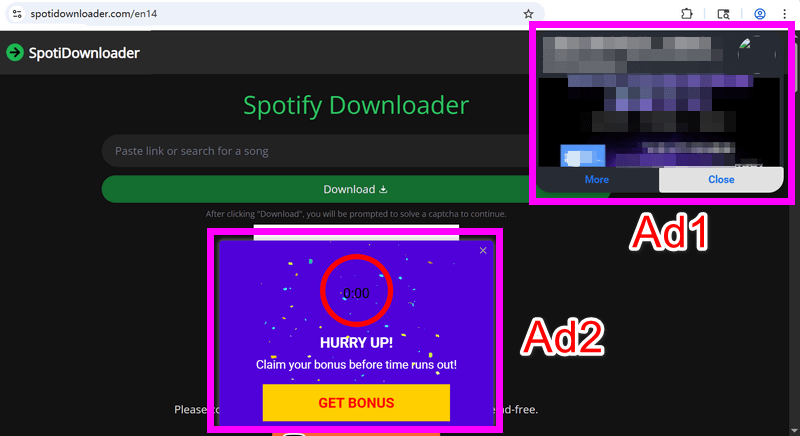
Although there is a "Buy Me a Coffee" button on the main interface, which suggests the site may be supported by donations to remain ad-free, the test results left us confused. Apparently, the Spotidownloader website is still driven by ads.
To check whether this issue only occurred to us, we conducted additional research and reviewed feedback from the Reddit community. It appears that the site worked properly for some time, but weird pop-ups later began to appear on the page. Users reported that clicking anywhere on the page could redirect them to suspicious websites. As a result, while the site still functions, there is a risk of encountering pop-ups and redirections that may pose a threat to your computer.
⚠️ Is SpotiDownloader legit?
Frankly speaking, using SpotiDownloader involves potential legal risks. According to feedback from some Reddit users, using this online Spotify downloader caused their Spotify accounts to be temporarily locked, requiring them to contact Spotify support to restore access. This clearly conflicts with Spotify's Terms of Service and may explain why such issues occur. In addition, the frequent changes to the website link may indicate underlying legal concerns. For example, SpotiDownloader URLs appeared as spotidownloader.com/en16 (shown en13, en14, en 15 with number changes), which suggests service instability. Beyond this, downloading unlicensed music may violate local or international copyright laws, depending on your country.
For a safer alternative, Kigo Spotify Converter is a better choice. It offers a transparent and reliable recording experience for downloading Spotify songs, albums, and playlists, allowing you to enjoy Spotify music more freely while staying aligned with Spotify's policies.
Part 3: How Does SpotiDownloader Work?
With no requirements for installing app nor creating an account, it is straightforward to download songs from Spotify using this SpotiDownloader web-based tool. Follow the steps below to download Spotify song or playlist to MP3.
- Step 1 Visit SpotiDownloader website on your browser.
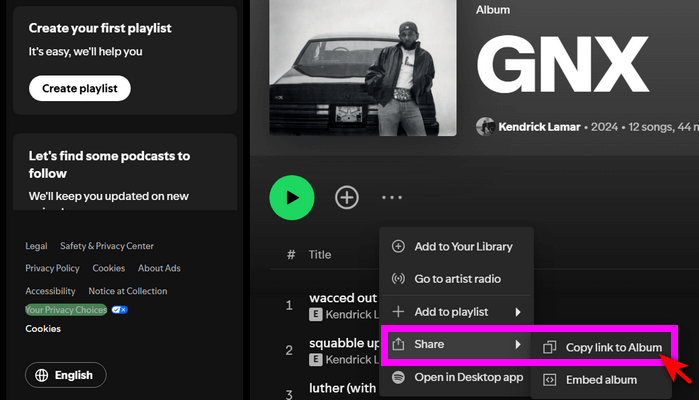
- Step 2 Open Spotify app or Spotify Web player, and copy the URL of the song/album/playlist you'd like to download.
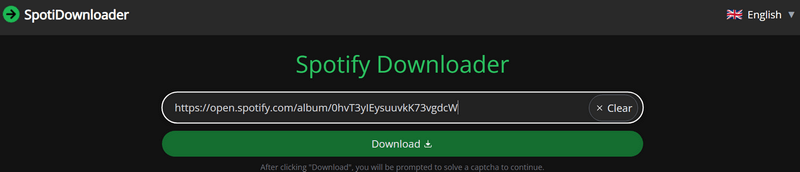
- Step 3 Return to SpotiDownloader website and paste the URL to the input filed.
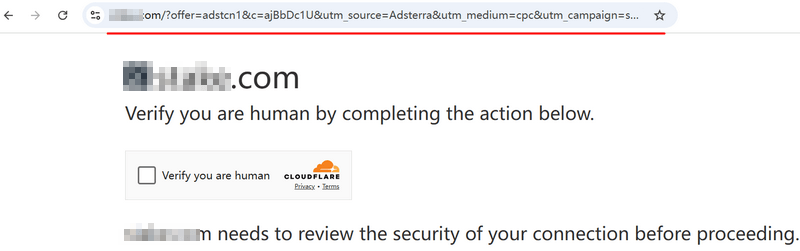
- Step 4 Click Download button. The site will prompt you to complete a CAPTCHA to verify you're human. Just do it.
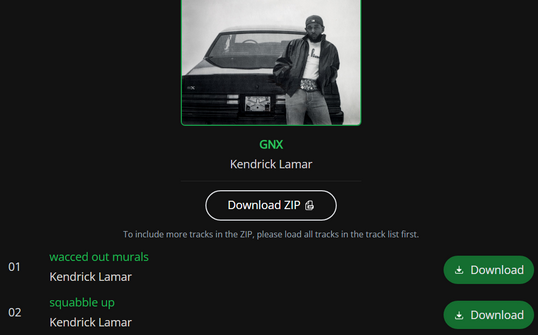
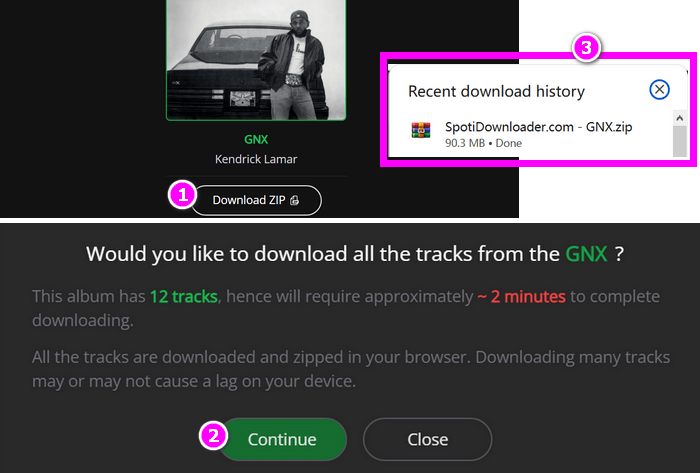
- Step 5 The site will process the link and display the album details. Click Download to download an individual song, or click Download ZIP to download the whole album.
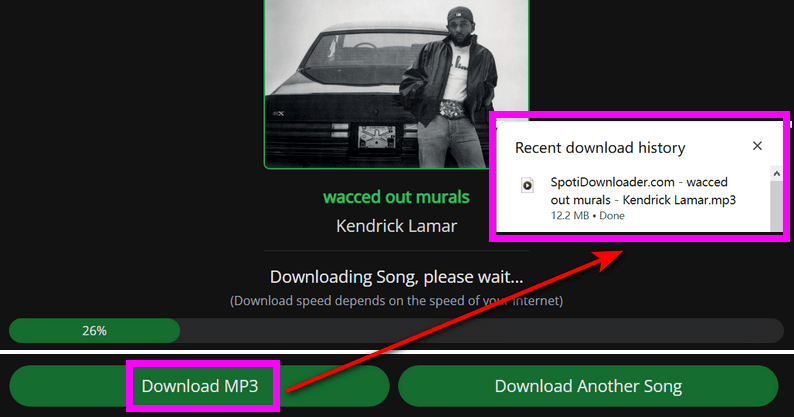
- Step 6-1 If you want to download a single song, just click the Download button next to the song. A progress bar will appear to show the download process. When it reaches 100%, two buttons will be displayed: Download MP3 and Download Another Song. Click Download MP3, and the song will be downloaded shortly and saved in your Downloads folder. Click Download Another Song to repeat the step.
- Step 6-2 If you want to download the entire album, just click the Download ZIP button. A reminder window will pop up—click Continue to proceed. You'll see the download progress displayed on the screen. Once the download is complete, you can find the ZIP file in your Downloads folder.
- Free and easy to use, accessible on any device.
- Support songs, albums and playlists.
- Retain certain metadata such as year, artist.
- Fast download speed.
- Don't support Spotify podcast, audiobook, MV, etc.
- Ads are distracting.
- Performance is unstable, certain song may end up being corrupted.
- Skip quite a few songs while doing an entire playlist download sometimes.
- Output MP3 name extension is 'websitename - title – artist' which is unable to change.
Part 4. The Best Alternative to SpotiDownloader 🏆🏆🏆
If SpotiDownloader is unavailable to you but you still prefer an online Spotify downloader, you can try these free online Spotify playlist downloaders instead. However, as web-based free tools, they often come with risks and limitations. If you fully understand and accept these drawbacks, you can use them to complete the Spotify-to-MP3 conversion. If you're looking for a more reliable solution, a professional Spotify music downloader like Kigo Spotify Converter is the best alternative to SpotiDownloader.
Kigo Spotify Converter meets all your requirements for safe Spotify downloading, higher—even lossless—audio quality, greater stability, and more. Whether it's single tracks, full albums, playlists, podcasts, audiobooks, or music videos, Kigo Spotify Converter can convert and download them all to your device for offline playback. With output formats including MP3, AAC, WAV, FLAC, and ALAC, it offers flexible options to download Spotify songs the way you need. The batch conversion feature allows you to download multiple tracks at once. Equipped with commonly used tools such as an ID3 tag editor, audio format converter, and CD burner, it greatly helps you manage music-related tasks. (Read Kigo Spotify Converter review -->)

Key Features of Kigo Spotify Converter
- Download Spotify track, album, playlist, podcast, radio, audiobook.
- Convert Spotify music to MP3, AAC, FLAC, AIFF, WAV, or ALAC audio.
- Keep 100% original audio quality; preserve ID3 tags, lyrics.
- Enjoy up to 10× faster conversion speeds with batch downloads.
- Burn Spotify music to CD or export to iTunes with one click.
- Enable offline listening for both Spotify Free and Premium users.
- Activate the permanent playback of Spotify music.
Windows 11/10/8 Free Download
macOS 11 or later
How to download Spotify music with Kigo Spotify Converter?
- Step 1 Launch Kigo Spotify Converter
- Step 2 Add Spotify music to Kigo
- Step 3 Adjust output settings
- Step 4 Download Spotify music in batch
- Step 5 Access your downloaded Spotify songs
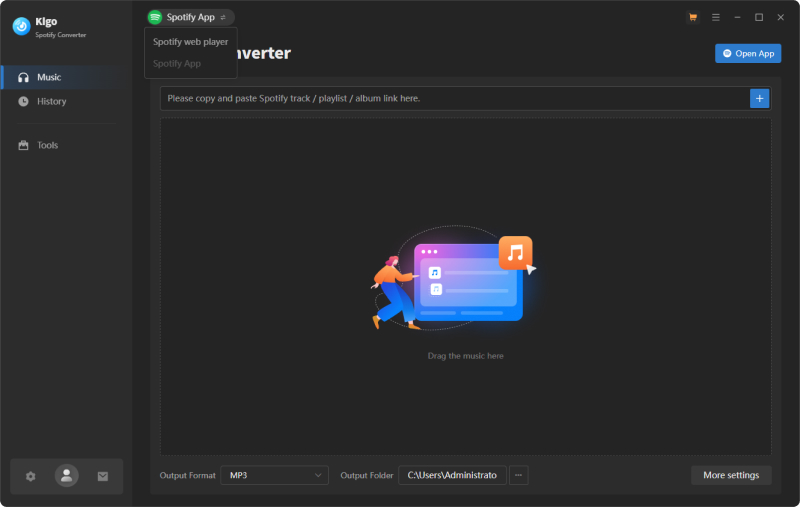
Download the program to your computer. Once installed, open it. Kigo Spotify Converter records songs directly from Spotify. You can choose the audio source from either the Spotify app or the Spotify web player. Here, we'll use the Spotify web player source as an example. The program has a built-in Spotify web player, making it easy to search for and select songs seamlessly.
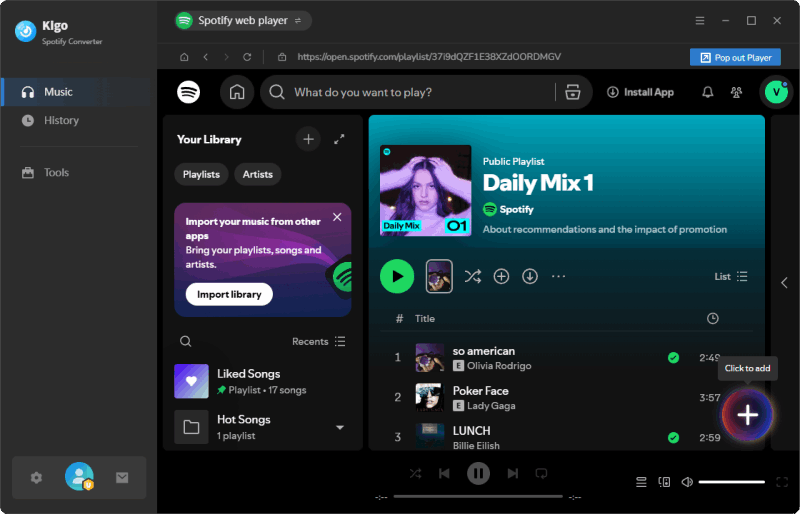
In Spotify web player, open the song, album or playlist you'd like to download, then click the + button to add them to Kigo program. Kigo Spotify Converter would detect and display the songs on the panel directly.
In Settings, you can adjust output format (MP3, AAC, WAV, FLAC, AIFF, ALAC), conversion speed (up to 10x), customize bitrate and sample rate, change file name organization (sort your list by title, artist, or album for easier selection) and etc. Here we set output format as MP3 and output quality as Very High 320kbps.

Click the Convert button to start downloading your selected Spotify songs in the format you chose in the previous step. With download speeds of up to 10× faster, it's a huge time-saver when downloading a large music library.
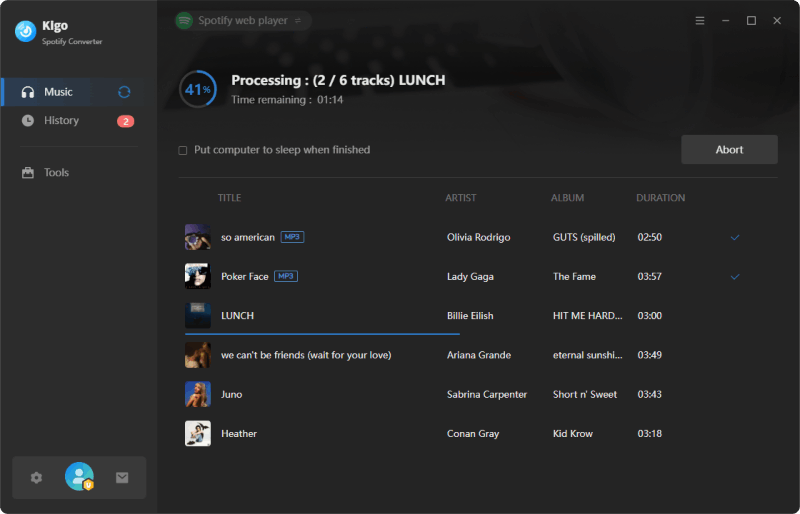
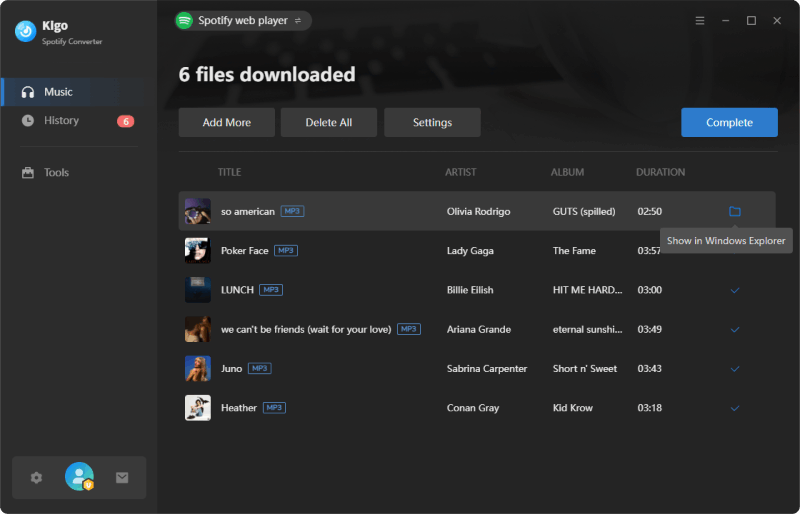
After the conversion is completed, you can view the converted files in the "History" tab and find the local files by clicking the "Folder" icon next to each song.
FAQs about SpotiDownloader
❓ Is it free to use SpotiDownloader?
Answer: Yes. Using SpotiDownloader allows you to download songs from Spotify without installing additional software, plugins, or registering an account. It does not require payment, but as an ad-driven service, it may put your privacy at risk as a hidden cost.
❓ Can the online Spotify playlist downloader download video from Spotify?
Answer: Based on our testing, free online Spotify downloaders only support downloading Spotify tracks, albums, or playlists as MP3 files. They do not support downloading podcast videos or music videos. If you want to download a wider range of Spotify content, including videos and podcasts, Kigo Spotify Downloader is a better option.
❓ SpotiDownloder Not Working? What to do?
Answer: Sometimes, you may find that SpotiDownloader doesn't work—you may be unable to access the service or fail to download Spotify songs. This may be due to domain changes, technical issues, server downtime, an unstable internet connection, legal restrictions, and other factors. Here are some troubleshooting tips for your reference.
- Check the URL: SpotiDownloader may change its domain name for various reasons, so keep an eye on its official URL and avoid visiting clone websites.
- Stable internet connection: The online Spotify downloader heavily relies on a stable internet connection. Having a strong connection can reduce the chance of download failures.
- Limit the song quantity: If you have a large playlist to download, it’s better to divide it into smaller playlists. Otherwise, your web browser would probably freeze during the download, which could lead to file corruption.
- Try other solution: If the issue is technical or legal and is causing SpotiDownloader not to work, there may be nothing you can do on your end except try other tools. Kigo Spotify Converter is a reliable downloader for both Spotify Free and Premium users.
❓ What audio quality does SpotiDownloader provide?
Answer: It claims to download Spotify songs to MP3 at 320 kbps, which sounds good. However, its audio source comes from platforms like YouTube, so the track version you download may not be the same as the one on Spotify.
Conclusion
This SpotiDownloader review covers everything you need to know about this online Spotify downloader, including how it works, its potential risks and legal issues, its pros and cons, and troubleshooting tips if it's not working. Based on our test results, SpotiDownloader is an easy-to-use Spotify-to-MP3 online downloader that is convenient for occasional use. However, its ad-heavy interface and legal uncertainties may pose risks to both your computer and your Spotify account. Kigo Spotify Converter is the best alternative to SpotiDownloader, providing a secure and reliable Spotify downloading solution, along with flexible output options (including lossless audio), complete metadata preservation, and useful music tools. Try Kigo Spotify Converter to enjoy original Spotify songs offline with a seamless experience.
Note: The trial version allows you to download the first 1 minute of each file. To access the full length, please unlock it with a valid license code.

Simon Durden | Editor-in-Chief
Simon Durden is the Editor-in-Chief at KigoSoft, specializing in music, video download and conversion. Before joining to KigoSoft, he served as a senior writer with the Any Video Converter Team. With extensive knowledge of music, video streaming platforms and expertise in video editing, Simon delivers high-quality content, expert tips, and in-depth tutorials in the multimedia field.