
Spotdown Review 2026: Is It Safe? Still Working? [Real Testing]
Spotify limits the offline download feature to Premium subscriptions only. You can either try the Premium free trial to download Spotify songs or look for third-party Spotify song downloaders to do so. Online Spotify downloaders like Spotdown are among the popular tools. As online Spotify MP3 downloaders come and go frequently, does Spotdown still work? Is it legal and legit?
In this article, we use a 20-song public Spotify playlist to test whether Spotdown works, how it works, and everything you should know if you want to try this Spotify downloader. We also provide troubleshooting tips if you encounter download issues when using Spotdown.
Spotdown does produce MP3 files, but our test with a 20-song Spotify playlist delivered only 12 of 20 tracks. The audio was also upsampled from low-bitrate sources: the files we inspected showed bitrates of 215–233 kbps and a 16 kHz spectrogram cutoff, rather than the promised 320 kbps. Every download involved three redirect hops, and every filename carried a "spotdown.org" watermark. For a throwaway single track with an ad blocker enabled, it may be passable. For reliable 320 kbps Spotify playlist downloads, Kigo Spotify Converter is worth considering.
Part 1. What is Spotdown?
Spotdown is a free, web-based Spotify downloader that allows you to download Spotify songs as MP3 files on a computer, tablet, or phone without installing an app or creating an account. By copying and pasting a Spotify track, song, playlist, or album link into the website, you can get MP3 files with just a few clicks. It advertises batch downloads for playlists and claims that its MP3s are available at "up to 320 kbps" without requiring a Spotify Premium subscription.
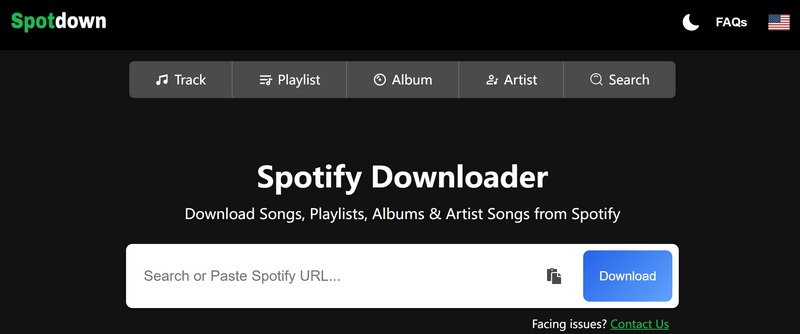
| Spotdown | Details |
|---|---|
| Website link | https://spotdown.org/en2 |
| Working platform | Windows, Mac, Android, iOS |
| Download Spotify track, album, playlist | Yes |
| Download Spotify podcast, audiobook, music video | No |
| Export audio format | MP3 |
| Clean tool? | No — contains redirections and ads |
One technical note that matters: Spotdown never touches Spotify's audio stream. It uses the metadata from your link to match a recording from external sources, typically YouTube uploads, and re-encodes it as an MP3. This means that its "up to 320 kbps" claim does not guarantee true 320 kbps-quality audio, as the final quality depends on the source recording it finds and the re-encoding process. We'll show you what we found in the following section. For more on how this category works, see our guide to online Spotify to MP3 converters.
- It is free.
- It requires no sign-up.
- The paste-and-download flow is simple on the surface.
- The audio is re-encoded from external uploads. Fake 320kbps.
- Every download involves redirect hops.
- Playlist downloads require manual track-by-track processing.
- Every filename gets a "spotdown.org" tag.
Part 2. Does Spotdown Really Work?
In this part, we will use a 20-song Spotify playlist to test whether Spotdown can download songs from Spotify as MP3 files and walk you through the download process step by step. You'll learn how the process works and see our test results for audio quality, stability, reliability, and more.
- Operating environment: Windows 11 / Chrome in Incognito mode / Stable network
- Sample: https://open.spotify.com/playlist/37i9dQZF1DWUzo5Cvs9zG6 - Spotify 20 Most Streamed Songs of All Time (20 songs, 1 hr 10 min)
- Inspection Tools: Mediainfo, Spek (spectrogram)
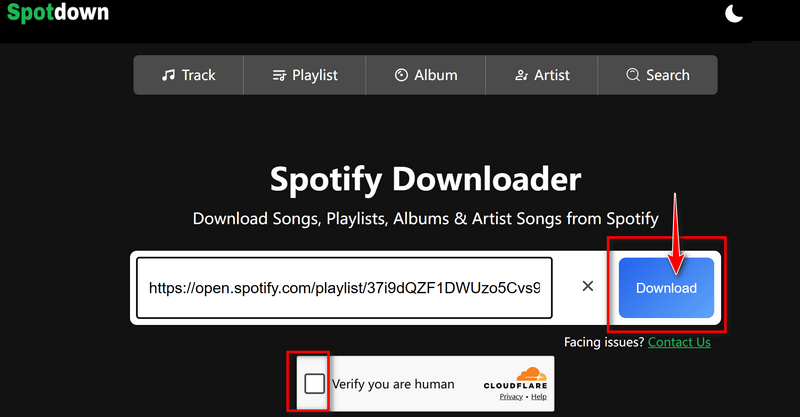
- Step 1Paste the Spotify playlist URL into the search bar on the Spotdown website. Note that every time you submit a link, the site runs a "machine human verification check" before accepting it.
- Step 2Click the Download button next to the search field and complete the "machine human verification check" again by ticking the verification box. The website then displays two options: Download Now (All Songs) and individual track download options.
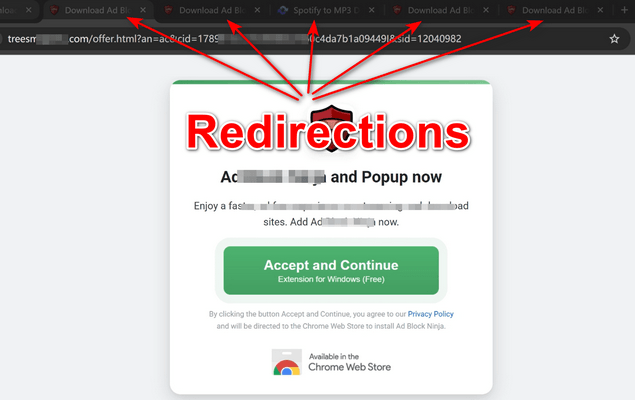
- Step 3Download an individual track. Click the Get Link button next to the track you want. You'll be redirected to another website and need to repeat the process three times. After the third redirection, the button changes to Download Now. Click it to download the MP3 file.
- Step 4Download the playlist. Click the Download Now (All Songs) button to download the playlist. You'll still have to go through three redirections before the download starts. The songs are then processed one by one, and each track has to be saved to your device manually.
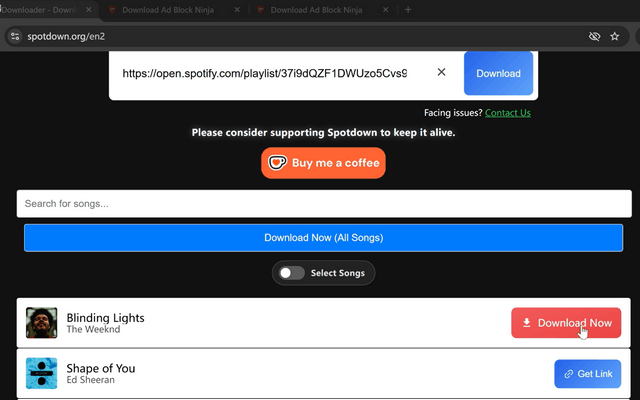

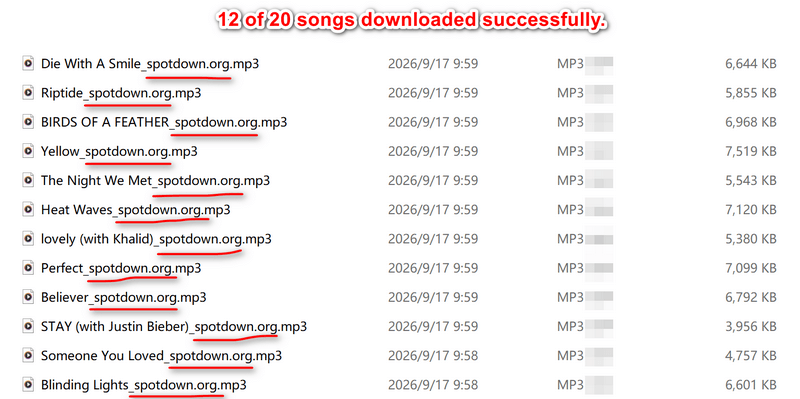
In the end, only 12 of the 20 tracks were successfully downloaded as MP3 files, with every filename carrying the "spotdown.org" tag:
Testing Results at a Glance
| Metric | Result | Notes |
|---|---|---|
| Playlist tested | 20 Most Streamed Songs of All Time | 20 tracks, 1 hr 10 min, public Spotify playlist |
| Tracks attempted | 20 | Windows 11 + Chrome in Incognito mode, tested in Sep 2026 |
| Successful downloads | 12/20 | 60% success rate |
| Failed tracks | 8 | Flagged "Not Matched" or a Retry button |
| Redirects per track (single mode) | 3 | Only the third click turns the button into "Download Now" |
| Redirects for "Download All" (batch) | 3 | Plus one more click to start the queue |
| Manual work per track | 1 save click | The browser prompts you to choose a save location for every file. |
| Measured container bitrate | 215–233 kbps | 📄 claimed: "up to 320 kbps" |
| File size (2 inspected files) | 6.49 MB / 5.72 MB | For example: Die With A Smile / Riptide |
| ID3 tags | Title, album, artist + cover | Both inspected files |
| Filename watermark | 12/12 files | Every file carries the "spotdown.org" suffix |
| FAQs | None | No FAQ section to answer questions |
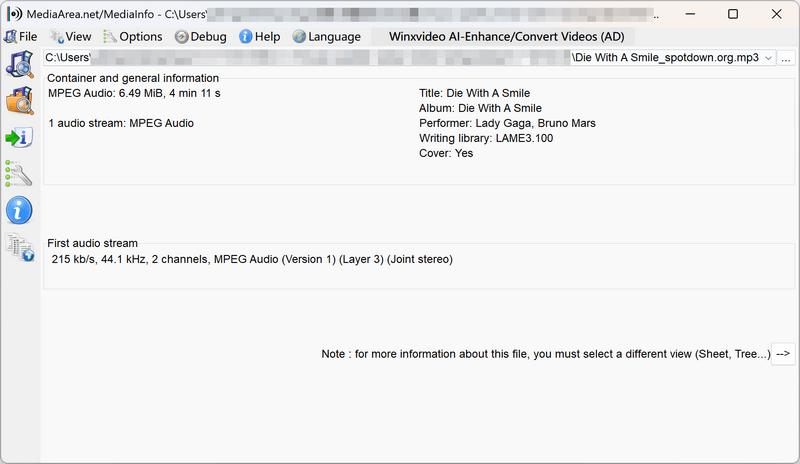
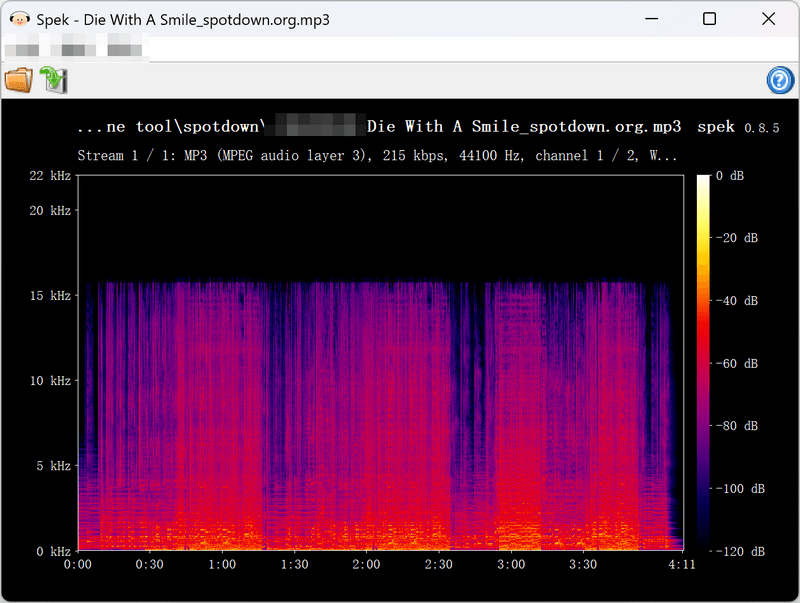
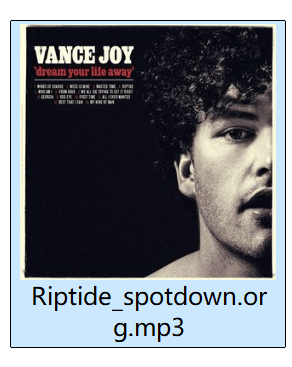
Two files under the microscope. To see what Spotdown actually delivers, we opened two of the 12 playlist MP3s in Mediainfo and Spek — Die With A Smile and Riptide.
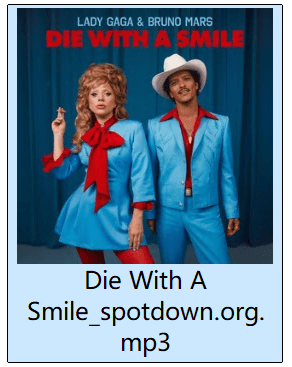
- FormatMP3
- Container bitrate215 kbps
- Actual audio content~128 kbps (upsampled)
- Sample rate44.1 kHz
- File size6.49 MB
- ID3 tagsTitle, album, artist + cover
- Filename
Die With A Smile_spotdown.org.mp3
- FormatMP3
- Container bitrate233 kbps
- Actual audio content~128 kbps (upsampled)
- Sample rate44.1 kHz
- File size5.72 MB
- ID3 tagsTitle, album, artist + cover
- Filename
Riptide_spotdown.org.mp3
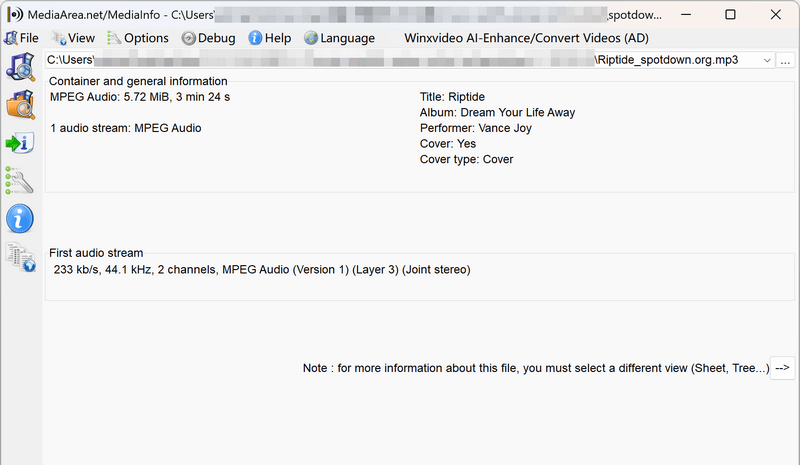
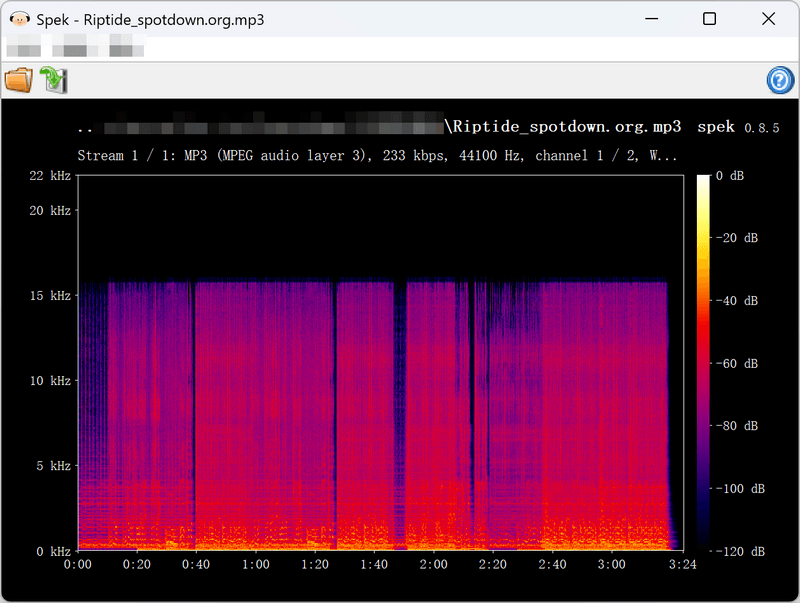
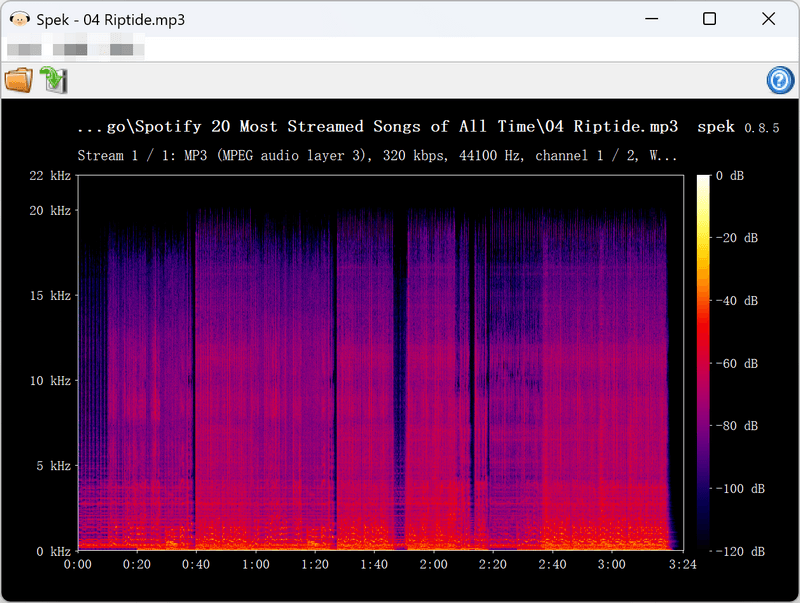
Why the "320 kbps" claim falls short. Mediainfo reports bitrates of 215–233 kbps for the two files above, already well below the claimed 320 kbps. The spectrogram tells an even clearer story: both files show an abrupt cutoff at 16 kHz, a strong indication that the source audio was of lower quality. In other words, Spotdown appears to take a lower-quality recording and re-encode it as an MP3 at a higher bitrate. The number goes up, but the underlying audio quality does not. Because the source varies from upload to upload, audio quality can also vary from track to track, and there is no way to preview or select the source quality before downloading.
Editor's note:
Quality can vary from one download to the next. The official page's only bitrate claim is "up to 320 kbps," but the actual quality ultimately depends on whichever recording the server matches. Every file also arrives with a "spotdown.org" suffix in the filename, so manual renaming is required if you want to keep your music library clean.
Overall score
Verdict across all five categoriesEase of use
5/10Audio quality
3/10Playlist reliability
3/10Ads & safety
4/10Metadata & filenames
5/10Try Kigo Spotify Converter to Save All Your Favorite Spotify Songs!
Download lossless FLAC audio. Convert Spotify songs to 320kbps MP3. Retain ID3 tags. 40X conversion speed.Part 3. Is Spotdown Safe and Legal?
➡️ Will it hurt your computer?
Spotdown requires no installation, so there is no installer to worry about. The potential risk lies in the download workflow itself: the Download and Get Link buttons trigger redirects. In our testing, every single-track download passed through three redirect hops to third-party pages before the actual download link appeared. These pages opened in new tabs, with no pop-ups appearing during our test. We kept an ad blocker enabled throughout testing; without one, the repeated redirects make the download process more difficult to navigate safely.
➡️ Another red flag: the "Contact us" link.
The page displays a "facing issues? contact us" message, but clicking "contact us" does not open a contact form. Instead, it triggers a Google sign-in window. You are then asked to sign in to your Google account through a third-party flow that you cannot independently audit. For your safety, we recommend not entering your Google credentials on the Spotdown website.
No installation, no account, no Spotify login required.
Three redirect hops fire on every download in our test; the landing pages vary by session and you cannot control where they lead.
External download sources are not disclosed — you cannot verify where the audio came from.
➡️ Is Spotdown legit?
Legally, the situation is less clear. Downloading music outside the official Spotify app may violate Spotify’s Terms of Service, and the recordings Spotdown matches from external sources may not be licensed for redistribution. Treat Spotdown downloads as personal offline listening only — never share or redistribute them.
Editor's note:
These risks are not unique to Spotdown — they are a structural trade-off of online downloaders. Every link you paste is processed on a third-party server that you cannot directly audit. A local desktop converter like Kigo Spotify Converter removes this middleman: your links stay on your PC, and there are no redirects to click through.
Try Kigo Spotify Converter to Save All Your Favorite Spotify Songs!
Download lossless FLAC audio. Convert Spotify songs to 320kbps MP3. Retain ID3 tags. 40X conversion speed.Part 4. Spotdown Not Working?
In our 20-song test, we encountered several problems when downloading songs from Spotify. Combined with feedback from online communities, these are some common issues you may encounter when using Spotdown to download Spotify songs as MP3 files:
Unknown error when link detection fails "Not Matched" download failure Redirects delay downloads Save prompt for every download
If you run into any of these issues, here are a few things you can try:
- Check your link. Spotdown only accepts open.spotify.com URLs. Private, region-locked, or expired links may fail to parse. It also does not support downloading Spotify podcasts or audiobooks.
- Retry in a clean browser. Open an incognito window or clear your browser cache. Ad blockers and security extensions may interfere with the redirect chain that Spotdown relies on, which can sometimes prevent the download from starting.
- Be patient with the download buttons. In our testing, it took three redirects before the actual download button appeared. If clicking the button once or twice only takes you to another website instead of starting the download, you may need to continue through the redirects before the download becomes available.
- Consider an alternative. If you want to avoid the redirects and manual saving process, you can try a desktop Spotify song downloader such as Kigo Spotify Converter. It automatically handles the download queue after you click Convert, supports batch downloads, and saves the tracks to your computer without requiring you to save them one by one.
Part 5. Best Spotdown Alternative: Kigo Spotify Converter
The best alternative to Spotdown is Kigo Spotify Converter, a desktop Spotify music converter for Windows and Mac that handles all types of Spotify content downloads locally on your computer. There are no shared download queues or redirect ads. It also supports 320 kbps MP3 and lossless FLAC output, along with a range of customizable output options.

Key Features of Kigo Spotify Converter
- Download Spotify track, album, playlist, podcast, radio, audiobook.
- Convert Spotify music to MP3, AAC, FLAC, AIFF, WAV, or ALAC audio.
- Keep 100% original audio quality; preserve ID3 tags, lyrics.
- Enjoy up to 40x faster conversion speeds with batch downloads.
- Burn Spotify music to CD or export to iTunes with one click.
- Enable offline listening for both Spotify Free and Premium users.
- Activate the permanent playback of Spotify music.
Windows 11/10/8 Free Download
macOS 11 or later
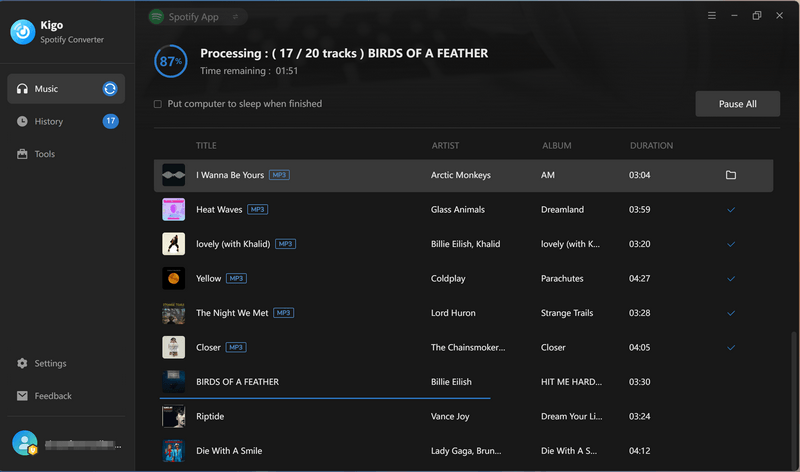
The workflow is familiar — paste a link, pick tracks, download.
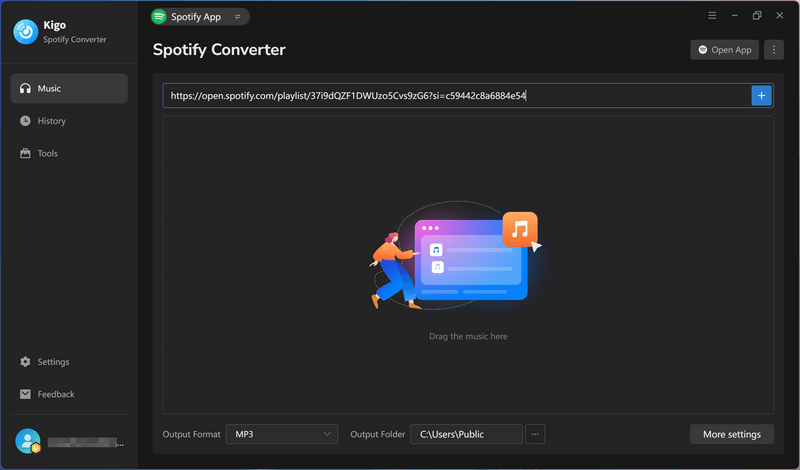
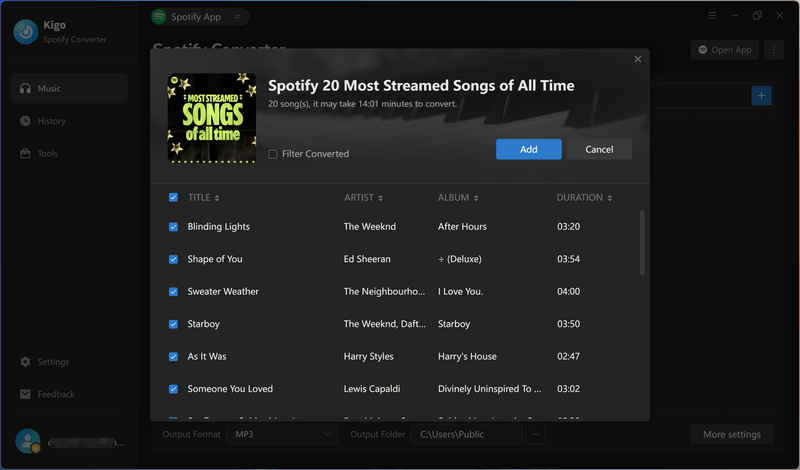
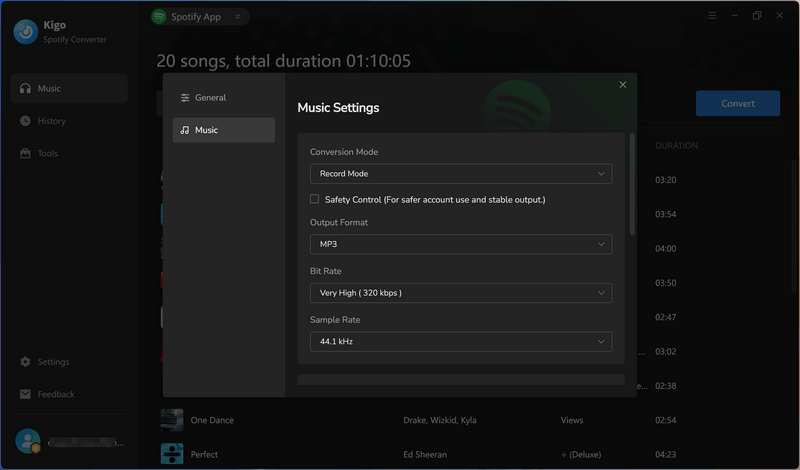
In the Settings panel, you can customize the output format (MP3, AAC, FLAC, WAV, AIFF, or ALAC), bitrate (up to 320 kbps), sample rate (up to 48 kHz), and filename templates — such as track number + title or artist + title — so your library stays organized without manual renaming.
Click Convert, and the entire playlist is saved as clean, numbered files in a folder — one batch run, no ZIP file to unpack, and no redirects. The same 20-track playlist we tested with Spotdown produced the following results in Kigo:
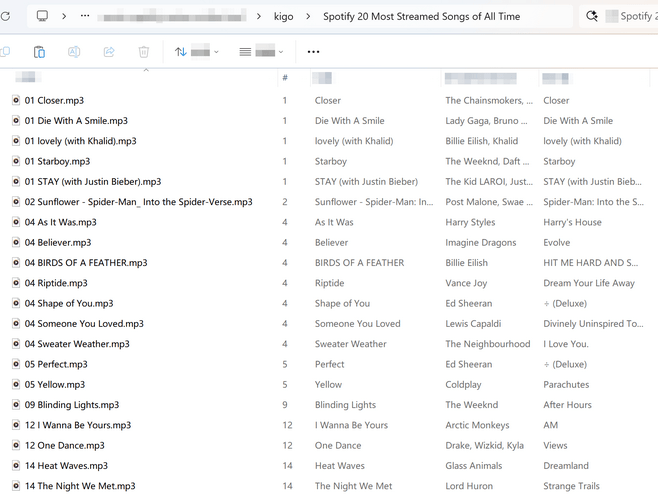
Spotdown vs Kigo Spotify Converter: head-to-head
| Feature | Spotdown | Kigo Spotify Converter |
|---|---|---|
| Type | Online converter (browser) | Desktop converter (Windows/Mac) |
| Audio source | Matched external uploads (e.g., YouTube) | Converts directly from Spotify app or webplayer |
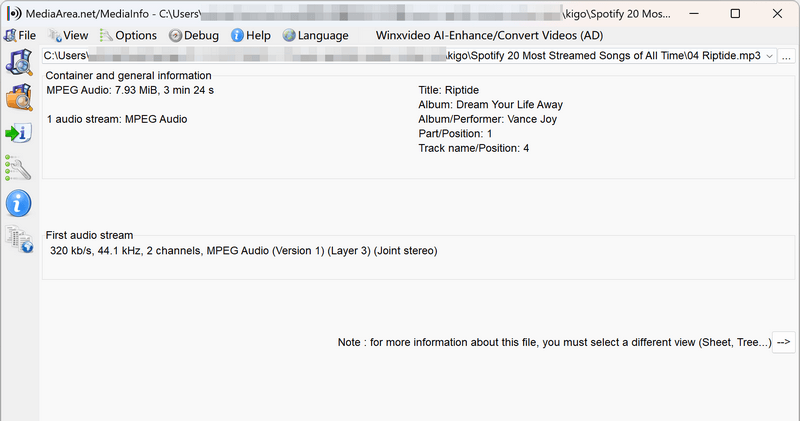
| Real audio quality | 215–233 kbps containers, upsampled — "320 kbps" claim fails | 320 kbps MP3/AAC; lossless FLAC/WAV/AIFF/ALAC |
| Output formats | MP3 only | MP3, AAC, FLAC, WAV, AIFF, ALAC, MP4 |
| Batch download | ❌ Manual per-track clicking in practice | ✅ One-click batch, up to 40X speed |
| Podcasts & audiobooks | ❌ Not supported | ✅ |
| ID3 tags | Basic (title, album, artist) | Artist, Title, Album, Track Number, Year, Disc Number, Artwork + lyrics |
| Filenames | "spotdown.org" watermark on every file | Custom templates (track number + title, artist + title, etc.) |
| Ads & redirects | Redirects on every download click | None |
| Stability | 8/20 tracks failed in our test | 98% download success rate; regualr updates |
| Technial support | None | Professional support team |
| Price | Free | Free trial; license for full-length downloads |
Editor's note:
Spotdown's main strength is convenience: there is nothing to install, which makes it acceptable for an occasional single track. Kigo Spotify Converter is the better option when you need more: real 320 kbps or lossless output, batch playlist downloads, podcasts and audiobooks, complete metadata, and no redirects or third-party servers involved.
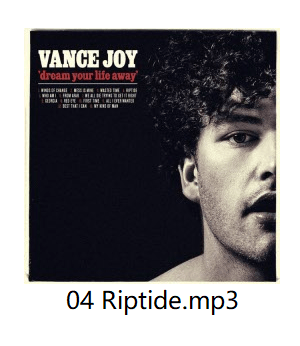
The same playlist through Kigo, inspected. To give you a clearer view of the download results from Spotdown and Kigo Spotify Converter, we tested the same 20-track playlist with Kigo and selected the two output tracks for comparison — checked the same way with Mediainfo and Spek:
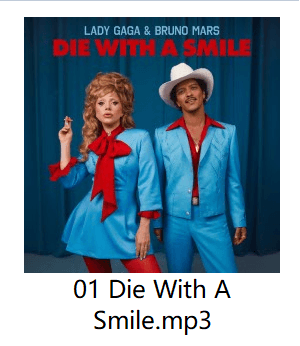
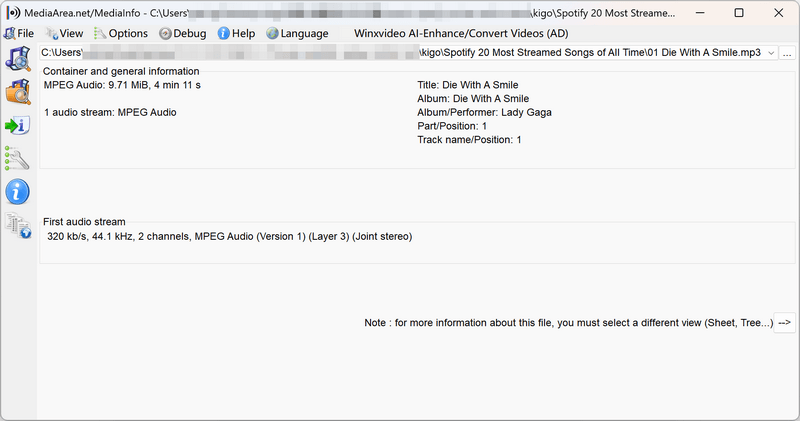
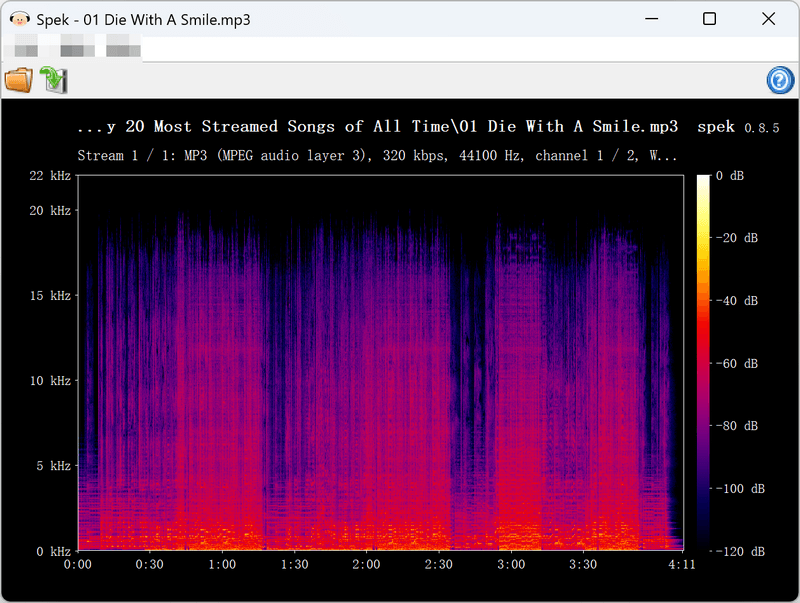
What about other free web tools? If you want to stay browser-based, SpotiDown, SpotiDownloader, and Spotisaver are the other names that keep coming up — but every online downloader shares the same ceiling: external audio sources, capped quality, and server-side processing. None of them solves the problems we measured above.
Which tool fits you?
Casual Listener
Grabbing one song occasionally
Spotdown + ad blocker
Free and convenient for a throwaway track
Playlist Collector
Building an offline music library
Kigo Spotify Converter
Batch downloads, stable, organized filenames and complete ID3 tags
Audiophile, DJ, Creator
Quality is non-negotiable
Kigo Spotify Converter
320 kbps MP3 or lossless output you can actually trust
Final Verdict
Spotdown works — technically. It turns Spotify links into MP3 files for free, but only 12 of our 20 test tracks were successfully downloaded. The files we inspected showed lower-quality source audio, with bitrates of 215–233 kbps rather than the claimed 320 kbps. Every download also involved three redirect hops, and every filename carried the site’s watermark. It may be fine for an occasional single track, but for building a music library, the failed downloads and manual steps make a local converter like Kigo Spotify Converter a more practical option.
Note: The trial version allows you to download the first 1 minute of each file. To access the full length, please unlock it with a valid license code.